
1. Introduction
This manual provides essential information for the safe and efficient operation of your Optoma EH500 High Brightness Projector. The Optoma EH500 is designed for business and educational environments, offering 1080p resolution, 4,700 lumens brightness, and extensive connectivity options. Please read this manual thoroughly before using the projector and retain it for future reference.
2. What's in the Box
Verify that all items listed below are included in your package:
- Optoma Technology EH500 Data Series DLP 3D Projector
- IR Remote Mouse Control
- 2 x AAA Batteries (for Remote)
- AC Power Cord
- VGA to VGA Cable
- Lens Cap
- Carrying Case
- Multilingual CD-ROM User's Manual
- 3-Year Limited Optoma Express Service Warranty
- 1-Year Limited Lamp Warranty
3. Product Overview
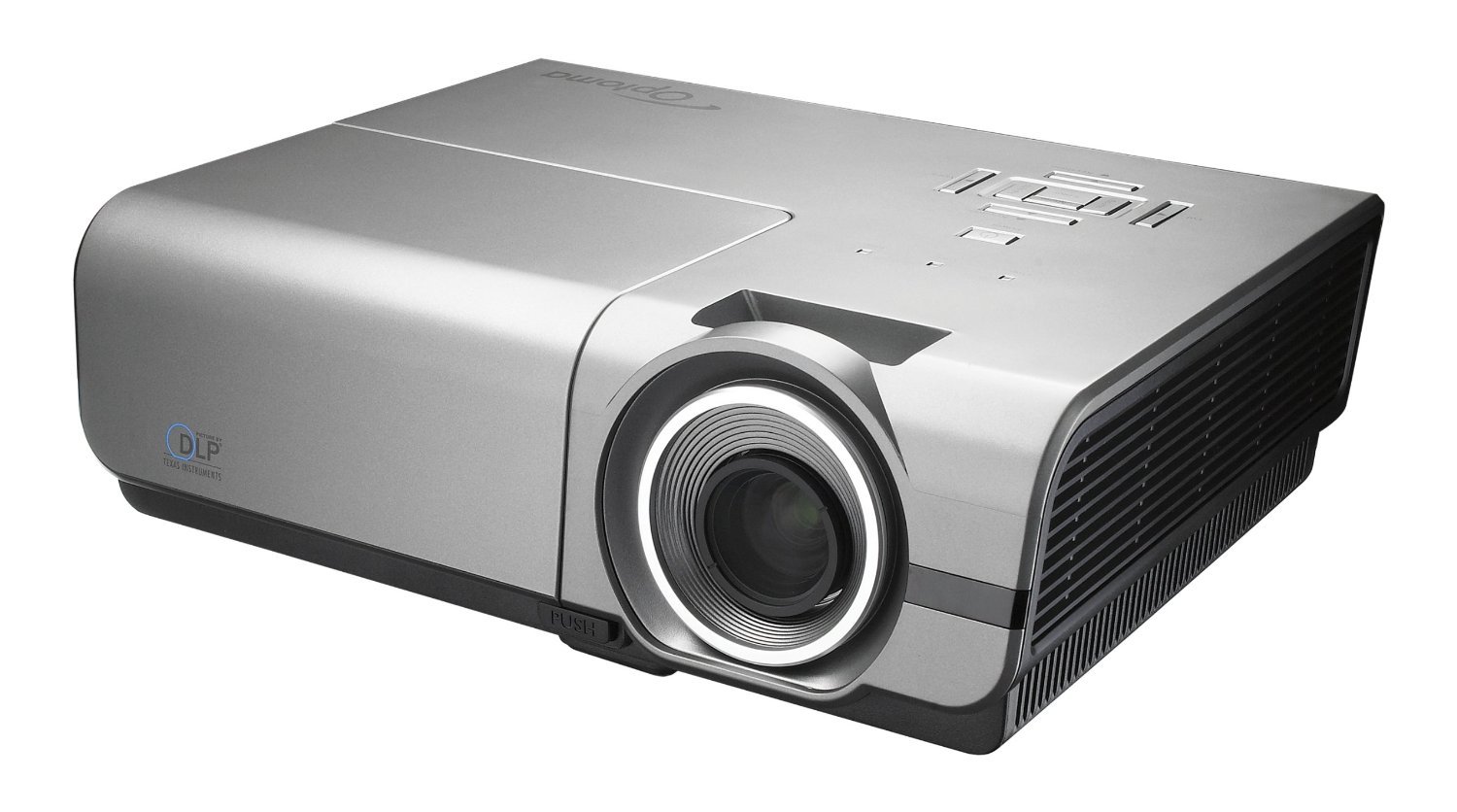
Figure 3.1: Front view of the Optoma EH500 projector, showcasing the lens and sleek design.

Figure 3.2: Rear panel of the Optoma EH500, displaying the comprehensive array of connectivity ports including HDMI, VGA, DisplayPort, USB, and network connections.

Figure 3.3: Top panel of the Optoma EH500, showing the power button, menu navigation, keystone correction, and source selection controls.
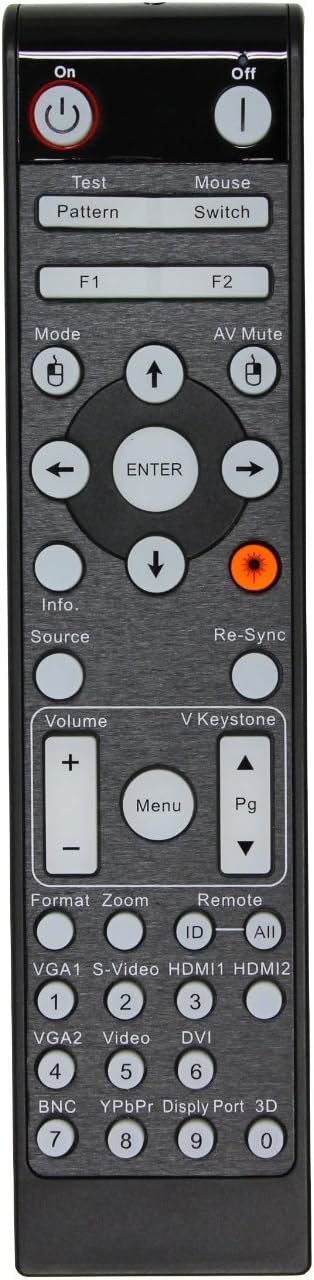
Figure 3.4: The remote control for the Optoma EH500, featuring dedicated buttons for power, menu, source selection, volume, and keystone adjustment.
4. Setup
4.1 Placement
Position the projector on a stable, flat surface or mount it securely to a ceiling. Ensure adequate ventilation around the unit. The distance from the screen will determine the image size. For optimal image quality, ensure the projector is centered with the screen.
4.2 Power Connection
- Connect the AC power cord to the projector's power inlet.
- Plug the other end of the power cord into a grounded electrical outlet.
- The power LED on the projector will illuminate, indicating standby mode.
4.3 Initial Connection
Connect your video source (e.g., laptop, Blu-ray player) to the projector using an appropriate cable (HDMI, VGA, DisplayPort, S-Video, or Composite Video). Refer to the 'Connectivity' section for port details.
5. Operating Instructions
5.1 Powering On/Off
- To Power On: Press the Power button on the projector's top panel or the remote control. The projector will initiate its startup sequence.
- To Power Off: Press the Power button twice. The first press will display a confirmation message; the second press will shut down the projector.
5.2 Input Source Selection
Press the 'Source' button on the projector or remote control to cycle through available input sources (HDMI 1, HDMI 2, VGA 1, VGA 2, DisplayPort, S-Video, Composite Video). Select the input corresponding to your connected device.
5.3 Image Adjustment
- Focus: Rotate the focus ring on the projector lens until the image is sharp and clear.
- Zoom: Adjust the zoom ring on the projector lens to achieve the desired image size.
- Keystone Correction: Use the 'Keystone' buttons (up/down arrows) on the projector or remote to correct trapezoidal image distortion. Note that the EH500 primarily offers vertical keystone correction.
- Menu Navigation: Press the 'Menu' button to access settings for picture, audio, display, and system. Use the arrow buttons to navigate and 'Enter' to confirm selections.
6. Connectivity
The Optoma EH500 offers a wide range of connectivity options:
- HDMI (x2): For high-definition digital video and audio input.
- VGA In (x2): For analog video input from computers.
- VGA Out: For connecting to an external monitor or display.
- DisplayPort: For high-resolution digital video input.
- S-Video: For standard definition video input.
- Composite Video: For standard definition video input.
- Audio In (x2) / Audio Out: For analog audio connections.
- USB: For service or firmware updates.
- RJ45 (LAN): For network control and management via Crestron RoomView.
- RS-232C: For serial control using HEX or ASCII commands.
- 12V Trigger: For automated screen control.
7. Key Features
- Incredible Picture Quality: Experience presentations with vibrant colors and sharp, clear text and graphics, enabled by 1080p full high definition and a 10,000:1 contrast ratio.
- High Brightness: Enjoy 4,700 lumens of brightness, suitable for well-lit meeting rooms, conference rooms, training rooms, and classrooms.
- Network Control with Crestron RoomView: Set up complete network control and management of up to 250 projectors, ideal for large installations in business and educational environments.
- RS-232 Control: Take control of the projector using HEX or ASCII commands via an RS-232 cable for integrated system management.
- Green by Design: The EH500 consumes less than 1 watt in standby mode, significantly reducing energy consumption. It features automatic shut down and remote management for energy conservation.
- Full 3D Compatibility: Display true 3D content from various 3D sources, including 3D Blu-ray Disc players and 3D broadcasting. Supports 144Hz rapid-refresh rate for ultra-smooth, flicker-free images (Optoma 3D glasses required).
8. Maintenance
8.1 Cleaning the Lens
Use a soft, lint-free cloth specifically designed for optical lenses. Avoid abrasive cleaners or cloths that could scratch the lens surface.
8.2 Cleaning the Projector Casing
Wipe the projector casing with a soft, damp cloth. Do not use harsh chemicals or solvents.
8.3 Lamp Replacement
The projector lamp has a limited lifespan. When the lamp life is nearing its end, a warning message will appear on the screen. Refer to the detailed instructions in the full user manual (on CD-ROM) for safe lamp replacement procedures. Always use genuine Optoma replacement lamps.
8.4 Air Filter Maintenance
Regularly clean or replace the air filter to ensure proper ventilation and prevent overheating. Consult the full user manual for specific instructions on accessing and maintaining the air filter.
9. Troubleshooting
- No Image: Ensure the power cord is securely connected and the projector is powered on. Verify that the correct input source is selected and the video cable is properly connected to both the projector and the source device.
- Image is Blurry: Adjust the focus ring on the projector lens. Ensure the projector is placed at an appropriate distance from the screen.
- Image is Trapezoidal: Use the keystone correction buttons to adjust the image shape.
- Projector Overheating: Ensure adequate ventilation around the projector. Clean or replace the air filter if it is clogged.
- Remote Control Not Working: Check and replace the batteries. Ensure there are no obstructions between the remote and the projector's IR receiver.
For more detailed troubleshooting steps, please refer to the comprehensive user manual provided on the CD-ROM.
10. Specifications
| Feature | Specification |
|---|---|
| Brand | Optoma |
| Model Number | EH500 |
| Brightness Rating | 4700 Lumens |
| Display Resolution | 1920 x 1080 (1080p) |
| Item Weight | 8.5 pounds |
| Product Dimensions | 12.8 x 10.2 x 4.3 inches |
| Connectivity Technology | HDMI, Wireless (optional dongle), DisplayPort, VGA, S-Video, Composite, RJ45, RS-232C |
| Special Feature | 3D-Ready, Internet-Ready (via Crestron RoomView) |
| Recommended Uses | Business, Home Cinema |
| Color | White |
11. Warranty and Support
Your Optoma EH500 projector comes with a 3-Year Limited Optoma Express Service Warranty and a 1-Year Limited Lamp Warranty. For warranty claims, technical support, or service inquiries, please contact Optoma customer support through their official website or the contact information provided in the full user manual.
For the most up-to-date support resources, including FAQs and driver downloads, visit the official Optoma website: www.optoma.com


