
1. Introduction and Product Overview
The Rems Multi-push SL is an advanced, compact electronic unit designed for efficient flushing, cleaning, disinfection, and pressure testing of pipe systems. Equipped with an oil-free compressor, it offers versatile applications including:
- Flushing with water or a water/air mixture.
- Disinfection and cleaning of piping systems.
- Protection of piping systems.
- Pressure testing with compressed air or water for pipe systems and tanks.
- Use as a compressor for filling various tanks with compressed air and powering pneumatic tools.
This single device features over 10 automatic flushing and pressure testing programs, continuous process monitoring, intervention reporting, and a USB interface for data management.
2. Safety Instructions
Always observe general safety regulations and local guidelines when operating the Rems Multi-push SL. Failure to do so may result in injury or damage to the equipment.
- Electrical Safety: Ensure the unit is connected to a properly grounded power supply. Do not operate with wet hands or in wet conditions. Disconnect power before performing any maintenance.
- Pressure Safety: Always wear appropriate personal protective equipment (PPE), such as safety glasses, when working with pressurized systems. Ensure all connections are secure before applying pressure. Do not exceed the maximum operating pressure specified for your piping system or the Rems Multi-push SL.
- Chemical Handling: If using cleaning or disinfection agents, follow the manufacturer's safety data sheets (SDS) and wear appropriate PPE. Ensure proper ventilation.
- Hose Connections: Use only hoses and fittings rated for the intended pressure and temperature. Inspect hoses for damage before each use.
- Children and Unauthorized Personnel: Keep the unit out of reach of children and ensure only trained personnel operate the equipment.
3. Setup
Proper setup is crucial for safe and effective operation. Follow these steps to prepare your Rems Multi-push SL:
- Positioning: Place the Rems Multi-push SL on a stable, level surface near the system to be serviced. Ensure adequate ventilation.
- Power Connection: Connect the unit to a suitable electrical outlet (refer to the unit's label for voltage requirements).
- Hose Connections:
- Connect the supply hose from the water source to the inlet of the Rems Multi-push SL.
- Connect the outlet hose from the Rems Multi-push SL to the system being flushed or tested.
- Ensure all connections are tight and leak-free.
- System Preparation: Prepare the piping system according to the specific task (e.g., draining, isolating sections).
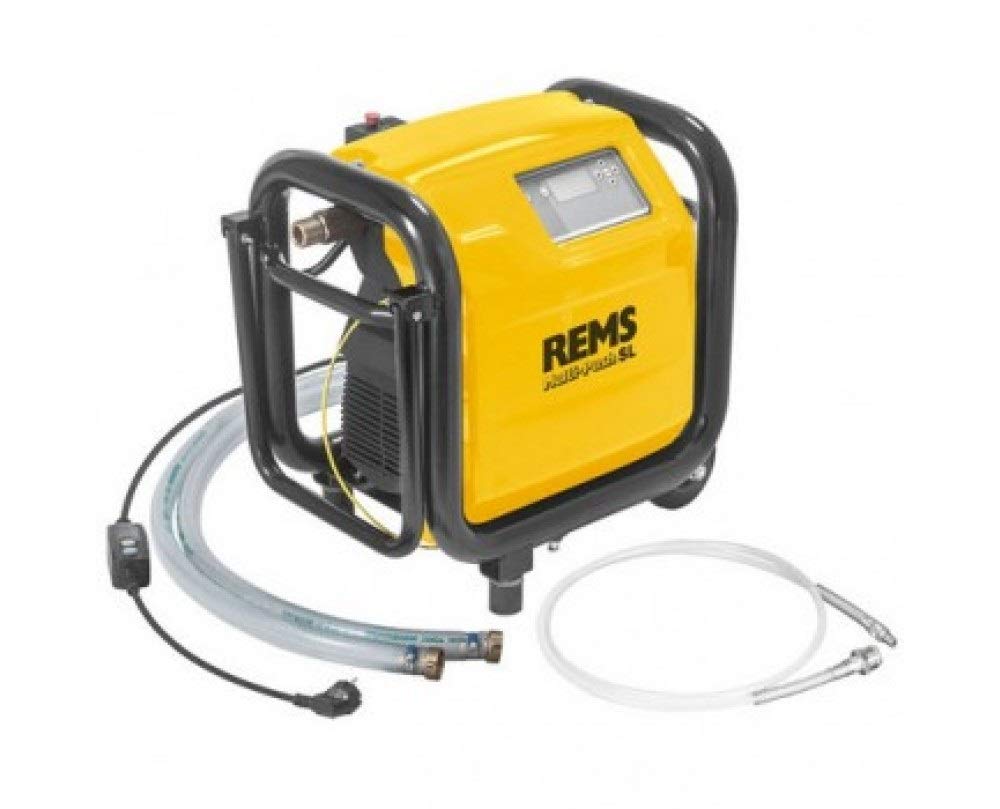
Figure 1: The Rems Multi-push SL unit connected to a pipe manifold system. The yellow unit is on the floor, with hoses connecting it to the plumbing. A filter and various valves are visible in the pipework, indicating a setup for system maintenance or testing.
4. Operating Instructions
The Rems Multi-push SL features an intuitive electronic control system. Refer to the display and control panel for program selection and monitoring.
- Power On: Switch on the main power button. The display will illuminate.
- Program Selection: Use the navigation buttons to select the desired program from the available options (e.g., flushing, pressure test, disinfection). The unit offers over 10 automatic programs.
- Parameter Adjustment: For certain programs, you may need to adjust parameters such as pressure, duration, or flow rate. Follow the on-screen prompts.
- Start Operation: Press the START button to begin the selected program. The unit will automatically execute the process.
- Process Monitoring: The display provides real-time information on the process status, pressure, and duration. The unit continuously monitors the process.
- Completion and Reporting: Upon completion, the unit will indicate the end of the program. You can generate intervention reports and transfer data via the USB interface.
- Compressor Function: To use the unit as a compressor, select the appropriate program. Connect the pneumatic tool or tank to be filled to the designated air outlet.
5. Maintenance
Regular maintenance ensures the longevity and optimal performance of your Rems Multi-push SL.
- Cleaning: After each use, clean the exterior of the unit with a damp cloth. Do not use abrasive cleaners or solvents.
- Hose Inspection: Regularly inspect all hoses for signs of wear, cracks, or damage. Replace damaged hoses immediately.
- Filter Maintenance: The system includes filters (visible in Figure 1). Check and clean or replace these filters as necessary to maintain optimal flow and prevent contamination. Refer to the detailed filter maintenance instructions in the comprehensive manual.
- Storage: Store the unit in a dry, frost-free environment when not in use.
6. Troubleshooting
If you encounter issues with your Rems Multi-push SL, consult the following basic troubleshooting steps:
- Unit Does Not Power On:
- Check the power cable connection to both the unit and the electrical outlet.
- Verify that the electrical outlet is functional.
- Check the unit's fuse, if accessible.
- Low Pressure/Flow:
- Ensure the water supply is adequate and all valves are fully open.
- Check for kinks or blockages in the hoses.
- Inspect and clean the filters.
- Verify that the correct program and pressure settings are selected.
- Error Message on Display:
- Note the error code or message.
- Refer to the comprehensive Rems Multi-push SL manual for specific error code explanations and solutions.
- Unusual Noise:
- Power off the unit immediately.
- Inspect for loose components or foreign objects.
- If the noise persists, contact Rems customer support.
For complex issues or repairs, always contact authorized Rems service personnel.
7. Specifications
| Brand | Rems |
| Model Number | multi-push |
| Item Weight | 39 kg (85.98 lbs) |
| Power Source | ad_aria |
| Recommended Product Uses | Flushing, Blowing |
| ASIN | B00FT2WEXU |
| International Article Code | 04039976132091 |
8. Warranty and Support
For detailed warranty information, please refer to the documentation included with your Rems Multi-push SL unit or visit the official Rems website. For technical support, service, or spare parts, please contact your authorized Rems dealer or Rems customer service directly.
Manufacturer: Rems


