

Introduction
The Alen T500 Air Purifier is designed to improve indoor air quality by capturing airborne particles. This portable tower unit is suitable for various living spaces, including bedrooms, living rooms, and offices, covering up to 500 square feet every 30 minutes. It utilizes an H13 True HEPA filter to effectively remove allergens, dust, pollen, pet dander, and other airborne contaminants down to 0.1 microns.
This manual provides essential information for the safe and efficient operation and maintenance of your Alen T500 Air Purifier.
Product Overview
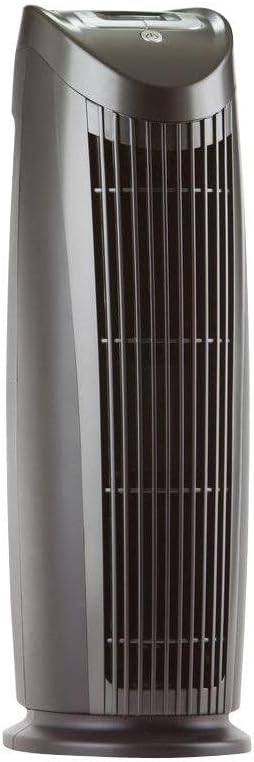
Figure 1: Alen T500 Air Purifier (Black)

Figure 2: Alen T500 Air Purifier Dimensions (10"D x 6.7"W x 21.7"H)
The Alen T500 is a compact and portable air purifier, measuring approximately 21.7 inches in height, 6.7 inches in width, and 10 inches in depth, and weighing 9 pounds. Its design allows for versatile placement in various room settings.
Setup
- Unpack the Unit: Carefully remove the air purifier from its packaging. Retain packaging for future transport or storage.
- Install the Filter:
The Alen T500 comes with an H13 True HEPA Pure filter. Before first use, ensure the filter is properly installed and any protective packaging is removed from the filter itself.

Figure 3: Filter Installation
- Open the filter compartment cover.
- Insert the H13 True HEPA filter, ensuring it is seated correctly.
- Close the filter compartment cover securely.
- Position the Air Purifier: Place the unit on a flat, stable surface. For optimal performance, ensure there is adequate space around the air intake and outlet vents. The unit is designed for versatile placement in various rooms.
- Connect to Power: Plug the power cord into a standard 120V electrical outlet.
Video 1: Alen T500 Air Purifier Overview and Filter Installation. This video demonstrates the features of the Alen T500 and shows how to install the filter.
Operating Instructions
The Alen T500 features an intuitive LCD control panel for easy operation.

Figure 4: Control Panel of Alen T500
- Power On/Off: Press the Power button (usually indicated by a circle with a vertical line) to turn the unit on or off.
- Adjust Fan Speed: Press the Fan Speed button to cycle through available fan speeds (e.g., Low, Medium, High).
- Speed 1: 48 CFM (Cubic Feet per Minute), 42 dB Noise Level
- Speed 2: 83 CFM, 47 dB Noise Level
- Speed 3: 130 CFM, 56 dB Noise Level
- Set Timer: Use the Timer button to set the desired operating duration.
- Ionizer Function: Press the ION button to activate or deactivate the ionizer feature.
- Energy Efficiency: The Alen T500 is Energy Star Certified, indicating low energy usage (up to 53 watts on highest speed).
Maintenance
Regular maintenance ensures optimal performance and extends the life of your air purifier.
Filter Replacement
The H13 True HEPA filter should be replaced periodically. The "Change Filter" indicator on the control panel will illuminate when a replacement is needed. Filter life is approximately 9 months, but may vary based on usage and air quality.
- Power Off and Unplug: Always turn off and unplug the unit before performing any maintenance.
- Open Filter Compartment: Locate and open the filter access panel.
- Remove Old Filter: Carefully remove the used filter. Dispose of it according to local regulations.
- Clean Prefilter (if applicable): The HEPA-Pure filter includes a vacuumable prefilter. Gently vacuum the prefilter to remove larger particles and extend filter life.
- Install New Filter: Insert a new Alen T500 replacement filter (TF60) into the compartment, ensuring proper orientation.
- Reset Filter Indicator: After installing a new filter, press and hold the RESET button on the control panel until the light turns off.
Exterior Cleaning
- Wipe the exterior of the unit with a soft, dry cloth. Do not use abrasive cleaners or solvents.
- Ensure no moisture enters the unit's vents or control panel.
Troubleshooting
| Problem | Possible Cause | Solution |
|---|---|---|
| Unit does not turn on. | Not plugged in; power outage; unit is off. | Ensure power cord is securely plugged into a working outlet. Check circuit breaker. Press the Power button. |
| Reduced airflow or unusual odor. | Clogged filter; filter needs replacement. | Check the filter. If the "Change Filter" light is on, replace the filter. Vacuum the prefilter if it's dirty. |
| "Change Filter" light remains on after replacement. | Filter indicator not reset. | Press and hold the RESET button until the light turns off. |
Specifications
| Model Number | T500 |
| Brand | Alen |
| Color | Black |
| Product Dimensions (D x W x H) | 10"D x 6.7"W x 21.7"H |
| Item Weight | 9 Pounds |
| Power Source | AC/DC (120V) |
| Wattage | 53 watts (highest speed) |
| Control Method | Touch |
| Filter Type | HEPA (H13 True HEPA) |
| Particle Retention Size | 0.1 Micron |
| Floor Area Coverage | 46 Square Meters (approx. 500 SqFt) |
| Noise Level | 42 Decibels (lowest speed) |
| CADR | 159 |
| UPC | 893127001575 |
Warranty Information
All Alen air purifiers include a warranty if used in the contiguous United States only. For detailed warranty terms and conditions, please refer to the official Alen website or contact customer support.
Support
For further assistance, product registration, or to purchase replacement filters, please visit the official Alen website:


