
Flysky FS GT-3C-24TI
Flysky FS-GT3C RC Transmitter and Receiver FS-GR3E User Manual
Model: FS GT-3C-24TI | Brand: Flysky
1. Introduction
This manual provides comprehensive instructions for the safe and efficient operation of your Flysky FS-GT3C RC Transmitter and FS-GR3E Receiver. The FS-GT3C is a 2.4GHz 3-channel radio controller designed for remote control cars and boats, featuring high receiving sensitivity, low power consumption, and stable performance through its AFHDS (Automatic Frequency Hopping Digital System).
Please read this manual thoroughly before using the product to ensure proper setup, operation, and maintenance.
2. Safety Precautions
- Always operate your RC model in a safe and responsible manner.
- Ensure the transmitter and receiver are properly bound and functioning before operation.
- Keep the product away from water and moisture to prevent damage.
- Do not disassemble or modify the product, as this may void the warranty and cause malfunction.
- Store the product in a cool, dry place when not in use.
- Keep out of reach of small children. Recommended age for use is 14 months and up.
3. Package Contents
Verify that all items listed below are included in your package:
- Flysky FS-GT3C Transmitter
- Flysky FS-GR3E Receiver
- USB Charging Cable
- Binding Plug
- Extra Grip (Large)
- User Manual (this document)

Figure 3.1: Complete package contents of the Flysky FS-GT3C system.
4. Product Overview
The Flysky FS-GT3C is a sophisticated yet user-friendly radio control system. Familiarize yourself with its main components and features:

Figure 4.1: Flysky FS-GT3C Transmitter and FS-GR3E Receiver.
4.1 Transmitter Features
- Backlit LCD Screen: Provides clear display of settings and telemetry data.
- Ergonomic Design: Rounded edges and comfortable grip for extended use.
- 90° Rotation Handwheel: Allows for precise steering control.
- Full Angle Gain Antenna: Enhances passive anti-interference capabilities.
- Rechargeable Li-ion Battery: Powers the transmitter, eliminating the need for disposable AA batteries.
- Low Voltage Alarm: Alerts you when the battery needs recharging.

Figure 4.2: Key features of the FS-GT3C Transmitter.
4.2 Transmitter Controls and Display
Refer to the diagram below for a detailed layout of the transmitter's controls and LCD display elements:

Figure 4.3: FS-GT3C Transmitter labeled diagram.
- LCD Display: Shows current settings, channel values, and model information.
- Antenna: Transmits the 2.4GHz signal to the receiver.
- Handwheel: Controls steering (Channel 1).
- Throttle Trigger: Controls throttle (Channel 2).
- Throttle Trim (TH.TRIM): Adjusts the neutral point of the throttle.
- Steering Trim (ST.TRIM): Adjusts the neutral point of the steering.
- Channel 3 Switch (CH3): Controls the third channel, often used for auxiliary functions.
- Buttons (ENTER, DOWN, UP, BACK, END, BIND): Used for menu navigation, setting adjustments, and binding.
5. Setup
5.1 Battery Installation and Charging
The FS-GT3C transmitter is powered by a rechargeable 3.7V Li-ion battery. To install or replace the battery, open the battery compartment cover located at the bottom of the transmitter handle. Connect the battery and close the cover securely.
To charge the transmitter, connect the included USB charging cable to the charging port on the transmitter and a USB power source (e.g., computer USB port, USB wall adapter). The LCD screen will indicate charging status. A full charge typically takes 1-2 hours.
5.2 Receiver Connection
The FS-GR3E receiver has three channels. Connect your steering servo to Channel 1 (ST), your Electronic Speed Controller (ESC) to Channel 2 (TH), and any auxiliary components (e.g., lights, winch) to Channel 3 (CH3). Ensure correct polarity when connecting components.

Figure 5.1: FS-GR3E Receiver and Binding Plug.
5.3 Binding the Transmitter and Receiver
Binding is the process of linking the transmitter and receiver so they communicate exclusively. Follow these steps:
- Ensure the transmitter is turned OFF.
- Insert the binding plug into the B/VCC port on the FS-GR3E receiver.
- Connect power to the receiver (e.g., from the ESC or a separate battery). The receiver's LED should flash rapidly.
- While holding down the BIND button on the transmitter, turn the transmitter ON.
- The receiver's LED should turn solid, indicating successful binding.
- Release the BIND button on the transmitter, then turn OFF both the transmitter and receiver.
- Remove the binding plug from the receiver.
- Turn on the transmitter first, then the receiver. The receiver's LED should be solid, confirming the link.
For a visual guide on the binding process and other setup procedures, please watch the official product video below:
Video 5.1: Official demonstration of the Flysky FS-GT3C RC Transmitter and FS-GR3E Receiver, including setup and binding.
6. Operating Instructions
Once your transmitter and receiver are successfully bound, you can begin operating your RC model. Always ensure your model is placed on a stable surface and clear of obstacles before powering on.
6.1 Basic Controls
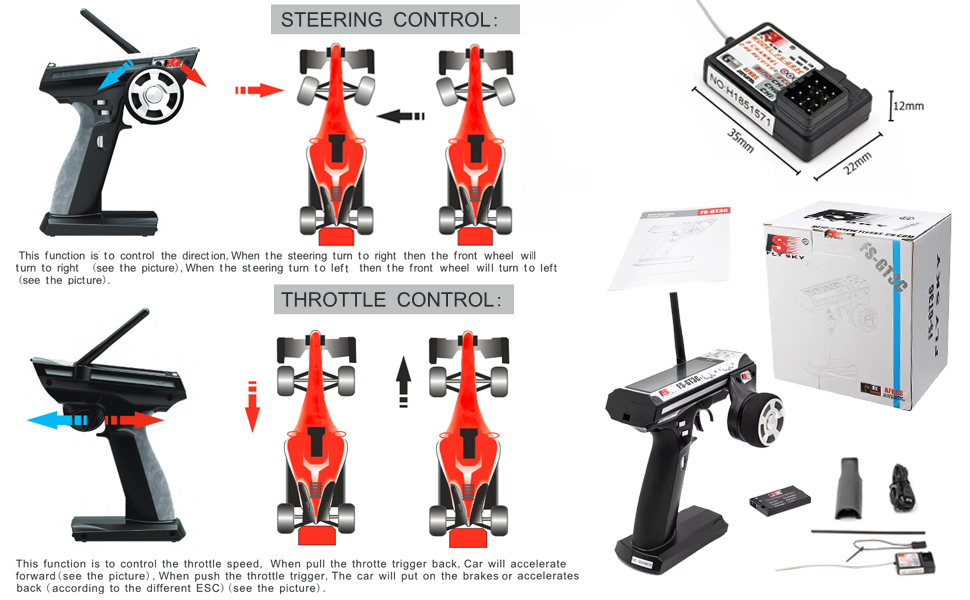
Figure 6.1: Steering and Throttle Control.
- Steering Control: Rotate the handwheel clockwise to turn right, and counter-clockwise to turn left.
- Throttle Control: Pull the trigger towards you for forward movement (acceleration). Push the trigger away from you for braking or reverse.
6.2 Menu Navigation and Settings
The FS-GT3C features an intuitive menu system accessible via the LCD screen and control buttons. Use the UP/DOWN buttons to navigate through options, ENTER to select, and BACK to return to the previous screen.
Key adjustable settings include:
- TRIM: Fine-tunes the neutral position of steering and throttle.
- D/R (Dual Rate): Adjusts the maximum steering angle or throttle throw.
- REV (Reverse): Reverses the direction of a channel's output.
- EXP (Exponential): Adjusts the sensitivity of the control around the center point.
- ABS (Anti-lock Braking System): Provides pulsed braking to prevent wheel lock-up.
- E.POINT (End Point Adjustment): Sets the maximum travel for each channel.
- MODEL NO.: Allows you to save and load settings for up to 10 different RC models.
Consult the on-screen menus for specific adjustments and their effects. Experiment with settings in a safe, open area until you achieve desired control characteristics.
7. Maintenance
- Cleaning: Use a soft, dry cloth to clean the transmitter and receiver. Avoid using solvents or abrasive cleaners.
- Storage: When not in use for extended periods, store the transmitter and receiver in a cool, dry place, away from direct sunlight and extreme temperatures. Ensure the battery is partially charged (around 50%) for long-term storage to prolong its lifespan.
- Battery Care: Recharge the transmitter battery regularly. Avoid fully discharging the Li-ion battery, as this can reduce its lifespan.
- Antenna Care: Do not bend or apply excessive force to the antenna.
8. Troubleshooting
| Problem | Possible Cause | Solution |
|---|---|---|
| Transmitter does not power on. | Low or dead battery; power switch off. | Charge the transmitter battery; ensure power switch is ON. |
| No control over RC model. | Not bound; receiver not powered; incorrect channel connections. | Perform binding procedure (Section 5.3); check receiver power; verify servo/ESC connections. |
| Controls are reversed. | Channel reverse setting is active. | Adjust the REV setting for the affected channel in the transmitter menu. |
| Limited range or interference. | Environmental interference; damaged antenna; low battery. | Operate in an open area; check antenna for damage; ensure batteries are charged. |
If you encounter issues not listed here, or if solutions do not resolve the problem, please contact Flysky customer support.
9. Specifications
| Feature | Detail |
|---|---|
| Model Number | FS GT-3C-24TI |
| Channels | 3 Channels |
| Frequency Band | 2.4GHz to 2.48GHz (160 wave bands) |
| Modulation | GFSK |
| System | AFHDS (Automatic Frequency Hopping Digital System) |
| Transmitter Battery | 3.7V Li-ion (included) |
| Product Dimensions | 7.9 x 7.3 x 5.1 inches |
| Item Weight | 11.6 ounces |
| Manufacturer Recommended Age | 14 months and up |
9.1 Receiver Compatibility
The FS-GR3E receiver is compatible with a range of Flysky transmitters. Refer to the compatibility chart below:

Figure 9.1: FS-GR3E Receiver Compatibility Chart.
10. Warranty and Support
Please note the legal disclaimer regarding this product: "Buy as is NO refund". For any technical support or inquiries, please refer to the official Flysky website or contact your retailer.
For additional information and resources, you may visit the official Flysky Store: Flysky Store on Amazon.
Ask a question about this manual
Ask about setup, troubleshooting, compatibility, parts, safety, or missing instructions. Manuals+ will review the question and use this page’s manual context to help answer it.