
1. Product Overview
This manual provides detailed instructions for the installation, operation, and maintenance of the TE Connectivity HE.24.STI.SC.B1-24 connector insert.
The HE.24.STI.SC.B1-24 is an insert from the HE.24 Series, designed with a product size of 8. It features a spring-clamp terminal contact type and a pin insert style, suitable for various industrial electrical applications.
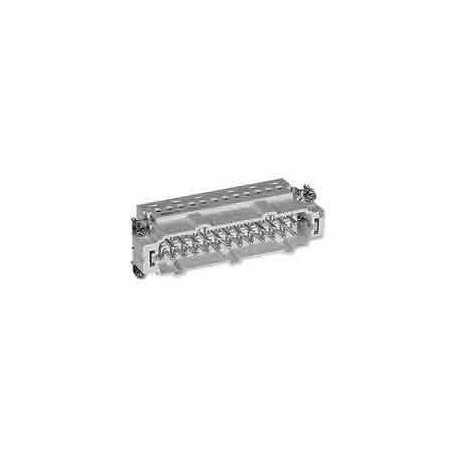
Figure 1: TE Connectivity HE.24 Series Insert (Model HE.24.STI.SC.B1-24). This image shows the overall structure of the connector insert, highlighting its compact design and the arrangement of its pin contacts.

Figure 2: Detailed view of the TE Connectivity HE.24 Series Insert. This image provides a closer look at the spring-clamp terminals and the pin configuration, essential for understanding the connection mechanism.
2. Safety Information
Always observe the following safety precautions to prevent injury and damage to the product:
- Disconnect Power: Ensure all power sources are disconnected before installation, maintenance, or troubleshooting.
- Qualified Personnel: Installation and maintenance should only be performed by qualified and trained personnel.
- Proper Tools: Use appropriate tools for installation and removal to avoid damage to the connector or injury.
- Environmental Conditions: Do not expose the connector to conditions outside its specified operating environment (e.g., extreme temperatures, excessive moisture, corrosive substances).
- Inspect for Damage: Before use, visually inspect the connector for any signs of damage. Do not use damaged components.
3. Product Components
The TE Connectivity HE.24.STI.SC.B1-24 connector insert primarily consists of:
- Insert Body: The main housing for the contacts.
- Pin Contacts: The conductive elements designed for signal or power transmission.
- Spring-Clamp Terminals: Mechanisms for securing wires without the need for screws, providing reliable and quick connections.
This insert is designed to be integrated into compatible HE.24 series housings (sold separately).
4. Setup and Installation
Follow these steps for proper installation of the HE.24.STI.SC.B1-24 insert:
- Prepare Wires: Strip the insulation from the wire ends according to the recommended length for spring-clamp terminals (typically 8-10mm, refer to specific wire gauge guidelines). Ensure the wire ends are clean and free of fraying.
- Open Clamp: Use a small screwdriver or appropriate tool to open the spring-clamp terminal. Insert the tool into the designated opening next to the wire entry point and apply gentle pressure.
- Insert Wire: While the clamp is open, carefully insert the stripped wire end into the terminal opening until it reaches the stop.
- Secure Wire: Remove the tool from the clamp opening. The spring mechanism will automatically close, securely clamping the wire. Gently pull on the wire to ensure it is firmly seated.
- Repeat for all Wires: Repeat steps 2-4 for all necessary wire connections.
- Mount Insert: Once all wires are connected, mount the HE.24.STI.SC.B1-24 insert into its corresponding HE.24 series housing. Ensure it clicks securely into place.
- Connect Housing: Connect the assembled housing to its mating connector or panel, ensuring proper alignment and secure locking mechanisms are engaged.
Note: Always refer to the specific wiring diagrams and housing instructions provided with your complete connector system.
5. Operating Instructions
The HE.24.STI.SC.B1-24 is a passive connector insert designed to facilitate electrical connections. Once properly installed within its housing and connected to mating components, it operates by providing a reliable conductive path for signals or power.
- Connection Integrity: Ensure all connections are secure and free from loose wires to maintain optimal performance.
- Environmental Protection: The performance of the connector is dependent on the integrity of the housing it is installed in, which provides protection against environmental factors.
No active user operation is required for the insert itself beyond initial installation.
6. Maintenance
Regular maintenance helps ensure the longevity and reliability of the HE.24.STI.SC.B1-24 insert:
- Visual Inspection: Periodically inspect the connector insert and its connections for any signs of wear, corrosion, discoloration, or physical damage.
- Cleaning: If necessary, gently clean the contact areas and the insert body using a lint-free cloth and a suitable non-abrasive, non-conductive cleaning solution. Ensure the connector is completely dry before re-energizing.
- Connection Check: Verify that all wire connections remain secure within the spring-clamp terminals. Re-terminate any loose connections.
- Environmental Check: Ensure the operating environment remains within the specified limits for temperature and humidity.
Caution: Always disconnect power before performing any maintenance.
7. Troubleshooting
If you encounter issues with the HE.24.STI.SC.B1-24 connector insert, consider the following:
| Problem | Possible Cause | Solution |
|---|---|---|
| No electrical continuity | Loose wire connection Damaged wire Corroded contact Incorrect wiring | Re-secure wire in spring-clamp terminal Replace damaged wire Clean or replace insert Verify wiring diagram |
| Intermittent connection | Vibration Partial wire insertion Degraded spring-clamp | Ensure housing is securely mounted Re-insert wire fully Replace insert if clamp is faulty |
| Difficulty inserting wire | Incorrect wire gauge Tool not fully opening clamp Frayed wire strands | Use specified wire gauge Ensure tool is fully inserted Re-strip wire cleanly |
If problems persist after following these steps, contact TE Connectivity customer support.
8. Specifications
Key specifications for the TE Connectivity HE.24.STI.SC.B1-24 insert:
- Series: HE.24 Series
- Product Size: 8
- Contact Type: Spring-Clamp Terminal
- Insert Style: Pin
- Manufacturer: TE Connectivity
- ASIN: B00FRBX6KI
- First Available: June 6, 2014
Note: For detailed electrical ratings (voltage, current) and environmental specifications, please refer to the official TE Connectivity datasheet for the HE.24.STI.SC.B1-24 model.
9. Warranty Information
Specific warranty details for the TE Connectivity HE.24.STI.SC.B1-24 are not provided within this document. For information regarding product warranty, please refer to the official TE Connectivity website or contact their customer service directly. Warranty terms typically cover defects in materials and workmanship under normal use.
10. Customer Support
For technical assistance, product inquiries, or support regarding the TE Connectivity HE.24.STI.SC.B1-24, please contact TE Connectivity through their official channels:
- Website: Visit the official TE Connectivity website for product documentation, FAQs, and contact forms.
- Technical Support: Refer to the contact information provided on the TE Connectivity website for technical support lines specific to your region.
When contacting support, please have your product model number (HE.24.STI.SC.B1-24) and any relevant purchase information ready.