
PORTER-CABLE 855284
Porter Cable Router Ball Bearing #855284 User Manual
Model: 855284
Product Overview
This manual provides essential information for the proper identification, installation, and maintenance of the Porter Cable Router Ball Bearing, Part #855284. This is a genuine OEM replacement part designed for specific Porter Cable router models.
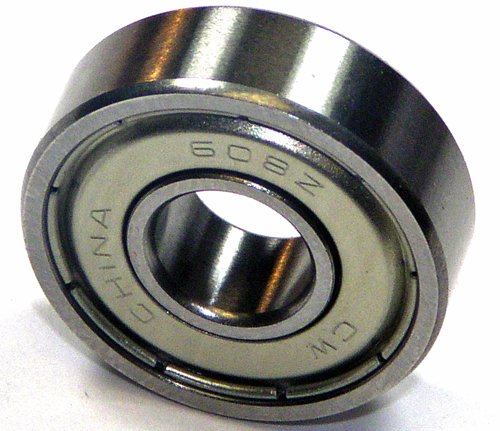
Figure 1: Porter Cable Router Ball Bearing #855284. This image shows the metallic ball bearing, which is a small, cylindrical component with an inner and outer ring, and visible ball bearings inside, designed for smooth rotational movement in power tools.
Safety Information
Always prioritize safety when working with power tools and replacement parts. Failure to follow these instructions may result in injury or damage to equipment.
- Disconnect Power: Before attempting any installation or maintenance, ensure the power tool is unplugged from its power source.
- Wear Protective Gear: Always wear appropriate personal protective equipment (PPE), including safety glasses and gloves.
- Consult Owner's Manual: Refer to your specific router's owner's manual for detailed disassembly and reassembly instructions. This manual provides general guidance for the ball bearing replacement.
- Proper Tools: Use only the correct tools for installation and removal to prevent damage to the part or the router.
- Secure Workspace: Work in a clean, well-lit, and stable environment.
Parts Included
- (1) Porter Cable Ball Bearing, Part #855284
Note: This part is typically supplied in bulk packaging.
Setup and Installation
This ball bearing is a replacement component. Installation requires disassembly of the router. Always consult your router's specific service manual for precise steps.
- Preparation:
- Ensure the router is disconnected from all power sources.
- Clear your workspace and gather necessary tools (e.g., screwdrivers, wrenches, bearing puller if required).
- Disassembly:
- Carefully disassemble the router housing and components to access the existing ball bearing. Pay close attention to the order of removal of parts.
- Identify the worn or damaged ball bearing that needs replacement.
- Bearing Removal:
- Using appropriate tools (e.g., a bearing puller or press, depending on the router design), carefully remove the old ball bearing from its shaft or housing. Avoid damaging surrounding components.
- New Bearing Installation:
- Clean the shaft and housing area where the new bearing will be installed.
- Gently press or tap the new #855284 ball bearing into place. Ensure it is seated squarely and fully. Do not use excessive force, which can damage the bearing.
- Ensure the bearing rotates freely once installed.
- Reassembly:
- Reassemble the router components in reverse order of disassembly. Ensure all screws and fasteners are tightened securely.
- Verify that all moving parts operate smoothly before closing the housing.
- Testing:
- Once fully reassembled, connect the router to power and perform a brief test run to ensure proper function and absence of unusual noises or vibrations.
Operating Principle
The #855284 ball bearing facilitates smooth, low-friction rotation of the router's motor armature or spindle. It supports radial and axial loads, ensuring stable and efficient operation of the tool. A properly functioning ball bearing is crucial for the router's performance and longevity, reducing wear on other components and maintaining cutting accuracy.
Maintenance
Ball bearings are generally sealed and require minimal maintenance. However, regular inspection is recommended:
- Inspection: Periodically inspect the bearing for signs of wear, such as excessive play, grinding noises, or visible damage.
- Cleanliness: Keep the area around the bearing clean and free from dust, debris, and moisture, which can compromise its performance and lifespan.
- Lubrication: This specific bearing is typically pre-lubricated and sealed. Do not attempt to lubricate it unless explicitly instructed by the router's service manual, as this can introduce contaminants.
Troubleshooting
If you experience issues after replacing the ball bearing, consider the following:
| Symptom | Possible Cause | Solution |
|---|---|---|
| Excessive noise (grinding, squealing) | Incorrect bearing installation, damaged new bearing, or other worn internal components. | Re-check installation for proper seating. Inspect the new bearing for defects. Consult router service manual for other potential issues. |
| Vibration during operation | Bearing not seated correctly, unbalanced armature, or other internal component issues. | Ensure bearing is fully seated. Check for any obstructions or misaligned parts during reassembly. |
| Router not spinning freely | Bearing binding, incorrect part, or obstruction. | Verify the bearing is the correct part number. Check for any debris or misaligned parts preventing free rotation. |
If issues persist, it is recommended to consult a qualified technician or refer to the official Porter Cable service documentation for your specific router model.
Specifications
| Attribute | Detail |
|---|---|
| Part Number | 855284 |
| Brand | PORTER-CABLE |
| Material | Alloy Steel |
| Bearing Type | Ball Bearing |
| Item Dimensions (L x W x H) | 1 x 1 x 0.5 inches |
| Item Weight | 0.01 Ounces |
| Country of Origin | China |
Compatibility
This ball bearing (Part #855284) is compatible with a wide range of Porter Cable tools. Always consult your specific tool's owner's manual or parts diagram to confirm compatibility before purchase and installation.
Known compatible models include, but are not limited to:
- Porter Cable 690, 6902, 6912 Routers
- Porter Cable 314, 314H, 2610, 2611, 2614, 2615, 2620, 2621
- Porter Cable 6302, 6614, 6615, 7551, 7556, 7563, 7564
- Porter Cable 4630, 4634, 4640, 6602, 6603, 6604, 6605 Shears
- Porter Cable 548, 725, 726, 7349, 7499L
- Porter Cable 309, 3092, 551 Cutter, 556 Joiner
- Porter Cable 647, 7301, 738
- Porter Cable 690LR, 690LRVS, 691
- Porter Cable 330, 332, 333, 333VS, 334, 341, 360VS, 360, 361, 362VS, 362 Sanders
- And many other models. Refer to your tool's parts diagram.
Warranty and Support
As a genuine OEM replacement part, this ball bearing is subject to the warranty terms provided by PORTER-CABLE for their replacement parts. Please retain your proof of purchase.
For specific warranty details, technical support, or further assistance, please visit the official PORTER-CABLE website or contact their customer service department. Always refer to the official documentation for your specific tool model for comprehensive support.
Official PORTER-CABLE Website: www.portercable.com
Ask a question about this manual
Ask about setup, troubleshooting, compatibility, parts, safety, or missing instructions. Manuals+ will review the question and use this page’s manual context to help answer it.