
1. Introduction
This manual provides detailed instructions for the setup, operation, and maintenance of your UtechSmart Venus DS-2535 Wired RGB MMO Gaming Mouse. Designed for high-precision gaming, this mouse offers extensive customization options to enhance your gaming experience. Please read this manual thoroughly to ensure optimal performance and longevity of your device.
2. Key Features
- Sensitive DPI MMO Mouse: Features up to 16400 DPI, 12000 FPS, 1000 Hz polling rate, 30G acceleration, 100-150in/s cursor speed, and a high-precision Avago sensor. Adjustable sensitivity from 200 to 16400 DPI via dedicated buttons.
- Fully Customizable Mouse & RGB Backlit: Multiple programmable buttons (including 12 side buttons) and 5 custom profiles, each with 5 LED RGB color backlit modes. Over 16 million LED RGB color options. LED breathing light can be disabled. A special Setting Switch Button on the bottom allows efficient profile switching.
- Programmable Mouse Buttons: All macro buttons are customizable to specific needs and can be mapped to keyboard keys or combos. Side buttons are easily accessible for thumb control. Includes an “Auto Fire button” for optimized gameplay.
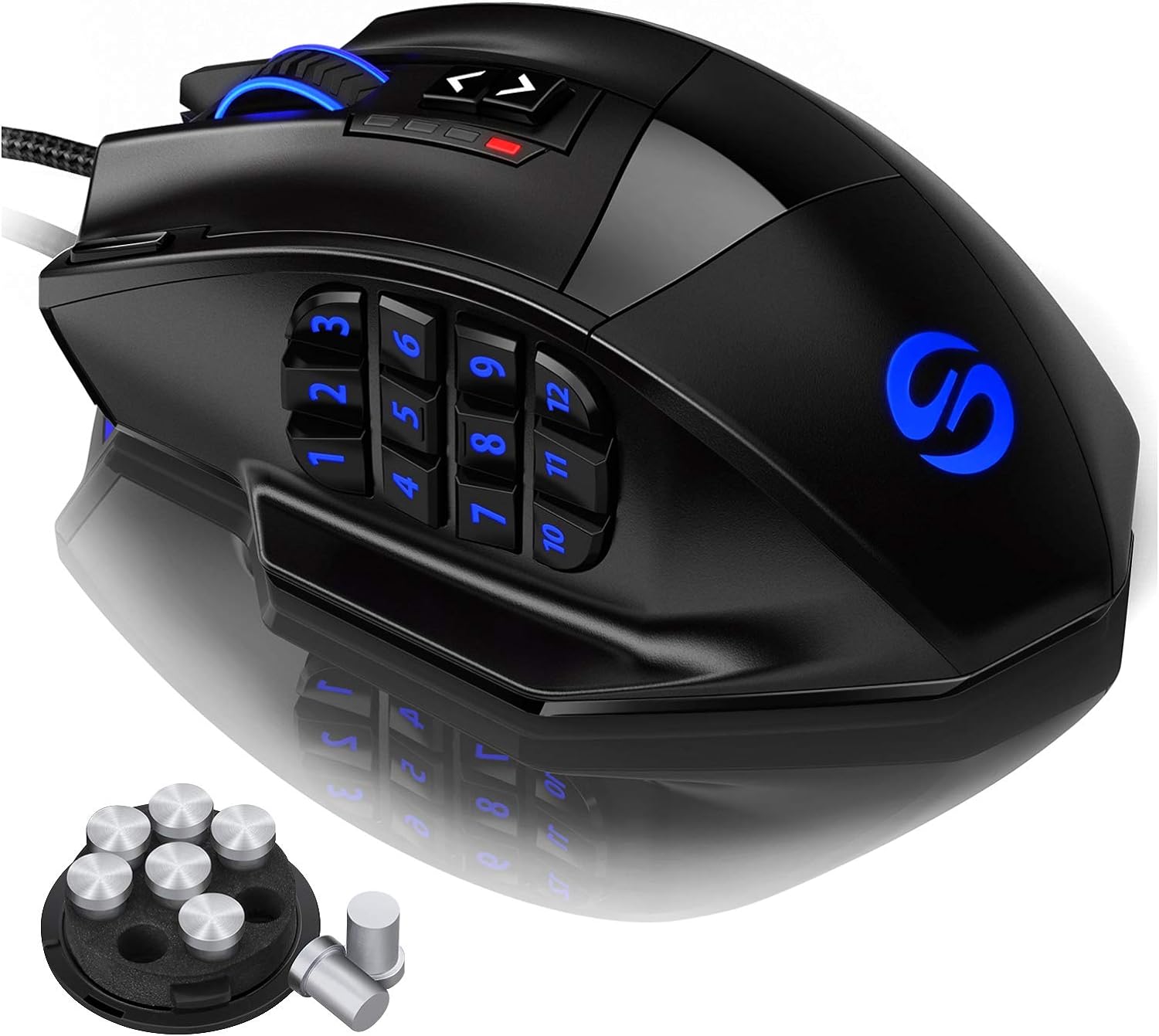
- Precise Control in Your Hand: Adjustable weighted mouse with 8 removable 2.4g weights. Angled 12 side buttons for faster positioning by touch. Features a thumb rest for comfort. Durable TEFLON feet pads ensure smooth gliding.
- Comfortable Shape & Textured Grip: Ergonomic right-handed design with a frosted painting surface to prevent hand sweat and improve grip. The mouse shape and texture provide comfort for most hand sizes. Equipped with a 6ft braided-fiber cable and gold-plated USB connector for durability.
3. Setup Guide
3.1 Connecting the Mouse
- Unpack the UtechSmart Venus DS-2535 mouse and its braided USB cable.
- Plug the gold-plated USB connector into an available USB port on your PC.
- Your operating system (Windows System) should automatically detect and install the necessary drivers.
3.2 Software Installation (for Customization)
To fully utilize the programmable buttons, DPI settings, and RGB customization, it is recommended to install the official UtechSmart software. Please visit the official UtechSmart website to download the latest software for your Venus DS-2535 mouse.
3.3 Weight Tuning
The mouse comes with 8 removable 2.4g weights to adjust its balance and feel. To access the weight compartment:
- Locate the weight adjustment box on the bottom of the mouse.
- Turn the lock in the "open" direction.
- Carefully pour the weights into your palm. Add or remove weights as desired to achieve your preferred mouse feel.
- Close the compartment by turning the lock to the "close" position.

4. Operating Instructions
4.1 DPI Adjustment
The UtechSmart Venus mouse allows for on-the-fly DPI adjustment. Use the dedicated DPI buttons located near the scroll wheel to cycle through sensitivity levels (200 - 16400 DPI). Each DPI level may correspond to a different LED color for quick identification.
4.2 Programmable Buttons & Macros
The mouse features 12 side buttons and other programmable buttons. These can be customized using the UtechSmart software to execute macros, keyboard commands, or specific in-game actions. The “Auto Fire button” can be configured for rapid repeated actions.

4.3 RGB Backlight Customization
The mouse features customizable RGB backlighting with over 16 million color options and various backlit modes. These settings can be configured through the UtechSmart software. The LED breathing light can also be disabled if preferred.

4.4 Profile Switching
The mouse supports 5 custom profiles. You can switch between these profiles using the dedicated Setting Switch Button located on the bottom of the mouse. Each profile can be assigned a unique LED RGB color for easy identification.
4.5 Official Product Video
5. Maintenance
- Cleaning: Use a soft, dry cloth to clean the mouse surface. For stubborn dirt, a slightly damp cloth can be used, ensuring no liquid enters the mouse.
- Cable Care: Avoid sharp bends or excessive pulling on the braided USB cable to prevent damage.
- Storage: Store the mouse in a dry, cool place away from direct sunlight and extreme temperatures.
6. Troubleshooting
- Mouse Not Responding: Ensure the USB cable is securely plugged into a working USB port. Try a different USB port or restart your computer.
- DPI Not Changing: Verify that the mouse software is installed and running correctly. Check if the DPI buttons are functioning.
- RGB Lights Not Working/Customizing: Ensure the mouse is in a mode that supports RGB lighting (check the bottom switch). Use the UtechSmart software to configure RGB settings.
- Programmable Buttons Not Working: Confirm that the UtechSmart software is installed and your custom profiles are active. Re-map the buttons if necessary.
7. Specifications
| Brand | UtechSmart |
| Model Number | DS-2535 |
| Hardware Platform | PC |
| Operating System | Windows System |
| Item Weight | 7.8 ounces |
| Product Dimensions | 4.6 x 3 x 1.5 inches |
| Color | Black |
| Connectivity Technology | USB |
| Movement Detection Technology | Laser |
| Special Features | High Precision Laser, Ergonomic Design, RGB LED Lights, Programmable Buttons, Adjustable weight, Adjustable Brightness Levels, Adjustable Breathing Speed |
8. Warranty and Support
The UtechSmart Venus DS-2535 Gaming Mouse comes with an 18-Month Manufacturer's Promise. For warranty claims, technical support, or further assistance, please visit the official UtechSmart website or contact their customer service directly. Keep your purchase receipt as proof of purchase.


