
1. Introduction
Thank you for choosing the Tomate Digital Internal Antenna MTV-5015. This antenna is designed to provide high-quality reception for digital and analog television signals (UHF/HDTV). Its compact design and magnetic base offer flexible placement options for optimal signal acquisition. Please read this manual carefully before installation and use to ensure proper operation and maximize your viewing experience.
2. Safety Information
- Do not expose the antenna to extreme temperatures, humidity, or direct sunlight.
- Keep the antenna away from heat sources and open flames.
- Do not attempt to disassemble or modify the antenna. This may void the warranty and pose a safety risk.
- Ensure the coaxial cable is not pinched or damaged during installation.
- Clean the antenna with a soft, dry cloth only. Do not use liquid cleaners or aerosols.
3. Package Contents
Please check the package for the following items:
- Tomate Digital Internal Antenna MTV-5015 unit
- Integrated Coaxial Cable (3 meters) with F-connector

Image: The Tomate MTV-5015 Digital Internal Antenna shown alongside its retail packaging, illustrating the antenna unit and its integrated coaxial cable with an F-connector.
4. Setup and Installation
Follow these steps to set up your Tomate MTV-5015 antenna:
- Connect the Antenna: Locate the antenna input (usually labeled 'ANT IN' or 'RF IN') on your television or digital converter box. Connect the F-connector of the antenna's coaxial cable securely to this input.
- Position the Antenna: The MTV-5015 features a magnetic base for easy placement. Position the antenna in a location that offers the best possible signal reception. Generally, higher locations or near a window facing the broadcast towers are ideal. Avoid placing it near large metal objects or other electronic devices that might cause interference. Extend the telescopic rod for improved reception.
- Scan for Channels: Access your TV's or converter box's menu and navigate to the 'Channel Scan' or 'Auto Program' function. Initiate the scan to find available digital and analog channels. This process may take several minutes.
- Optimize Reception: If you experience poor signal quality or missing channels, try repositioning the antenna and performing another channel scan. Slight adjustments in orientation can significantly impact reception.
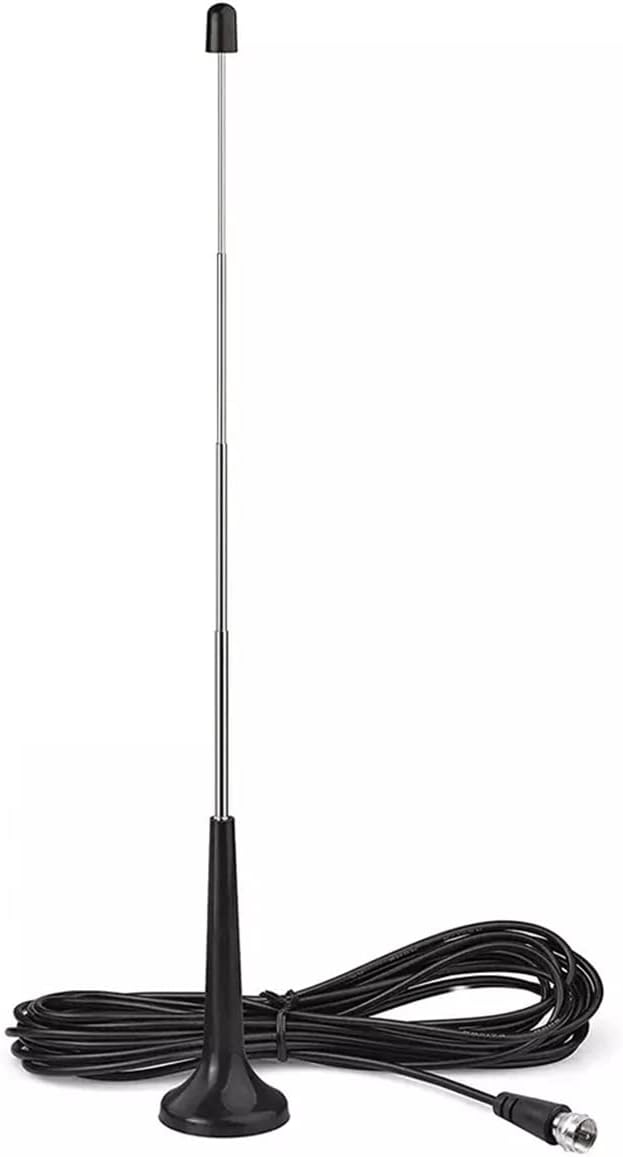
Image: The Tomate MTV-5015 antenna with its telescopic rod fully extended, illustrating its readiness for signal reception. The attached coaxial cable is also visible.

Image: A diagram illustrating the dimensions of the antenna, including its base width (4.5cm), collapsed height (12cm), and fully extended height (36cm). A close-up of the F-connector is also shown.
5. Operating Instructions
Once installed and channels are scanned, operating your Tomate MTV-5015 antenna is straightforward:
- Channel Selection: Use your TV's or converter box's remote control to browse and select channels as usual.
- Signal Optimization: If a channel's signal quality degrades, try slightly adjusting the antenna's position or the extension of its rod. Re-scan channels if significant adjustments are made.
- Telescopic Rod: The antenna features an extendable telescopic rod. Adjust its length and angle to fine-tune reception for specific channels or to improve overall signal strength.

Image: A detailed view of the antenna's extendable telescopic rod, highlighting its construction and functionality for signal adjustment.
6. Maintenance
The Tomate MTV-5015 antenna requires minimal maintenance:
- Cleaning: Periodically wipe the antenna with a soft, dry, lint-free cloth to remove dust. Do not use abrasive cleaners, solvents, or harsh chemicals.
- Cable Inspection: Regularly check the coaxial cable for any signs of damage, such as cuts, kinks, or frayed insulation. Damaged cables can affect signal quality.
- Storage: If storing the antenna for an extended period, ensure it is clean and kept in a dry, cool place away from direct sunlight.
7. Troubleshooting
If you encounter issues with your antenna, refer to the following common problems and solutions:
| Problem | Possible Cause | Solution |
|---|---|---|
| No signal or 'No Signal' message on TV | Antenna not connected properly; TV input not set correctly; No channel scan performed; Weak signal. | Ensure cable is securely connected. Select correct TV input (e.g., 'TV' or 'Antenna'). Perform a channel scan. Reposition antenna and re-scan. |
| Poor picture quality (pixelation, freezing) | Weak signal; Interference; Antenna not optimally positioned. | Adjust antenna position and telescopic rod. Try a different location. Ensure no large electronic devices are too close. Re-scan channels. |
| Missing channels | Incomplete channel scan; Antenna not receiving signals from all broadcast towers. | Perform a full channel scan. Try rotating the antenna slightly and re-scanning. Check online for local broadcast tower directions. |
| Antenna does not stick to surface | Surface is not metallic or is uneven. | The magnetic base works best on flat, metallic surfaces. If not available, place it on a stable, flat surface. |
8. Specifications
- Model: MTV-5015
- Frequency Range: 470-862 MHz (UHF)
- Compatibility: UHF, HDTV, Digital and Analog TV
- Impedance: 75 Ω
- Gain: 4-6 dB
- Cable Length: 3 meters
- Connector Type: F-connector
- Base: Magnetic
- Dimensions (Collapsed): Approximately 12 cm (height) x 4.5 cm (base diameter)
- Dimensions (Extended): Approximately 36 cm (height)

Image: The Tomate MTV-5015 antenna displayed with its packaging, clearly listing key technical specifications such as UHF HDTV compatibility, 75 Ohm impedance, 4-6dB gain, 470-862 MHz frequency range, and a 3-meter cable length.

Image: The Tomate MTV-5015 antenna and its box, highlighting key features like easy installation, excellent digital and analog signal reception, modern and compact design, compatibility with any TV and digital converter, and a magnetic base.
9. Warranty and Support
This product comes with a standard manufacturer's warranty. Please refer to the product packaging or your point of purchase for specific warranty terms and conditions. For technical support or further assistance, please contact Tomate customer service through the contact information provided with your purchase or on the official Tomate website.