
Showtec Pixel Bar 8 COB (Model No. 129-41266)
Showtec Pixel Bar 8 COB - User Manual
Model: Pixel Bar 8 COB (129-41266)
Introduction
The Showtec Pixel Bar 8 COB is a powerful LED light bar utilizing advanced COB (Chip-on-Board) RGB LED technology. This design ensures high light output and a wide beam angle while minimizing glare. It offers versatile control options including DMX-512, Stand Alone, Master/Slave, and music-controlled modes, making it suitable for various professional lighting applications.
Safety Information
Please read this manual carefully before operating the device. Keep it for future reference.
- This device is for professional use only. Ensure proper grounding.
- Do not expose the device to rain or moisture.
- Ensure adequate ventilation. Do not block ventilation openings.
- Disconnect from power before cleaning or servicing.
- Avoid direct eye exposure to the light source.
- Operate within the specified voltage range (100-240 VAC, 50/60 Hz).
- Do not attempt to repair the device yourself. Refer all servicing to qualified personnel.
Package Contents
Verify that all items are present and in good condition upon unpacking:
- 1 x Showtec Pixel Bar 8 COB
- 1 x Power Cable
- 1 x User Manual
- Mounting Brackets (pre-attached or included)
Product Overview
Front View
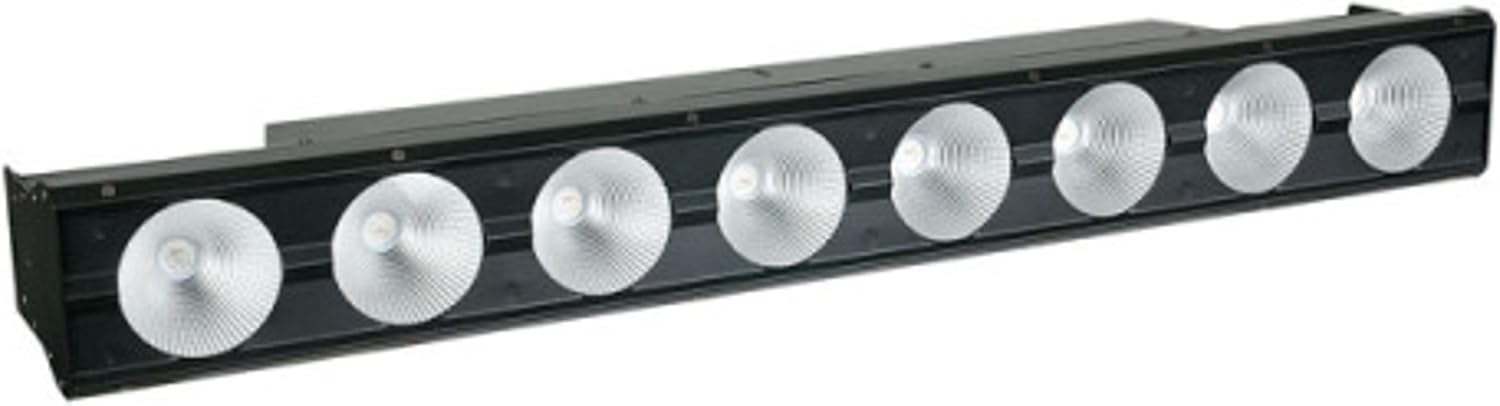
This image displays the front of the Showtec Pixel Bar 8 COB, featuring eight distinct COB LED modules. Each module is designed to produce high-intensity RGB light.
Rear View

The rear panel of the Pixel Bar 8 COB includes the LED display for menu navigation, control buttons, DMX input and output ports, and the power input connector. Ventilation grilles are also visible.
Side View

This image shows the side profile of the Pixel Bar, illustrating the robust, adjustable mounting bracket that allows for flexible positioning. The DMX and power connections are also visible from this angle.
Setup
Mounting
The Pixel Bar 8 COB comes with integrated mounting brackets. Securely attach the fixture to a truss, stand, or other stable structure using appropriate clamps (not included). Ensure the mounting point can support the weight of the fixture (2.8 kg) and any additional accessories.
Power Connection
Connect the supplied power cable to the power input on the rear of the unit and then to a grounded electrical outlet (100-240 VAC, 50/60 Hz). Ensure the power source matches the device's requirements.
DMX Connection
For DMX control, connect a DMX cable from your DMX controller's output to the DMX IN port on the Pixel Bar. If linking multiple units, connect from the DMX OUT of the first unit to the DMX IN of the next, and so on. Terminate the last unit in the chain with a DMX terminator.
Operating Instructions
Control Modes
The Pixel Bar 8 COB supports several operational modes:
- DMX-512 Mode: Allows external control via a DMX controller. Set the DMX address using the onboard LED display.
- Stand Alone Mode: The unit operates independently, running pre-programmed shows or static colors.
- Master/Slave Mode: Link multiple units where one acts as the master, controlling the others (slaves).
- Music Timing Mode: The unit reacts to sound via its built-in microphone.
DMX Channel Modes
The device offers various DMX channel configurations to suit different control needs:
| Mode | Channels | Description |
|---|---|---|
| 2CH | Dimmer, Strobe | Basic intensity and flash control. |
| 3CH | Red, Green, Blue | Individual color control for the entire bar. |
| 5CH | Red, Green, Blue, Dimmer, Strobe | Full color and effect control for the entire bar. |
| 6CH | (Specific functions, e.g., built-in programs) | Provides access to internal programs and modes. |
| 12CH | (More detailed control, e.g., pixel groups) | Offers more granular control, potentially over pixel groups. |
| 24CH | Individual Pixel Control (8 x RGB) | Enables individual control of Red, Green, and Blue for each of the 8 COB pixels. |
Menu Navigation
The LED display on the rear panel allows for easy navigation through the device's settings. Use the provided buttons (usually Menu, Up, Down, Enter) to select modes, set DMX addresses, adjust parameters, and access built-in programs.
Basic Operation
- Dimmer: Adjust the overall light intensity from 0% to 100%.
- Strobe: Control the flash rate from 0 Hz (no strobe) to 20 Hz (fastest strobe).
- Color Mixing: In DMX mode, control individual Red, Green, and Blue values to create 16.7 million color combinations.
Maintenance
Cleaning
Regularly clean the lenses and the exterior of the fixture with a soft, lint-free cloth. For stubborn dirt, use a mild glass cleaner applied to the cloth, not directly to the fixture. Ensure the device is powered off and disconnected before cleaning.
Storage
When not in use, store the Pixel Bar in a dry, dust-free environment, preferably in its original packaging or a suitable flight case to protect it from damage.
Troubleshooting
| Problem | Possible Cause | Solution |
|---|---|---|
| No Power | Power cable disconnected; no power from outlet; faulty fuse. | Check power cable connection; test outlet; check/replace fuse. |
| No DMX Control | Incorrect DMX address; faulty DMX cable; no DMX signal from controller; missing terminator. | Verify DMX address matches controller; test DMX cable; check controller output; add DMX terminator to last unit. |
| Lights Flicker | Unstable power supply; DMX signal interference. | Ensure stable power; check DMX cabling for interference; use DMX terminator. |
| Overheating | Blocked ventilation; operating in high ambient temperature. | Clear ventilation openings; ensure adequate airflow around the unit. |
Technical Specifications
| Feature | Detail |
|---|---|
| Light Source | 8 x 15 W COB RGB LEDs |
| Lux (@ 2 meters) | Red: 300 Lux, Green: 340 Lux, Blue: 410 Lux, Full: 1050 Lux |
| Max. Projection Distance | 15 meters |
| Color Range | 16.7 million colors |
| Current | 500 mA |
| Display | LED display |
| Control Modes | DMX-512, Auto, Master/Slave, Music Timing |
| DMX Channels | 2, 3, 5, 6, 12, 24 CH |
| Dimmer | 0-100 % |
| Strobe | 0–20 Hz |
| Beam Angle | 60 degrees |
| Color | Black |
| Cooling | Twin cooling |
| Input Voltage | 100~240 VAC, 50/60 Hz |
| Power Consumption | 120 W |
| IP Protection Class | IP20 |
| Dimensions (L x W x H) | 703 mm x 120 mm x 130 mm |
| Weight | 2.8 kg |
| Refresh Rate | 7.8 KHz |
Warranty and Support
For warranty information, please refer to the warranty card included with your product or visit the official Showtec website. Keep your proof of purchase for any warranty claims.
For technical support, troubleshooting assistance, or spare parts, please contact your authorized Showtec dealer or the manufacturer's customer service department. Contact details can typically be found on the Showtec website or your purchase documentation.
Related documentsPixel Bar 8 COB (Model No. 129-41266)


Ask a question about this manual
Ask about setup, troubleshooting, compatibility, parts, safety, or missing instructions. Manuals+ will review the question and use this page’s manual context to help answer it.