
Introduction
The Bose SoundTouch SA-4 amplifier is designed to pair with your choice of speakers for streaming music. It provides wireless access to Internet radio, music services, and your music library. The system features proprietary signal processing for rich lows and includes a SoundTouch controller for convenient operation.

Image: Bose SoundTouch SA-4 Amplifier with its wireless adapter and circular controller.
Package Contents
Verify that all items are present in the package:
- SoundTouch SA-4 amplifier
- SoundTouch wireless adapter
- SoundTouch controller
- USB cable
- AC power cord

Image: All components included with the Bose SoundTouch SA-4 Amplifier, laid out for inspection.
Setup Instructions
1. Connecting Speakers
The SoundTouch SA-4 amplifier is designed for easy connection to your chosen speakers. Ensure speakers are compatible with the amplifier's impedance range (4-16 Ohms).
2. Power Connection
Connect the AC power cord to the amplifier and then to a power outlet. The amplifier is designed to enter sleep mode after 20 minutes of inactivity.
3. Wireless Adapter Setup
Connect the SoundTouch wireless adapter to the amplifier. This adapter enables wireless access to Internet radio, music services, and your music library.
4. SoundTouch Controller Pairing
The SoundTouch controller provides intuitive access to your music. Pair the controller with the system for immediate access to personalized presets and volume control. A wall-mounted cradle with an included bracket is available for convenient placement.
5. SoundTouch App Installation
Download and install the free SoundTouch app on your computer, smartphone, or tablet. Use the app to configure your system, drag and drop music sources to your six presets, and explore other music options from your library or online services. The app also allows you to play different music in different rooms if you have multiple SoundTouch systems.
6. Auxiliary and Ethernet Connections
An auxiliary port is available for connecting other audio sources, such as an MP3 player. An Ethernet port allows for easy connection to a home network via an Ethernet cable. A USB input is also provided for system setup via a computer.

Image: Rear view of the Bose SoundTouch SA-4 Amplifier, detailing connection ports.
Video: General overview of Bose Professional AudioPack installation. While not specific to the SA-4, it provides context for setting up Bose audio systems.
Operation
SoundTouch Controller
The SoundTouch controller allows for direct control of your music. Use it to adjust volume, skip or pause songs, and power the system on or off. Personalized presets provide one-touch access to your favorite music.
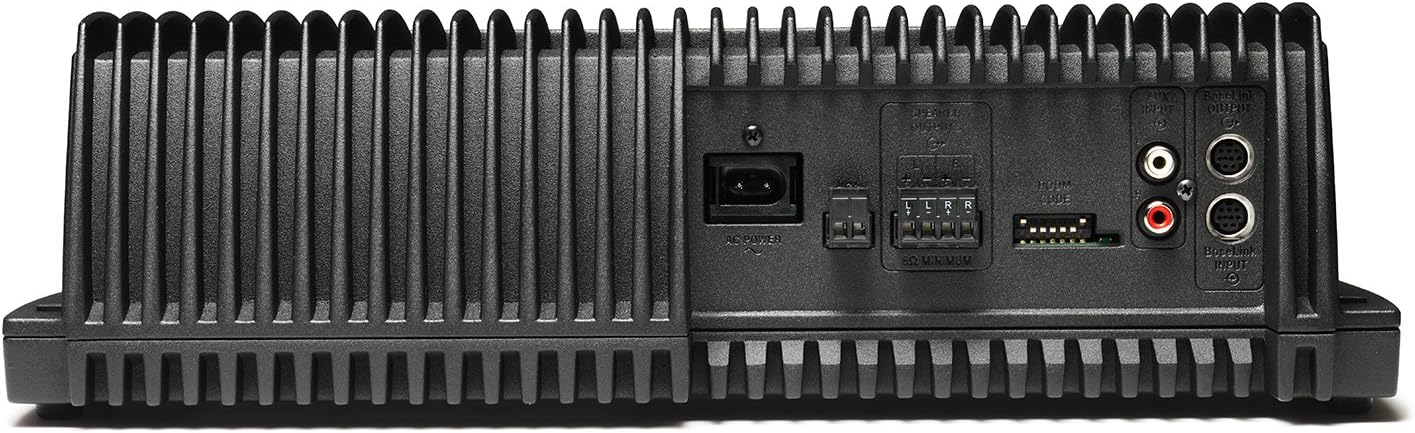
Image: Front view of the Bose SoundTouch SA-4 Amplifier and its controller.
SoundTouch App
The SoundTouch app offers comprehensive control over your system. Manage music sources, customize presets, and browse your music library or online services. For multi-room setups, the app enables playing the same music everywhere or different music in different rooms.
AirPlay Functionality
The amplifier supports AirPlay, allowing you to stream audio directly from compatible Apple devices.
Maintenance
To ensure optimal performance and longevity of your Bose SoundTouch SA-4 amplifier, keep the unit clean and free from dust. Use a soft, dry cloth for cleaning. Avoid exposing the amplifier to excessive moisture or extreme temperatures. Ensure proper ventilation to prevent overheating.
Troubleshooting
If you encounter issues with your SoundTouch SA-4 amplifier, consider the following general troubleshooting steps:
- No Power: Ensure the AC power cord is securely connected to both the amplifier and a working power outlet.
- No Sound: Verify that speakers are correctly connected to the amplifier. Check volume levels on both the amplifier and the SoundTouch controller/app. Ensure the correct input source is selected.
- Wireless Connectivity Issues: Confirm your Wi-Fi network is active and the SoundTouch wireless adapter is properly connected. Restart your router and the amplifier. For Bluetooth, ensure the device is in pairing mode and within range.
- Controller Not Responding: Check the batteries in the SoundTouch controller. Ensure it is within range of the amplifier.
- App Issues: Ensure the SoundTouch app is updated to the latest version. Restart the app or your device.
For more detailed troubleshooting or persistent issues, refer to the official Bose support resources or contact customer service.
Specifications
| Brand | Bose |
| Model Name | SoundTouch SA 4 |
| Item Model Number | 361755-1100 |
| Product Dimensions | 5.5"D x 14.25"W x 4.25"H |
| Item Weight | 11 Pounds |
| Connectivity Technology | Wi-Fi |
| Wireless Communication Technology | Wi-Fi |
| Audio Output Mode | Stereo |
| Control Method | App |
| Power Source | Corded Electric |
| Mounting Type | Floor Standing, Wall Mount |
| Special Feature | Bass Boost |
| Recommended Uses For Product | Music |
| Compatible Devices | MP3 Player |
| Color | Black |
| UPC | 017817598323 |
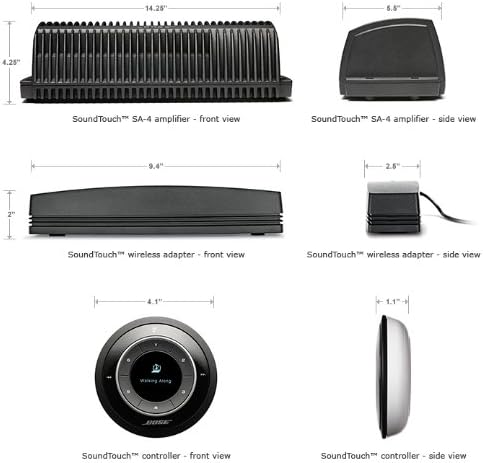
Image: Dimensions of the amplifier and accessories.
Warranty and Support
The Bose SoundTouch SA-4 amplifier comes with a limited warranty. For specific warranty details, please refer to the documentation included with your product or visit the official Bose website. For technical support, product registration, or service inquiries, please contact Bose customer support directly.
You can find additional resources and contact information on the Bose Store.


