
1. Product Overview
The PILOT Frixion Ball 2 Biz is an erasable multi-color ballpoint pen designed for professional use. It features a sophisticated matte metal body and a smooth rotary mechanism for selecting ink colors. The pen utilizes Frixion thermo-sensitive ink, which becomes transparent when friction heat is applied by the integrated eraser, allowing for clean corrections without leaving residue. This pen offers the convenience of writing and erasing repeatedly.

Image: The PILOT Frixion Ball 2 Biz pen, presented in its retail packaging.
2. Setup
The PILOT Frixion Ball 2 Biz pen is ready for immediate use upon removal from its packaging. No assembly is required.
2.1 Initial Inspection
Before first use, inspect the pen for any visible damage. Ensure the pen tip is free from any protective wax or cover. If present, gently remove it.
3. Operation
3.1 Selecting Ink Color
To select an ink color (black or red), twist the upper barrel of the pen. Rotate it clockwise or counter-clockwise until the desired color refill extends from the pen tip.
3.2 Writing
Once the desired ink color is extended, write as you would with any standard ballpoint pen. The Frixion ink provides a smooth writing experience.

Image: A hand demonstrating writing with the PILOT Frixion Ball 2 Biz pen.
3.3 Erasing
To erase, use the special rubber eraser located at the top of the pen, concealed under the cap. Rub the eraser firmly over the Frixion ink. The friction generates heat, causing the thermo-sensitive ink to become transparent. No eraser residue is produced.
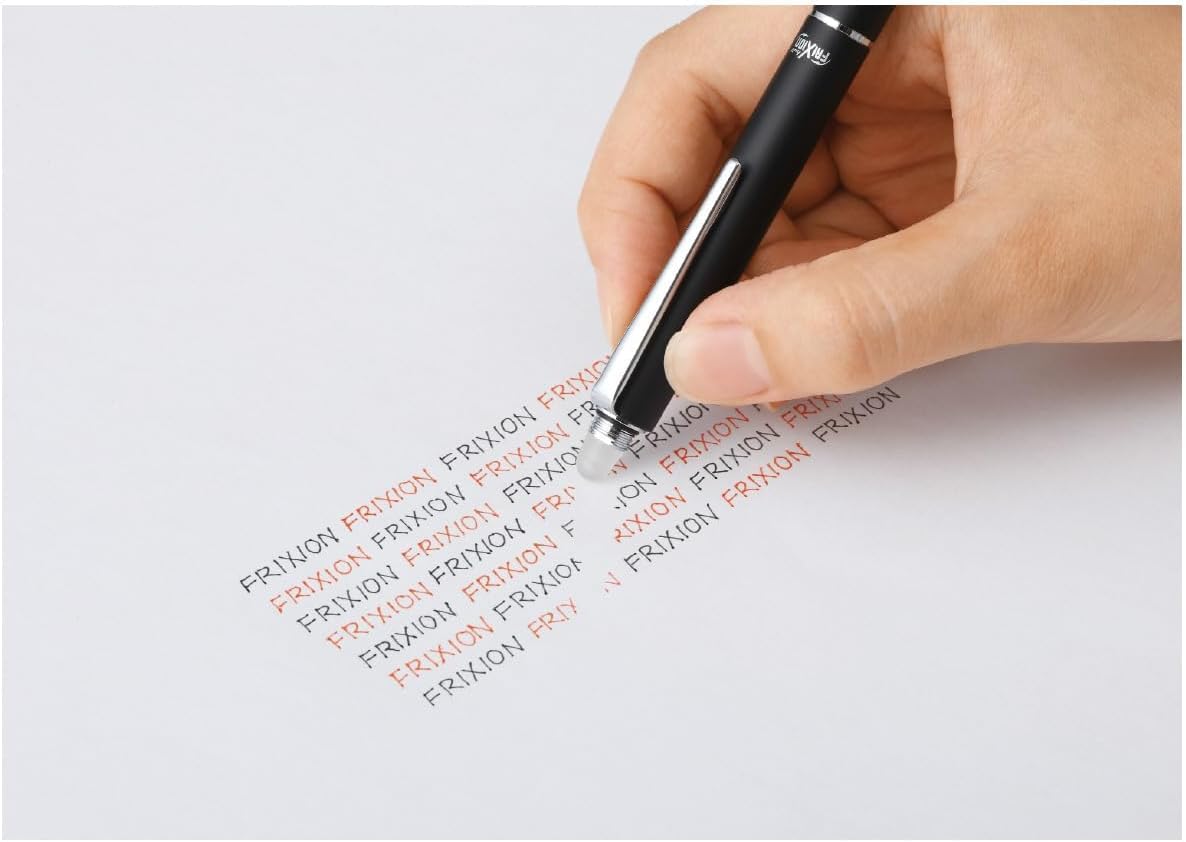
Image: A hand demonstrating erasing with the integrated eraser on the PILOT Frixion Ball 2 Biz pen.
3.4 Important Notes on Frixion Ink
- Frixion ink is thermo-sensitive. Ink may disappear if exposed to high temperatures (e.g., direct sunlight, car interiors, laminators).
- Ink may reappear if exposed to temperatures below -10°C (14°F).
- Do not use Frixion pens for signatures, legal documents, or examinations where permanent writing is required.
4. Maintenance
4.1 Refill Replacement
When an ink refill runs out, it can be replaced with a new PILOT Frixion Ball Slim refill (model LFBTRF30EF3 or similar compatible Frixion Ball Slim refills).
- Unscrew the pen body at the central joint to separate the upper and lower barrels.
- Carefully remove the empty refill from its housing.
- Insert the new refill, ensuring it is properly seated.
- Screw the pen body back together until secure.
4.2 Cleaning and Storage
- Wipe the pen body with a soft, dry cloth to remove dust or smudges. Avoid harsh chemicals.
- Store the pen at room temperature, away from direct sunlight or extreme heat, to prevent ink disappearance.
- Avoid storing in very cold environments, as this may cause erased ink to reappear.
5. Troubleshooting
| Problem | Possible Cause | Solution |
|---|---|---|
| Ink not flowing | Refill is empty or clogged. | Replace the refill. Gently tap the pen tip on a surface to dislodge any clogs. |
| Eraser not working effectively | Insufficient friction or ink exposed to extreme cold. | Rub more firmly. Ensure the pen and paper are at room temperature. |
| Erased ink reappears | Exposure to low temperatures (below -10°C / 14°F). | This is a characteristic of Frixion ink. Store the pen and written documents at room temperature. |
| Ink disappears while writing/storage | Exposure to high temperatures (above 60°C / 140°F). | Avoid leaving the pen or written documents in hot environments (e.g., direct sunlight, hot car). |
6. Specifications
| Brand | PILOT |
| Model Number | LFBT-3SUF-B |
| Ink Colors | Black, Red |
| Line Width | 0.38 mm (Note: Product title may indicate 0.5mm, but actual refill line width is 0.38mm) |
| Pen Type | Erasable Ballpoint Pen |
| Mechanism | Rotary |
| Material | Metal |
| Product Dimensions | 14.02 x 1.04 x 1.04 cm |
| Product Weight | 27.22 g |
| Included Accessories | Integrated Eraser |

Image: Dimensions of the PILOT Frixion Ball 2 Biz pen.
7. Warranty and Support
Specific warranty information for the PILOT Frixion Ball 2 Biz pen is not provided in this manual. For warranty details, product support, or inquiries, please refer to the official PILOT website or contact your retailer.
You can visit the official PILOT store for more information: PILOT Official Store


