
1. Introduction
This manual provides comprehensive instructions for the installation, operation, and maintenance of your FRACARRO T8N 910306 Alarm Keypad. Please read this manual thoroughly before using the device to ensure proper functionality and safety.
The FRACARRO T8N 910306 is a sophisticated alarm system keypad designed for intuitive control and clear status indication. It features a 32-character LCD display and a compact design, compatible with standard flush-mounted boxes.
2. Product Overview
2.1 Key Features
- 32-character LCD display with blue backlight for clear visibility.
- Adjustable and timed backlight for both display and keys.
- Three status LEDs: Power, Arm/Disarm, and Alarm indication.
- Four freely configurable function keys with corresponding LEDs.
- Dedicated keys for exclusion and timing functions.
- Integrated and configurable buzzer for audible feedback.
- Two integrated Normally Closed (N.C.) inputs, dip-switch enabled.
- Protective flap for keypad keys.
- Compact design, compatible with standard 503 flush-mounted boxes.
- Anti-tear protection for enhanced security.
2.2 Keypad Components
The image below illustrates the main components of the FRACARRO T8N 910306 Alarm Keypad.
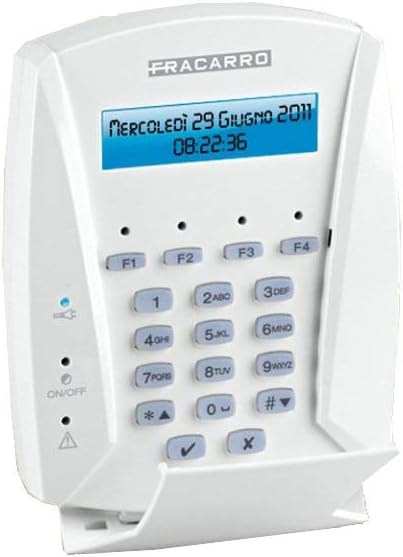
Figure 1: Front view of the FRACARRO T8N 910306 Alarm Keypad. It features a central LCD screen displaying date and time, a numeric keypad (0-9, *, #), four function keys (F1-F4) above the numeric pad, and status indicators (Power, ON/OFF, Alarm) on the left side. A protective flap covers the lower part of the keypad.
- LCD Display: Shows system status, date, time, and programming menus.
- Function Keys (F1-F4): Programmable keys for quick access to specific alarm functions.
- Numeric Keypad (0-9): Used for entering codes and navigating menus.
- Special Keys (*, #): Used for various system commands and navigation.
- Confirmation Key (✓): Used to confirm selections or entries.
- Cancel/Back Key (X): Used to cancel operations or go back in menus.
- Status LEDs:
- Blue LED: Indicates power status.
- Green LED (ON/OFF): Indicates arm/disarm status.
- Red LED (Triangle/Alarm): Indicates alarm activation or system fault.
- Protective Flap: Covers the lower part of the keypad for protection when not in use.
3. Setup and Installation
Proper installation is crucial for the reliable operation of your alarm keypad. It is recommended that installation be performed by a qualified technician.
3.1 Mounting
- The keypad is designed for wall mounting.
- It is compatible with standard 503 flush-mounted boxes for a clean installation.
- Ensure the mounting location is secure and provides easy access for daily use.
- Dimensions: Height 125 mm, Width 125 mm, Depth 30 mm.
3.2 Wiring
- Connect the keypad to the main alarm control panel according to the wiring diagram provided with your central unit.
- Utilize the two integrated Normally Closed (N.C.) inputs as required by your system configuration. These inputs can be enabled via dip-switches on the keypad's circuit board.
- Ensure all connections are secure and properly insulated.
3.3 Initial Power-Up
- After completing all wiring, apply power to the alarm system.
- The keypad display should illuminate, and the blue power LED should light up.
- Follow the instructions in your alarm central unit manual for initial system setup and keypad registration.
4. Operating Instructions
This section outlines the basic operations of the FRACARRO T8N 910306 Alarm Keypad.
4.1 Basic Operations (Arming/Disarming)
- To Arm the System: Enter your user code followed by the arming command (refer to your central unit manual for specific commands, often a function key or a specific numeric sequence). The green ON/OFF LED will indicate armed status.
- To Disarm the System: Enter your user code. The green ON/OFF LED will turn off, indicating disarmed status.
- The integrated buzzer will provide audible feedback for arming/disarming actions.
4.2 Display and Indicators
- The 32-character LCD display shows real-time system status, zone information, and any alerts or messages from the central unit.
- The display backlight and key backlight can be adjusted for brightness and timed to turn off after a period of inactivity to save energy.
- Power LED (Blue): Indicates the keypad is receiving power.
- Arm/Disarm LED (Green): Lit when the system is armed, off when disarmed.
- Alarm/Fault LED (Red): Lit when an alarm is active or a system fault is detected.
4.3 Function Keys (F1-F4)
The four function keys (F1, F2, F3, F4) are programmable and their specific actions depend on the configuration of your alarm central unit. Common uses include:
- Quick arming modes (e.g., Stay Arm, Away Arm).
- Panic or emergency functions.
- Activating specific outputs (e.g., lights, gates).
- Accessing system menus.
4.4 Programming
The FRACARRO T8N 910306 keypad is compatible with FRACARRO Defender central units (e.g., Defender 8, 24, 64). Programming of the keypad and the overall alarm system is typically done through the keypad interface, guided by the central unit's manual. This includes:
- Setting user codes.
- Configuring zones.
- Adjusting system settings.
- Managing function key assignments.
Refer to your specific FRACARRO Defender central unit manual for detailed programming instructions.
5. Maintenance
The FRACARRO T8N 910306 Alarm Keypad requires minimal maintenance to ensure its longevity and proper functioning.
5.1 Cleaning
- Use a soft, dry, or slightly damp cloth to clean the keypad surface and display.
- Do not use abrasive cleaners, solvents, or aerosol sprays, as these can damage the plastic and electronic components.
- Ensure no liquid enters the keypad housing.
5.2 System Checks
- Periodically check the status LEDs to ensure the keypad is powered and communicating correctly with the central unit.
- Test the arming and disarming functions regularly to confirm proper operation.
- If the keypad is part of a larger alarm system, follow the recommended maintenance schedule for the entire system.
6. Troubleshooting
This section provides solutions to common issues you might encounter with your FRACARRO T8N 910306 Alarm Keypad.
- Keypad Display is Blank:
- Check if the alarm central unit is powered on.
- Verify the wiring connections between the keypad and the central unit.
- Ensure the blue power LED on the keypad is lit. If not, there might be a power issue.
- Keypad Not Responding to Input:
- Ensure the keypad is properly connected to the central unit.
- Try restarting the central unit (power cycle) if safe to do so.
- Check for any system fault indicators on the display or red LED.
- Alarm LED (Red) is Lit Constantly:
- This indicates an active alarm or a system fault. Check the display for specific error messages.
- Consult your central unit manual for fault codes and their meanings.
- Disarm the system to clear the alarm, then investigate the cause.
- Buzzer Not Working:
- Check the central unit's programming to ensure the buzzer is enabled and configured correctly.
If you encounter issues not listed here or if troubleshooting steps do not resolve the problem, please contact FRACARRO customer support or a qualified alarm technician.
7. Technical Specifications
| Attribute | Detail |
|---|---|
| Brand | FRACARRO |
| Model | T8N 910306 |
| Display Type | 32-character LCD with blue backlight |
| Dimensions (H x W x D) | 125 mm x 125 mm x 30 mm |
| Mounting | Wall mount, compatible with 503 flush-mounted box |
| Inputs | 2 integrated N.C. inputs (dip-switch enabled) |
| Power Source | No internal batteries required (powered by central unit) |
| Compatibility | FRACARRO Defender central units (e.g., 8, 24, 64) |
| ASIN | B00F8OR32G |
| First Available Date | August 28, 2014 |
8. Warranty and Support
8.1 Warranty Information
For specific warranty terms and conditions, please refer to the documentation provided with your FRACARRO alarm central unit or contact FRACARRO directly. Warranty coverage typically applies to manufacturing defects and varies by region.
8.2 Customer Support
If you require technical assistance, have questions about your FRACARRO T8N 910306 Alarm Keypad, or need to report an issue, please contact FRACARRO customer support. Contact details can usually be found on the FRACARRO official website or in the packaging of your alarm system.
It is recommended to have your product model number (T8N 910306) and ASIN (B00F8OR32G) ready when contacting support.