
Introduction
The OREI eARC/ARC HDMI to Optical/Coaxial Audio Extractor (DA41) is designed to convert the audio signal from a TV's ARC/eARC HDMI source into simultaneous digital audio outputs via Toslink (optical) and coaxial connections. This device allows users to connect their TV's HDMI ARC port to the DA41's input and then connect their audio device (such as a soundbar, speaker, or amplifier) to either the coaxial or Toslink output for enhanced audio quality.

Image: The OREI DA41 Audio Extractor, highlighting its primary function.
This extractor is ideal for integrating newer TVs with older audio systems that may lack HDMI ARC/eARC inputs but support optical or coaxial digital audio. It supports PCM 5.1 / LPCM 2.0 Channel, Dolby 5.1, and DTS 5.1 audio standards. Please note that it does not support Dolby AC3/Dolby Digital Plus or higher formats, and volume cannot be controlled by the TV remote when using the coaxial or optical output.
Package Contents
Upon opening the package, you will find the following items:
- 1 x OREI DA41 eARC/ARC HDMI to Optical/Coaxial Audio Extractor
- 1 x Standard USB Power Cable (DC 5V)
- 1 x User Manual

Image: Visual representation of the items included in the OREI DA41 package. HDMI cables are not included.
Product Features
The OREI DA41 Audio Extractor offers a range of features designed for seamless audio integration:
- Toslink/SPDIF Output: Provides digital optical audio output.
- Coaxial Output: Offers digital coaxial audio output.
- ARC & eARC Connections: Supports both Audio Return Channel (ARC) and enhanced Audio Return Channel (eARC) for input.
- Plug and Play Operation: Simple to set up and use without complex configurations.
- 5.1ch / 2.1ch Support: Compatible with multi-channel audio systems.
- Dolby 5.1 & DTS 5.1 Support: Ensures compatibility with popular surround sound formats.
- PCM 5.1 / LPCM 2.0 Channel Support: Handles various uncompressed audio formats.
- Compact Size: Ultra-light and compact design (2 x 2 x 1 inches, 4.9 ounces) for easy placement.

Image: Diagram illustrating the product features and supported connections.
Setup and Installation
Follow these steps to set up your OREI DA41 Audio Extractor:
- Connect HDMI Input: Connect an HDMI cable from your TV's ARC/eARC HDMI port to the HDMI IN port on the DA41 extractor. Ensure you are using an HDMI 2.1 cable for eARC support.
- Connect Audio Output: Connect either a Toslink (optical) cable or a coaxial cable from the DA41's corresponding output port (TOSLINK or COAXIAL) to the digital audio input on your soundbar, speaker, or amplifier.
- Power On: Connect the provided USB power cable to the DC 5V input on the DA41 and plug the other end into a standard wall outlet or an available USB-A port on your media equipment. Slide the power switch on the side of the unit to the 'ON' position.
- Configure TV Audio Settings: Access your TV's audio settings and ensure the audio output is set to PCM or LPCM 2.0 Channel for optimal compatibility. Some TVs may require specific settings for ARC/eARC functionality.

Image: A visual guide to connecting the OREI DA41 between your TV and audio system.
Official Product Video: How to Use the HDMI to Analog Audio Converter
Video Description: This official video from OREI Direct provides a detailed walkthrough on how to connect and use the DA41 audio extractor with your existing home theater setup. It covers the unboxing, port identification, and step-by-step connection process.
Operating Instructions
Once properly connected, the OREI DA41 operates as a plug-and-play device. It automatically extracts the digital audio from the HDMI ARC/eARC signal and outputs it simultaneously through both the Toslink and coaxial ports.
- Audio Format: Ensure your TV's audio output is configured to PCM 5.1 / LPCM 2.0 Channel for the DA41 to process the audio correctly. If your TV is set to other formats like Dolby Digital Plus, the device may not function as expected.
- Volume Control: The DA41 does not support CEC (Consumer Electronics Control), meaning the volume cannot be controlled by your TV remote when using the coaxial or optical outputs. Volume adjustments must be made directly on your connected audio device (soundbar, amplifier, etc.).

Image: The OREI DA41, emphasizing its support for PCM 5.1 and LPCM 2.0 Channel audio.
Maintenance
To ensure the longevity and optimal performance of your OREI DA41 Audio Extractor, follow these simple maintenance guidelines:
- Keep the device in a cool, dry place away from direct sunlight and excessive heat.
- Avoid exposing the unit to moisture or liquids.
- Clean the device with a soft, dry cloth. Do not use harsh chemicals or abrasive cleaners.
- Ensure all cable connections are secure and free from dust or debris.
Troubleshooting
If you encounter issues with your OREI DA41, consider the following:
- No Audio Output:
- Ensure the power switch on the DA41 is in the 'ON' state and the blue LED indicator is lit.
- Verify that your TV's HDMI ARC/eARC port is correctly connected to the DA41's HDMI IN.
- Check your TV's audio settings to confirm the output format is set to PCM or LPCM 2.0 Channel. The DA41 will not work with Dolby AC3/Dolby Digital Plus or other unsupported formats.
- Confirm that your audio device (soundbar, amplifier) is correctly connected to either the Toslink or Coaxial output of the DA41 and is set to the correct input source.
- Try using a different HDMI 2.1 cable if you are experiencing issues with eARC support.
- Volume Control Issues: Remember that volume cannot be controlled by your TV remote when using the DA41's digital audio outputs. Adjust volume directly on your audio receiver or soundbar.
- Compatibility: If you encounter any setup issues and are uncertain about the device's compatibility with your specific equipment, please contact the manufacturer for verification and support.
Specifications
| Specification | Value |
|---|---|
| Product Dimensions | 2 x 2 x 1 inches |
| Item Weight | 4.9 ounces |
| Item Model Number | DA41 |
| Manufacturer | Orei Products |
| Input | HDMI ARC/eARC |
| Output | Toslink/SPDIF, Coaxial |
| Audio Support | PCM 5.1 / LPCM 2.0 Channel, Dolby 5.1, DTS 5.1 |
| Power Supply | DC 5V (via Micro USB) |
| UPC | 045635948068 |
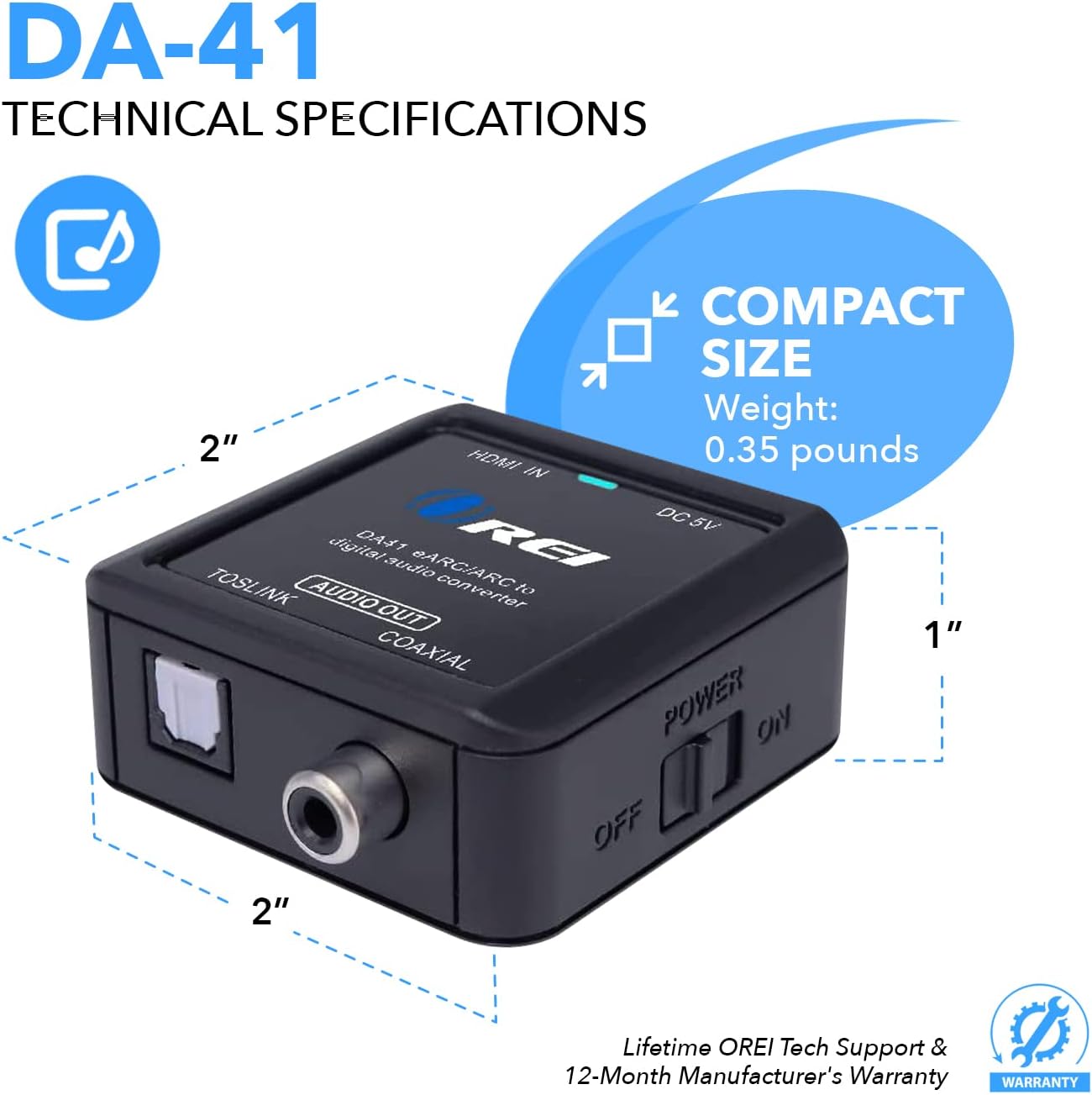
Image: Detailed technical specifications and compact dimensions of the OREI DA41.
Warranty and Support
The OREI DA41 Audio Extractor comes with a 1-Year Limited Warranty from the manufacturer. OREI is a leading AV and HDMI accessories brand in the US, providing residential and commercial solutions. They offer lifetime local technical support for their products.

Image: Information regarding OREI's experience, warranty, and US-based support.
For any inquiries, technical assistance, or warranty claims, please refer to the contact information provided in your user manual or visit the official OREI website.


