
1. Introduction
This manual provides essential information for the proper use, maintenance, and troubleshooting of the Fluke FLK-TI400 60HZ Industrial Thermal Infrared Camera. Please read this manual thoroughly before operating the device to ensure safety and optimal performance. The Fluke FLK-TI400 is designed for industrial applications, offering advanced thermal imaging capabilities with features like LaserSharp Auto Focus and IR-Fusion AutoBlend.
2. Safety Information
Always adhere to the following safety precautions to prevent injury and damage to the camera:
- Electrical Safety: Do not use the camera in environments where explosive gas, vapor, or dust is present. Ensure proper lockout/tagout procedures are followed when inspecting live electrical equipment.
- Temperature Limits: Do not expose the camera to temperatures outside its specified operating range (-20°C to +1200°C).
- Handling: Handle the camera with care. While designed for industrial use, dropping the device from significant heights may cause damage.
- Battery Safety: Use only Fluke-approved batteries and chargers. Do not disassemble, crush, heat above 60°C (140°F), or incinerate batteries.
- Lens Care: Avoid touching the infrared lens with bare hands. Clean only with approved lens cleaning materials.
3. Product Overview
The Fluke FLK-TI400 is a robust industrial thermal imager featuring a 320x240 resolution for clear thermal images. It incorporates advanced technologies to enhance diagnostic capabilities.
Key Features:
- LaserSharp Auto Focus: Utilizes a laser distance meter to calculate and display the distance to your target, providing precise focus.
- IR-Fusion AutoBlend: Blends visible light and infrared images to pinpoint problems faster and easier.
- Fluke Connect Wireless: Enables wireless communication for data transfer and remote viewing.
- High Thermal Sensitivity (NETD): Detects small temperature differences, crucial for identifying potential issues.
- Widescreen Full VGA Color LCD: Provides a clear and detailed display of thermal images.
- Intuitive Three-Button Menu: Simplifies navigation and operation.
Included Components:
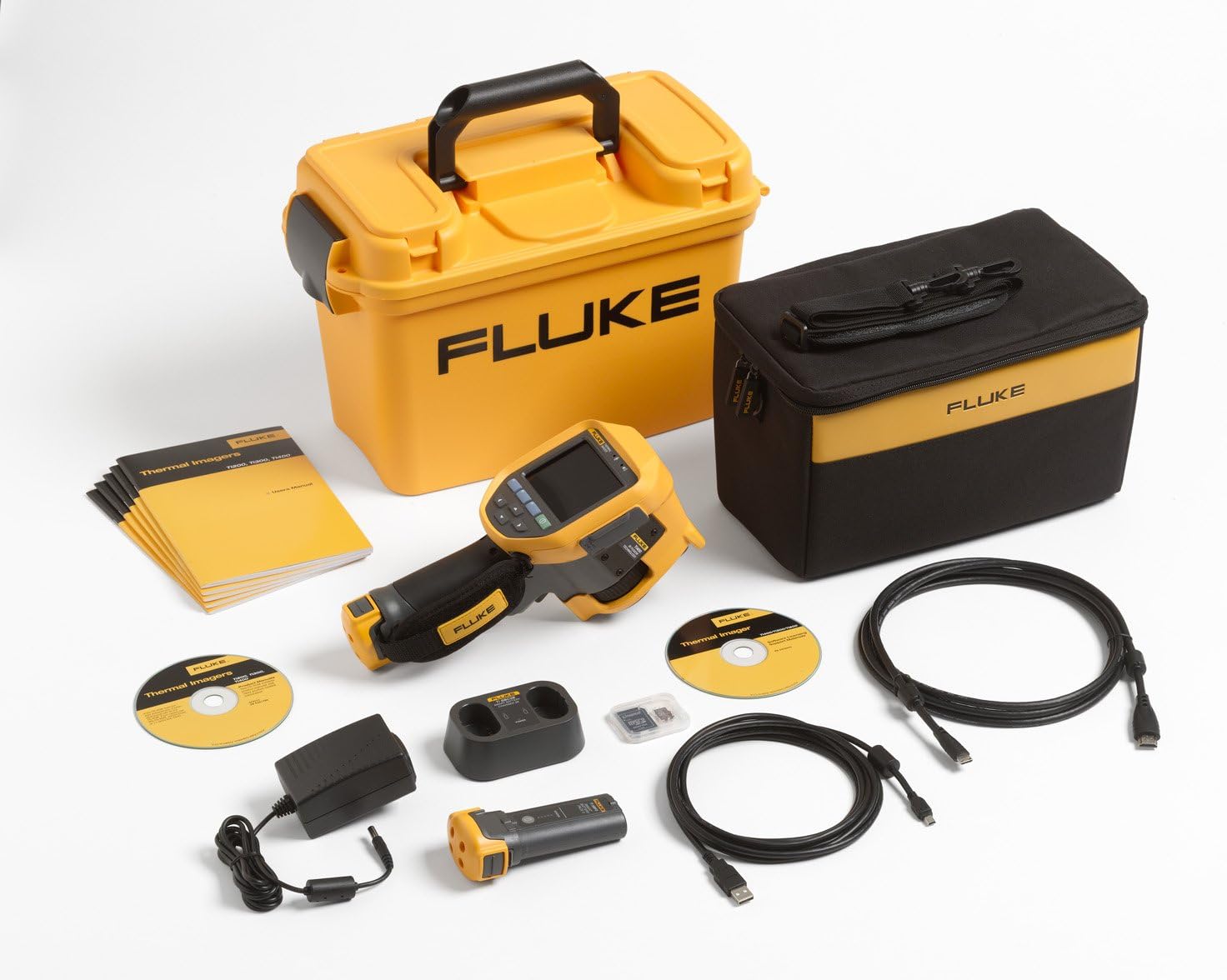
Figure 3.1: The Fluke FLK-TI400 Thermal Imager kit includes the camera, hard carrying case, soft transport bag, AC power adapter, battery charger, two smart lithium-ion batteries, USB cable, HDMI cable, SD memory card, and documentation.

Figure 3.2: Front view of the Fluke FLK-TI400 Thermal Imager, showing the display, control buttons, and ergonomic grip.

Figure 3.3: Side view of the Fluke FLK-TI400, illustrating the power input and battery compartment.
4. Setup
4.1 Battery Installation and Charging
- Ensure the camera is powered off.
- Open the battery compartment cover located on the side of the camera.
- Insert a fully charged Fluke smart lithium-ion battery, ensuring proper orientation.
- Close the battery compartment cover securely.
- To charge the battery, connect the AC power adapter to the camera or use the external battery charger provided. The charging indicator will illuminate.
4.2 Initial Power-On and Basic Settings
- Press and hold the power button (usually marked with ⓘ) until the Fluke logo appears on the screen.
- Upon first use, the camera may prompt you to set the language, date, and time. Use the navigation buttons to select your preferences.
- Adjust display brightness as needed for your environment.
5. Operating Instructions
5.1 Powering On/Off
- Power On: Press and hold the power button until the display activates.
- Power Off: Press and hold the power button until the shutdown prompt appears, then confirm.
5.2 Using LaserSharp Auto Focus
- Point the camera at the target object.
- Press the LaserSharp Auto Focus button (refer to camera diagram for location). The laser will project onto the target, and the camera will automatically adjust focus.
- The distance to the target will be displayed on the screen.
5.3 IR-Fusion AutoBlend
- Access the IR-Fusion menu option using the navigation buttons.
- Select 'AutoBlend' to combine the thermal and visible light images.
- Adjust the blend percentage to optimize the image for your inspection needs.
5.4 Capturing Images and Videos
- Frame your target on the display.
- Press the capture button (typically a trigger on the handle or a dedicated button) to save a thermal image.
- For video recording, select the video mode from the menu and then press the capture button to start/stop recording.

Figure 5.1: A technician using the Fluke FLK-TI400 to inspect an electrical panel, demonstrating typical operational use in an industrial setting.

Figure 5.2: Close-up of the Fluke FLK-TI400 in operation, showing the thermal display analyzing machinery components.
6. Maintenance
6.1 Cleaning the Camera
- Exterior: Use a soft, damp cloth with mild soap and water to clean the camera body. Do not use abrasive cleaners or solvents.
- Lens: Gently clean the infrared lens with a lens cleaning cloth and approved lens cleaning solution. Avoid excessive pressure.
- Display: Use a soft, lint-free cloth to clean the LCD screen.
6.2 Battery Care and Storage
- Store batteries in a cool, dry place when not in use.
- For long-term storage, charge batteries to approximately 50% capacity.
- Replace batteries when their capacity significantly diminishes.
6.3 Storage
Store the camera in its protective hard case when not in use to prevent damage from impacts, dust, and moisture.
7. Troubleshooting
This section addresses common issues you may encounter with your Fluke FLK-TI400.
| Problem | Possible Cause | Solution |
|---|---|---|
| Camera does not power on or boot up. | Low or depleted battery; software issue; hardware malfunction. | Ensure battery is fully charged and properly installed. Try a different charged battery. If issue persists, contact Fluke support. |
| Image is blurry or out of focus. | Incorrect focus setting; dirty lens. | Use LaserSharp Auto Focus. Manually adjust focus if needed. Clean the infrared lens. |
| Fluke Connect wireless connection fails. | Out of range; incorrect settings; interference. | Ensure camera and connected device are within range. Verify wireless settings on both devices. Reduce potential interference sources. |
| Rubber port covers do not stay closed. | Wear and tear; improper seating. | Ensure covers are pressed firmly into place. If covers are damaged or worn, contact Fluke for replacement parts to maintain environmental protection. |
If you encounter a problem not listed here or if the suggested solutions do not resolve the issue, please contact Fluke customer support.
8. Specifications
| Specification | Detail |
|---|---|
| Model | FLK-Ti400 60HZ |
| Resolution | 320x240 |
| Temperature Range | -20°C to +1200°C |
| Field of View | 24° x 17° |
| Minimum Focus Distance | 15 cm |
| Focus Mechanism | LaserSharp Auto Focus, Manual Focus |
| Image Blending | IR-Fusion AutoBlend |
| Connectivity | Fluke Connect Wireless |
| Display | Widescreen Full VGA Color LCD |
| Power Source | Battery Powered (Lithium-ion) |
| Item Weight | 6 pounds |
| Manufacturer | Fluke Corporation |
| UPC | 095969668620 |
9. Warranty and Support
Fluke products are built to the highest quality standards. For specific warranty terms and conditions applicable to your FLK-TI400, please refer to the warranty card included with your product or visit the official Fluke website. For technical assistance, service, or calibration, contact Fluke customer support through their official channels. Ensure you have your product model number and serial number available when contacting support.


