
Cross AT0679-2
Cross Tech1 Chrome Stylus User Manual
Brand: Cross | Model: AT0679-2
Introduction
This manual provides essential information for the proper use and maintenance of your Cross Tech1 Chrome Stylus. Designed for precision and compatibility, this stylus enhances your interaction with capacitive touch screen devices, offering a smooth and accurate experience for various tasks.
Product Overview

The Cross Tech1 Chrome Stylus, showcasing its sleek chrome finish and integrated lanyard loop.
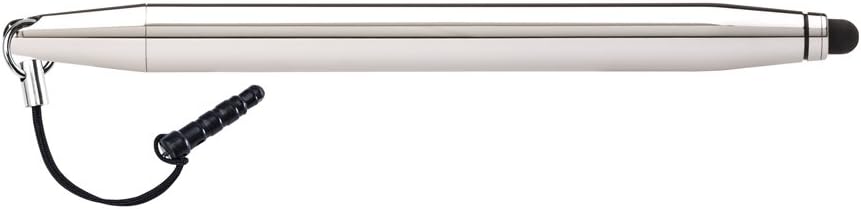
The Cross Tech1 Chrome Stylus, illustrating the attached lanyard for secure carrying and preventing loss.
Key Features
- Narrow 6mm precision stylus
- Compatible with most capacitive touch screen devices
- Offers greater accuracy for writing, line and detail work especially for use on smart phones
- Smooth glide across the screen, Improves touch and typing accuracy
- Avoids, grease and finger prints on the screen
Setup
The Cross Tech1 Chrome Stylus requires no complex setup or battery installation. It is ready for use directly out of the packaging.
- Unpack the stylus from its protective packaging.
- If desired, attach the included lanyard to the stylus for secure handling or attachment to your device.
- Ensure your capacitive touch screen device (smartphone, tablet, etc.) is clean and free of debris for optimal performance.
Operating Instructions
The Cross Tech1 Chrome Stylus is designed for intuitive use with capacitive touch screens.
- Hold the stylus comfortably as you would a pen.
- Gently touch the rubber tip of the stylus to the screen of your device to interact. Apply light pressure; excessive force is not required and may damage the tip.
- Use the stylus for precise navigation, drawing, writing, and selecting items on your screen.
- For best results, keep the screen of your device clean.
Maintenance and Care
- To clean the stylus body, wipe with a soft, dry cloth. Do not use abrasive cleaners or solvents.
- The rubber tip should be kept clean. If it accumulates dust or debris, gently wipe it with a slightly damp, lint-free cloth. Ensure the tip is dry before use.
- Avoid exposing the stylus to extreme temperatures or direct sunlight for prolonged periods.
- Store the stylus in a protective case or a safe place when not in use to prevent damage to the tip.
Troubleshooting
| Problem | Solution |
|---|---|
| Stylus not responding on screen | Ensure the screen is clean. The stylus is designed for capacitive touch screens; verify your device's compatibility. Apply gentle, consistent pressure. |
| Tip appears worn or damaged | The stylus tip is designed for durability but can wear over time with heavy use. Replacement tips are generally not available for this model. Consider replacing the stylus if performance significantly degrades. |
| Stylus leaves marks on screen | This is unlikely with proper use. Ensure your screen is clean and free of any residue. The stylus tip itself should not leave marks. |
Product Specifications
| Attribute | Value |
|---|---|
| Manufacturer | Cross |
| Brand | Cross |
| Item Weight | 0.512 ounces |
| Product Dimensions | 4.79 x 0.39 x 4.79 inches |
| Item model number | AT0679-2 |
| Color | Chrome |
| Material Type | chrome |
| Number of Items | 1 |
| Manufacturer Part Number | AT0679-2 |
| Compatible Devices | Tablet |
Warranty and Support
Cross products are manufactured to high standards and are backed by a limited warranty. For specific warranty details and support inquiries, please refer to the official Cross website or contact their customer service directly.
For further assistance, visit the official Cross Store: Cross Official Store
Ask a question about this manual
Ask about setup, troubleshooting, compatibility, parts, safety, or missing instructions. Manuals+ will review the question and use this page’s manual context to help answer it.