
1. Overview
The PAC LP7-2 L.O.C. PRO Series 2-Channel Line Output Converter is designed to integrate aftermarket amplifiers with factory (OEM) car audio systems. It optimizes audio levels between the radio and amplifier to achieve the best audio performance and minimize noise. This unit features a full 20-20k +/-1.5dB frequency response, unique stereo gain controls, and a universal harness for versatile installation.
Key Features:
- PRO Series 2-Channel High Power Line Output Converter
- Optimizes audio levels between radio and amplifier for superior sound quality
- Ideal for adding an amplifier to an OEM system
- Configurable for speaker level or RCA level input/output
- Single dial, precision-matched stereo gain adjustment
- Signal-sensing circuit for amplifier remote turn-on

2. Safety Information
WARNING: This product contains chemicals known to the State of California to cause cancer and birth defects or other reproductive harm. For more information, please visit www.p65warnings.ca.gov.
Always ensure proper electrical connections and insulation to prevent short circuits or damage to vehicle electronics. Disconnect the vehicle's battery before installation. Consult a professional if you are unsure about any installation steps.
3. What's in the Box
Upon opening the package, verify that all components are present:
- PAC LP7-2 Line Output Converter unit
- Wiring Harness
- Instruction Manual (this document)

4. Setup and Installation
Careful installation is crucial for optimal performance. Follow these steps for proper setup:
4.1. Wiring Connections
The LP7-2 connects to your factory speaker wires and provides RCA outputs for your amplifier, along with a remote turn-on lead.
- Input Wires: Connect the high-level input wires from your factory radio's speaker outputs to the corresponding inputs on the LP7-2 harness. Ensure correct polarity (positive to positive, negative to negative).
- Ground: Connect the chassis ground wire (black) to a solid metal point on the vehicle's chassis. An optional audio ground output (brown) is available.
- 12V Constant: Connect the 12V constant wire (yellow) to a constant 12V power source.
- Remote Turn-On: The LP7-2 features a signal-sensing remote turn-on. The blue wire provides a 12V remote output (500mA max) to turn on your amplifier when an audio signal is detected.
- RCA Outputs: Connect the RCA cables from the LP7-2's output jacks to the input jacks on your aftermarket amplifier.


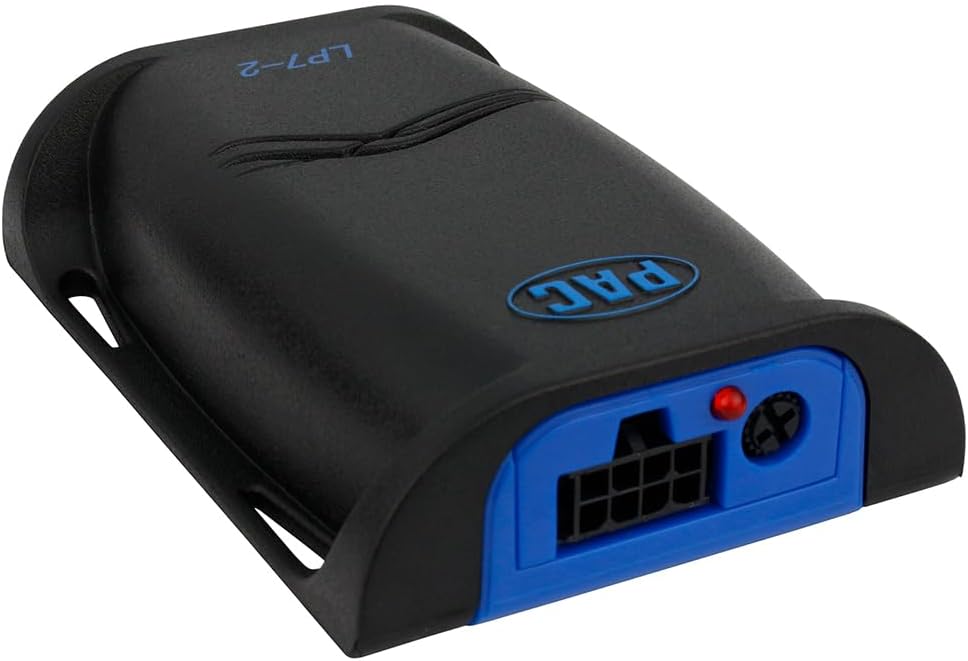
4.2. Gain Adjustment
The LP7-2 features a single dial for precision-matched stereo gain adjustment. This control allows you to match the output level of the converter to the input sensitivity of your amplifier.
- Start with the gain control on the LP7-2 set to its minimum position.
- Turn your amplifier's gain control to its minimum setting.
- Play a dynamic piece of music through your system at a moderate volume level.
- Slowly increase the gain on the LP7-2 until the desired output level is achieved without distortion.
- Fine-tune the amplifier's gain control if necessary, ensuring no audible distortion at high volumes.
5. Operation
Once properly installed and configured, the PAC LP7-2 operates automatically. When your factory radio is turned on and produces an audio signal, the LP7-2 will detect this signal and activate its remote turn-on output, signaling your amplifier to power on. When the audio signal ceases (e.g., when the radio is turned off), the LP7-2 will deactivate the remote turn-on, causing the amplifier to power off.
The gain adjustment, as described in Section 4.2, is a one-time setup process to ensure optimal audio level matching between your factory radio and aftermarket amplifier.
6. Maintenance
The PAC LP7-2 is designed for reliable, maintenance-free operation. To ensure longevity and consistent performance:
- Ensure the unit is installed in a dry location, away from excessive heat, moisture, and direct sunlight.
- Periodically check all wiring connections for tightness and corrosion. Loose connections can lead to signal degradation or intermittent operation.
- Keep the unit free from dust and debris. A soft, dry cloth can be used for cleaning the exterior.
7. Troubleshooting
If you encounter issues with your PAC LP7-2, refer to the following common problems and solutions:
| Problem | Possible Cause | Solution |
|---|---|---|
| No sound from amplifier/subwoofer |
|
|
| Distortion or poor sound quality |
|
|
| Amplifier does not turn on/off with radio |
|
|
| Hissing or buzzing noise |
|
|
8. Specifications
| Feature | Specification |
|---|---|
| Model | LP7-2 |
| Brand | PAC |
| Number of Channels | 2 |
| Interface Type | RCA |
| Mounting Type | Surface Mount |
| Product Dimensions (L x W x H) | 8" x 4" x 1.25" (approximate) |
| Item Weight | 4 ounces (approximate) |
| Remote Turn-On Output | 12V (500mA max) |
| Frequency Response | 20-20k +/-1.5dB |

9. Warranty Information
For detailed warranty information regarding the PAC LP7-2, please refer to the official warranty document provided with your product or visit the manufacturer's website. Warranty terms and conditions may vary.
10. Support and Contact Information
If you require further assistance or have questions not covered in this manual, please contact PAC customer support:
- Manufacturer: AAMP of America (PAC)
- Address: Pacific Accessory Corporation®, Santa Ana, California 92705
- Phone: 866-931-8021
- Email: support@pac-audio.com
- Website: www.pac-audio.com


