
1. Introduction
This instruction manual provides essential information for the proper installation, operation, and maintenance of your Omnipure Q5405 Sediment Water Filter. The Q5405 is a 5-micron sediment filter designed to remove dirt, sand, and sediment from your water supply. It features an optional Twist Tap in-head valve system, which automatically shuts off water flow when the filter body is disconnected from the head. This filter is suitable for various applications, including ice makers, refrigerators, beverage equipment, drinking fountains, under-sink systems, and reverse osmosis systems.
2. Safety Information
- Always turn off the main water supply before installing or replacing the filter.
- Ensure all connections are secure to prevent leaks.
- Do not use with water that is microbiologically unsafe or of unknown quality without adequate disinfection before or after the system.
- Do not exceed the maximum pressure of 125 PSIG or maximum temperature of 100°F (38°C).
- Keep the filter away from direct sunlight and freezing temperatures.
3. Product Overview
The Omnipure Q5405 is a compact, high-performance sediment filter. Its design allows for easy replacement when used with a compatible Q-Series filter head.
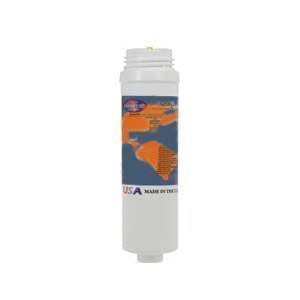
Image 1: Omnipure Q5405 Sediment Water Filter. This image shows the cylindrical filter cartridge, approximately 8 inches in length and 2.5 inches in diameter, with the Omnipure branding visible.
The filter body is constructed from polypropylene, providing effective depth filtration for sediment removal.
4. Installation Instructions
The Q5405 filter is a replacement cartridge designed for use with an existing Omnipure Q-Series filter head. Ensure you have the correct Q-Series head with 1/4" Quick-Connect, 1/4" NPT female, or 3/8" NPT female threads.
4.1. Preparing for Installation
- Locate the existing Q-Series filter head.
- Turn off the main water supply to the filtration system.
- Relieve any pressure in the system by opening a nearby faucet.
4.2. Filter Replacement
- Grasp the old filter cartridge and twist it counter-clockwise approximately a quarter turn until it disengages from the filter head. The Twist Tap valve system will automatically shut off the water.
- Remove the old filter cartridge.
- Remove the protective cap from the new Omnipure Q5405 filter.
- Align the new filter cartridge with the filter head. Insert the filter into the head and twist clockwise approximately a quarter turn until it locks securely into place. You should feel a positive stop.
- Slowly turn on the main water supply.
- Check for any leaks around the filter head connection. If leaks occur, ensure the filter is fully seated and twisted into place.
- Flush the new filter by running water through it for approximately 5 minutes to remove any carbon fines or air.
5. Operating Principles
Once installed, the Omnipure Q5405 filter operates passively, filtering water as it flows through the system. The 5-micron polypropylene depth filtration media effectively traps suspended particles such as dirt, sand, and rust, improving water clarity and protecting downstream equipment. The Twist Tap valve system ensures that water flow is automatically stopped when the filter is removed, simplifying replacement without needing to turn off the main water supply to the entire system (though it is still recommended for safety during installation).
6. Maintenance and Replacement
Regular replacement of your Omnipure Q5405 filter is crucial for maintaining optimal water quality and system performance.
6.1. Filter Service Life
The recommended service life for the Omnipure Q5405 filter is 1 year or 3000 gallons, whichever comes first. Actual service life may vary depending on local water conditions and usage.
6.2. Replacement Procedure
Follow the steps outlined in the Installation Instructions (Section 4) to replace the filter cartridge. It is advisable to mark the replacement date on the new filter or a nearby surface for future reference.
7. Troubleshooting
| Problem | Possible Cause | Solution |
|---|---|---|
| Low water flow | Clogged filter cartridge (end of service life) | Replace the filter cartridge. |
| Low water flow | Air trapped in the system | Flush the filter by running water for several minutes until air is purged. |
| Water leaks at filter head | Filter not properly seated or twisted into head | Ensure the filter is fully inserted and twisted clockwise until it locks. |
| Water leaks at filter head | Damaged O-rings in filter head (less common for Q-Series) | Contact Omnipure customer support or a qualified plumber. |
8. Specifications
| Model | Q5405 |
| Filter Type | Sediment Filter |
| Micron Rating | 5 Micron |
| Dimensions (Approx.) | 2.5" D x 2.5" W x 8" H |
| Flow Rate | 0.5 GPM (Gallons Per Minute) |
| Maximum Pressure | 125 PSIG |
| Maximum Temperature | 100°F (38°C) |
| Service Life | 1 Year or 3000 Gallons |
| Material | Polypropylene (PP) |
| Fitting Compatibility | Q-Series heads with 1/4" Quick-Connect, 1/4" NPT female, or 3/8" NPT female threads |
9. Warranty Information
Omnipure filters are manufactured to high-quality standards. For specific warranty details, please refer to the official Omnipure website or contact their customer support. Keep your proof of purchase for any warranty claims.
10. Customer Support
If you have any questions regarding the installation, operation, or maintenance of your Omnipure Q5405 filter, please contact Omnipure customer support. You can typically find contact information on the product packaging or the official Omnipure website.
Please note: This manual is for informational purposes only and does not replace professional plumbing advice.