
1. Introduction
This instruction manual provides essential information for the proper installation, operation, and maintenance of the York S1-33109150002 Simplicity Control Kit. This component is an original equipment manufacturer (OEM) replacement part designed for specific York HVAC systems. Adhering to these instructions will help ensure safe and efficient performance of your HVAC unit.
2. Safety Information
WARNING: Improper installation, adjustment, alteration, service, or maintenance can cause property damage, injury, or death. Read these instructions thoroughly before installing or servicing this equipment.
- Always disconnect power to the HVAC unit before installing, servicing, or removing the control kit. Failure to do so can result in electrical shock or damage to the equipment.
- Installation and service should only be performed by a qualified HVAC technician.
- Wear appropriate personal protective equipment (PPE), such as safety glasses and gloves, during installation and maintenance.
- Ensure all wiring connections are secure and comply with local and national electrical codes.
- This control kit is an electronic component. Handle with care to avoid damage from static electricity.
3. Product Description and Components
The York S1-33109150002 Simplicity Control Kit is a critical electronic control board designed to manage various functions within a compatible York HVAC system. It is an original replacement part, ensuring compatibility and optimal performance with your existing unit. York is renowned for its innovation and quality in the HVAC industry, and this OEM part upholds those standards for safety, reliability, and performance.

Figure 1: Top view of the York S1-33109150002 Simplicity Control Kit, showing various relays, capacitors, and terminal blocks.

Figure 2: Angled view of the control kit, highlighting the various connection points and integrated circuits.
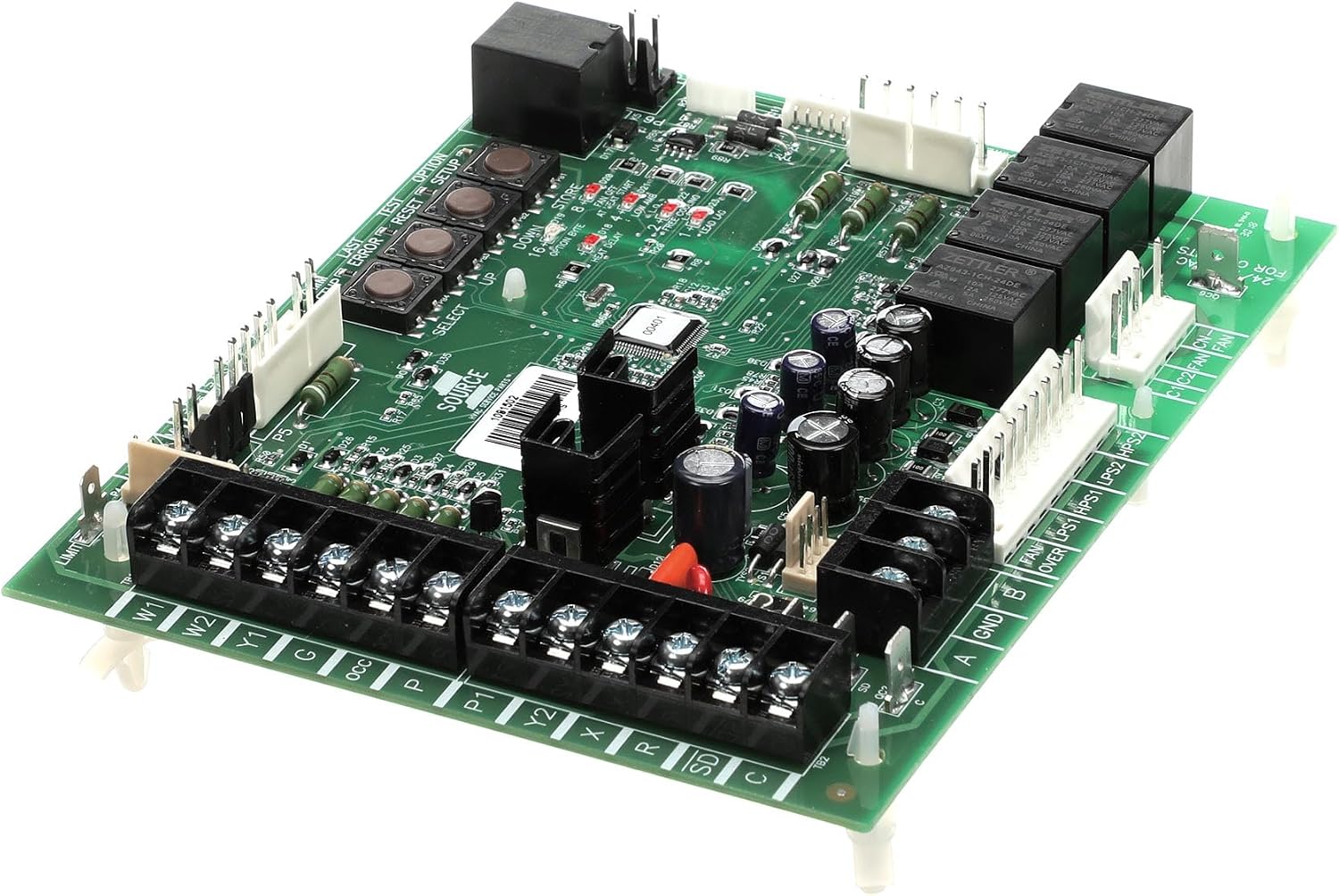
Figure 3: A different angled perspective of the control kit, showing the layout of components and mounting points.
4. Setup and Installation
Installation of the York S1-33109150002 Simplicity Control Kit should only be performed by a qualified HVAC service technician. Refer to the specific service manual for your HVAC unit for detailed wiring diagrams and installation procedures. The following are general steps:
- Power Disconnection: Ensure all electrical power to the HVAC unit is completely disconnected at the main breaker or fuse box before beginning any work. Verify with a voltage meter.
- Access Control Panel: Open the access panel of your HVAC unit to locate the existing control board.
- Document Connections: Before disconnecting any wires, take clear photographs or make detailed diagrams of all existing wiring connections to the old control board. Label each wire if necessary.
- Remove Old Board: Carefully disconnect all wires and mounting screws/clips securing the old control board. Remove the old board.
- Install New Board: Position the new York S1-33109150002 control kit in the same location as the old board. Secure it using the appropriate mounting hardware.
- Connect Wiring: Reconnect all wires to the new control board according to your documented diagrams and photographs. Double-check each connection for accuracy and tightness.
- Close Access Panel: Once all connections are verified, close and secure the HVAC unit's access panel.
- Restore Power and Test: Restore power to the HVAC unit. Perform functional tests as outlined in your unit's service manual to ensure the new control kit is operating correctly.
5. Operating Instructions
The York S1-33109150002 Simplicity Control Kit operates automatically once installed and configured within the HVAC system. Its primary function is to interpret signals from the thermostat and other sensors to control the various components of the HVAC unit, such as the fan, compressor, and heating elements, to maintain desired indoor temperatures.
- System Start-up: After installation and power restoration, the control kit will typically perform a self-diagnostic check.
- Thermostat Control: The control kit responds to commands from the connected thermostat. Ensure your thermostat is set to the desired mode (Heat, Cool, Auto) and temperature.
- Indicator Lights: Some control boards may feature LED indicator lights that provide status or diagnostic information. Refer to your specific HVAC unit's service manual for the interpretation of these lights.
For detailed operational sequences and specific settings, consult the comprehensive service manual for the complete HVAC system in which this control kit is installed.
6. Maintenance
The York S1-33109150002 Simplicity Control Kit is designed for reliable, long-term operation with minimal maintenance. However, periodic inspection by a qualified technician can help ensure its longevity and proper function.
- Annual Inspection: During routine HVAC system maintenance, have a technician inspect the control board for any signs of wear, corrosion, or loose connections.
- Cleanliness: Ensure the area around the control board is free from dust, debris, and moisture, which can interfere with electronic components.
- Wiring Integrity: Verify that all wiring connections remain tight and free from damage.
Do not attempt to repair the control board yourself. If a malfunction is suspected, contact a qualified HVAC service technician for diagnosis and replacement if necessary.
7. Troubleshooting
If your HVAC system is not functioning correctly after the installation of the York S1-33109150002 Simplicity Control Kit, consider the following general troubleshooting steps. Always ensure power is disconnected before inspecting internal components.
- No Power: Check the main circuit breaker or fuse for the HVAC unit. Ensure it is in the "ON" position. Verify power supply to the control board.
- Incorrect Wiring: Double-check all wiring connections against the diagrams taken during removal of the old board. A single miswired connection can prevent proper operation.
- Thermostat Issues: Ensure the thermostat is correctly set and functioning. Test with a known good thermostat if possible.
- Error Codes: Some HVAC units display error codes on the thermostat or via LED flashes on the control board. Consult your HVAC unit's service manual for specific error code interpretations.
- Component Failure: If the control board is receiving power and all connections are correct, but the system still fails to operate, other components of the HVAC system may be at fault, or the control board itself may be defective.
For complex issues or if you are unsure about any step, contact a qualified HVAC service technician.
8. Specifications
| Feature | Specification |
|---|---|
| Brand | York |
| Model Number | S1-33109150002 |
| Part Number | S1-33109150002 |
| Included Components | Replacement Part (Control Kit) |
| Item Package Quantity | 1 |
| Batteries Required | No |
| Product Dimensions (L x W x H) | 20.32 x 22.86 x 22.86 cm (8 x 9 x 9 inches) |
| Item Weight | 0.28 g |
| ASIN | B00EZHKVRG |
| First Available Date | April 2, 2015 |
9. Warranty and Support
As an original OEM replacement part, the York S1-33109150002 Simplicity Control Kit is manufactured to high standards of quality and reliability. Using genuine OEM parts is crucial for maintaining the safety, reliability, and performance of your HVAC system.
For specific warranty information regarding this component, please refer to the warranty documentation provided with your complete York HVAC system or contact York customer support directly. For technical support or assistance with installation and troubleshooting, it is recommended to contact a certified HVAC professional or the official York support channels.
You can typically find support contact information on the official York website or within your HVAC unit's main documentation.