
Fujifilm 16405575
Fujinon XF 23mm F1.4 R Lens User Manual
Model: 16405575
1. Introduction
The FUJINON XF23mm F1.4 R lens is designed for Fujifilm X-Mount cameras, offering a focal length equivalent to a 35mm lens on a full-frame camera. It is suitable for a wide range of photographic applications, including portraits, landscapes, and general everyday photography. Its fast maximum aperture of F/1.4 allows for excellent low-light performance and the creation of beautiful background blur (bokeh).
Key Features:
- 35mm equivalent F1.4 lens, fully compatible with FUJIFILM X-Mount.
- Focus range: Normal - 0.6m - ∞, Macro: 28cm - ∞. Max. magnification: 0.1x.
- Seven round-edged aperture blades, offering 22 stops in 1/3 EV steps for smooth bokeh.
- Lens elements treated with Fujifilm’s multilayer HT-EBC (High Transmittance Electron Beam Coating) for enhanced durability and even light spread.
- Internal focusing system with a lens group consisting of three cemented lens elements and one aspheric lens element.
- Built-in high-torque DC coreless motor for ultra-fast autofocus performance.

2. Setup and Installation
This section provides general guidance for attaching and preparing your Fujinon XF 23mm F1.4 R lens for use. For detailed camera-specific instructions, please refer to your camera's user manual.
Attaching the Lens:
- Ensure both the camera and lens are powered off.
- Remove the rear lens cap from the Fujinon XF 23mm F1.4 R lens and the body cap from your Fujifilm X-Mount camera.
- Align the white mounting mark on the lens barrel with the white mounting mark on the camera body.
- Insert the lens into the camera's lens mount and rotate it clockwise until it clicks securely into place. Do not force the lens.
- Attach the front lens cap when the lens is not in use to protect the front element.
Firmware Updates:
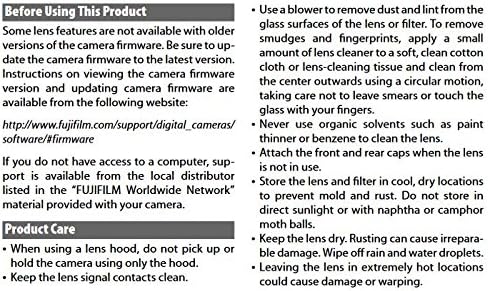
Some lens features may not be available with older versions of camera firmware. Ensure your camera firmware is updated to the latest version for optimal performance and compatibility. Instructions on viewing and updating camera firmware are available from the official Fujifilm website:
http://www.fujifilm.com/support/digital_cameras/software/#firmware

3. Operating the Lens
The Fujinon XF 23mm F1.4 R lens offers both autofocus and manual focus capabilities, along with an aperture ring for direct control over depth of field.
Focusing:
- Autofocus: When the camera is set to autofocus mode, the lens will automatically adjust focus. The built-in high-torque DC coreless motor ensures fast and precise autofocus performance.
- Manual Focus: To engage manual focusing, pull the focus ring towards the camera body. This will reveal distance markings on the barrel. Rotate the focus ring to adjust focus manually. This feature is particularly useful for pre-focusing on fast-moving subjects or minimizing shutter lag.
- Depth-of-Field Scale: The lens barrel includes a depth-of-field scale, which can assist in understanding the range of acceptable sharpness at different apertures and focus distances.
Aperture Control:
The lens features a dedicated aperture ring, allowing for direct and tactile control over the lens's aperture. The seven round-edged aperture blades contribute to smooth and pleasing bokeh, even when shooting at medium apertures.
Video Overview of Fujinon Lens Manufacturing:
For an insight into the precision and craftsmanship involved in producing Fujinon lenses, including the XF series, watch the official manufacturing process video below. This video demonstrates the polishing, coating, lens barrel processing, assembling, measuring, and engraving stages.
4. Maintenance and Care
Proper care and maintenance will ensure the longevity and optimal performance of your Fujinon XF 23mm F1.4 R lens.
- When using a lens hood, do not pick up or hold the camera using only the hood.
- Keep the lens signal contacts clean.
- Use a blower to remove dust and lint from the glass surfaces of the lens or filter.
- To remove smudges and fingerprints, apply a small amount of lens cleaner to a soft, clean cotton cloth or lens-cleaning tissue and clean from the center outwards using a circular motion, taking care not to leave smears or touch the glass with your fingers.
- Never use organic solvents such as paint thinner or benzene to clean the lens.
- Attach the front and rear caps when the lens is not in use.
- Store the lens and filter in cool, dry locations to prevent mold and rust. Do not store in direct sunlight or with naphtha or camphor moth balls.
- Keep the lens dry. Rusting can cause irreparable damage. Wipe off rain and water droplets immediately.
- Leaving the lens in extremely hot locations could cause damage or warping.
5. Troubleshooting
This section addresses common issues you might encounter with your Fujinon XF 23mm F1.4 R lens. If you experience problems not listed here, or if the suggested solutions do not resolve the issue, please contact Fujifilm customer support.
Common Issues:
- Lens not recognized by camera: Ensure the lens is securely attached to the camera body. Check for any debris on the lens or camera contacts and clean them carefully. Verify that your camera's firmware is up to date.
- Autofocus is slow or inaccurate: Ensure there is sufficient light for the autofocus system. Check that the lens is clean and free from smudges. If using manual focus, ensure the focus ring is properly engaged.
- Image quality issues (e.g., blur, distortion): Confirm that the lens elements are clean. Ensure proper focus technique is being used. For optimal image quality, ensure camera settings (e.g., aperture, shutter speed) are appropriate for the shooting conditions.
6. Specifications
| Feature | Detail |
|---|---|
| Product Dimensions | 2.48 x 2.83 x 2.83 inches |
| Item Weight | 10.6 ounces |
| ASIN | B00EZ8BEXK |
| Item Model Number | 16405575 |
| Brand | Fujifilm |
| Focal Length Description | 23mm (35mm Equivalent Focal Length: 35mm) |
| Lens Type | Wide Angle |
| Compatible Mountings | Fujifilm X |
| Camera Lens Description | 23 millimetres |
| Date First Available | September 5, 2013 |

7. Warranty Information
The Fujinon XF 23mm F1.4 R lens includes a U.S.A. Warranty. For specific terms, conditions, and duration of your warranty, please refer to the warranty card included in the product packaging or visit the official Fujifilm support website.
It is recommended to retain your proof of purchase for warranty claims.
8. Support and Contact
For further assistance, technical support, or to download the full user manual in PDF format, please visit the official Fujifilm support resources:
- Official User Manual (PDF): Download PDF
- Fujifilm Support Website: Visit Fujifilm Store on Amazon (for general product information and brand store)
- Firmware Updates & Software: Fujifilm Software & Firmware Support
If you do not have access to a computer, support may be available from the local distributor listed in the "FUJIFILM Worldwide Network" material provided with your camera.
Related documents16405575


Ask a question about this manual
Ask about setup, troubleshooting, compatibility, parts, safety, or missing instructions. Manuals+ will review the question and use this page’s manual context to help answer it.