
1. Introduction
This manual provides essential information for the safe and efficient use of your UPBRIGHT 30V AC/DC Adapter. This power supply is designed to be compatible with various Bose Lifestyle Media Centers, including models such as DCS91, DCS101, DCS104, Lifestyle AV 18, 28, 35, 38, 48, LS18, LS28, LS35, LS38, LS48, V10, V20, V30, VS2, V2, and MC1. It features a wide input voltage range (100-240VAC) for global use and includes built-in safety protections.
Please read these instructions carefully before using the product to ensure proper function and longevity.
2. Product Overview

Image 1: The UPBRIGHT 30V AC Adapter showing the main unit and the barrel connector tip. This adapter is designed for various Bose Lifestyle Media Centers.
The UPBRIGHT AC Adapter is a switching mode power supply designed to convert AC wall power to the specific DC voltage required by compatible Bose devices. It features a barrel round plug tip for connection.
- Input Voltage: 100-240VAC, 50/60Hz (Worldwide compatible)
- Output Voltage: 30V - 33V DC
- Output Current: 1.1A
- Safety Features: Over Voltage Protection (OVP), Over Current Protection (OCP), Short Circuit Protection (SCP)
3. Setup Instructions
- Verify Compatibility: Before connecting, ensure your device requires a 30V to 33V DC input with a barrel round plug tip. This adapter is NOT compatible with 12V devices or the Bose AV35 Control Console.
- Connect to Device: Insert the barrel connector tip of the adapter cable firmly into the DC input port of your Bose Lifestyle Media Center.
- Connect to Power Outlet: Plug the AC adapter into a standard wall power outlet (100-240VAC).
- Power On: Once connected, your device should receive power. Refer to your device's manual for specific power-on procedures.
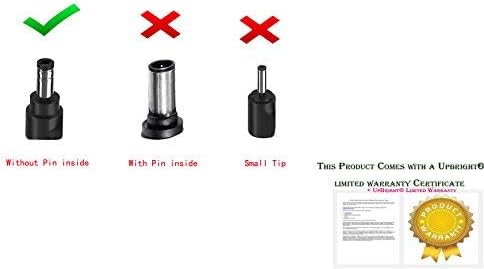
Image 2: Visual guide illustrating the correct barrel connector type (without pin inside) for compatibility with this adapter. Ensure your device's port matches this type.
4. Operating Instructions
The UPBRIGHT AC Adapter operates automatically once connected to a power source and a compatible device. It provides a stable power supply within its specified voltage and current range.
- Ensure the adapter is placed in a well-ventilated area to prevent overheating.
- Do not cover the adapter during operation.
- If the device does not power on, check all connections and ensure the wall outlet is functional.
5. Maintenance and Care
- Cleaning: Disconnect the adapter from the power outlet and the device before cleaning. Use a dry, soft cloth to wipe the surface. Do not use liquid cleaners or sprays.
- Storage: When not in use, store the adapter in a cool, dry place, away from direct sunlight and moisture. Avoid tightly coiling the cable to prevent damage.
- Handling: Do not drop, disassemble, or attempt to repair the adapter. This can void the warranty and pose a safety risk.
- Environmental Conditions: Avoid exposing the adapter to extreme temperatures, humidity, or corrosive environments.
6. Troubleshooting
| Problem | Possible Cause | Solution |
|---|---|---|
| Device does not power on. |
|
|
| Adapter feels hot. |
|
|
7. Specifications
| Feature | Detail |
|---|---|
| Brand | UPBRIGHT |
| Input Voltage | 100-240VAC, 50/60Hz |
| Output Voltage | 30V - 33V DC |
| Output Current | 1.1 Amps |
| Output Wattage | 33 Watts |
| Connector Type | Barrel Connector (Round Plug Tip) |
| Safety Compliance | CE, RoHS (CECCCROHS) |
| Item Weight | 0.23 Kilograms |
| Item Dimensions | Approximately 4 x 2 x 2 inches (Compact rectangular shape) |
8. Warranty and Support
UPBRIGHT products are designed for reliability and performance. This adapter comes with the following warranty:
- Refund Policy: 30 Days Refund
- Exchange Policy: 24 Months Exchange
For warranty claims, technical assistance, or any product-related inquiries, please contact UPBRIGHT customer support through your retailer or the official UPBRIGHT website. Please have your purchase details and product model information ready when contacting support.

Image 3: Example of the UPBRIGHT Limited Warranty Certificate, indicating product assurance.
