
Legrand 412790
Legrand 412790 Programmable Time Switch
User Manual
Introduction
This manual provides comprehensive instructions for the installation, operation, and maintenance of the Legrand 412790 Programmable Time Switch. This device is designed for precise control of electrical circuits based on a programmed time schedule.
Key features include:
- Programmed via captive segments for easy time setting.
- Operates on a 230 V~ - 50/60 Hz power supply.
- Features a 3-position override switch ("ON-AUTO-OFF") on the front panel for manual control.
- Includes a manual changeover function for summer/winter time adjustments.
- Equipped with 1 outlet, rated 16 A - 250 V~ - µ cos = 1.
- Offers a 100-hour working reserve, ensuring timekeeping during power outages.
Safety Information
Important: Always disconnect power before installing or servicing the device. Installation should be performed by a qualified electrician in accordance with local electrical codes and regulations. Failure to follow these instructions may result in electric shock, fire, or serious injury.
- Do not expose the device to moisture or extreme temperatures.
- Ensure proper grounding.
- Verify the power supply voltage matches the device's specifications (230 V~ - 50/60 Hz).
Setup and Installation
The Legrand 412790 time switch is designed for DIN rail mounting within an electrical enclosure.
- Mounting: Securely clip the time switch onto a standard DIN rail inside your electrical panel.
- Wiring:
- Connect the incoming live (L) and neutral (N) wires to the designated terminals on the top of the device.
- Connect the load (e.g., lighting circuit) to the output terminals (1 and 4) at the bottom of the device. Refer to the wiring diagram printed on the device for precise connections.
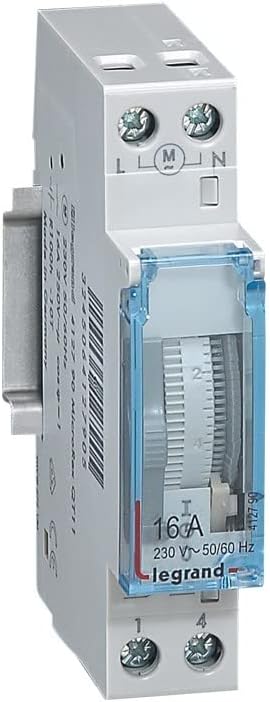
Image: Side view of the Legrand 412790 Programmable Time Switch, highlighting the wiring terminals for live (L), neutral (N), and load connections (1, 4).
- Power On: Once all connections are secure and verified, restore power to the circuit.

Image: Front view of the Legrand 412790 Programmable Time Switch, showing the vertical dial and the 16A output rating.
Operating Instructions
- Setting Current Time: Rotate the central dial until the current time aligns with the indicator mark.
- Programming ON/OFF Times:
- The dial is surrounded by small, captive segments. Each segment typically represents a specific time interval (e.g., 15 minutes).
- To set an "ON" period, push the corresponding segments outwards.
- To set an "OFF" period, leave the corresponding segments pushed inwards.
- The time switch will activate the circuit when the dial reaches an "ON" segment and deactivate it when it reaches an "OFF" segment.
- Using the Override Switch: The 3-position switch on the front panel allows for manual control:
- ON: Forces the circuit to remain continuously ON, overriding the programmed schedule.
- AUTO: The circuit operates according to the programmed schedule. This is the standard operating mode.
- OFF: Forces the circuit to remain continuously OFF, overriding the programmed schedule.
- Summer/Winter Time Changeover: If applicable, manually adjust the current time setting on the dial by one hour forward or backward as required for daylight saving changes.
- Power Reserve: The integrated 100-hour working reserve ensures that the time switch maintains accurate timekeeping for up to 100 hours during power interruptions. No manual reset of the time is typically required after short power outages.
Maintenance
The Legrand 412790 Programmable Time Switch requires minimal maintenance.
- Cleaning: Use a soft, dry cloth to clean the exterior of the device. Do not use abrasive cleaners or solvents. Ensure power is disconnected before cleaning.
- Inspection: Periodically inspect the wiring connections to ensure they remain secure.
- Battery Backup: The device features a 100-hour working reserve. This internal mechanism maintains time during power outages and does not require user intervention or battery replacement.
Troubleshooting
| Problem | Possible Cause | Solution |
|---|---|---|
| Device does not power on or operate. | No power supply; incorrect wiring; faulty device. | Check circuit breaker. Verify wiring connections (L, N, Load). Consult a qualified electrician if the issue persists. |
| Programmed schedule is not followed. | Override switch is not in "AUTO" position; incorrect programming of segments; current time not set correctly. | Ensure the override switch is set to "AUTO". Re-check that segments are pushed out for "ON" times and in for "OFF" times. Verify the current time is accurately set on the dial. |
| Difficulty reading the current time on the dial. | Dial position or lighting conditions. | Ensure adequate lighting. Observe the dial from a direct angle to clearly see the time indicator. |
| Time switch loses time after power outage. | Power outage exceeded 100-hour reserve. | Manually reset the current time on the dial. The 100-hour reserve should cover most typical outages. |
Specifications

Image: Legrand 412790 Programmable Time Switch with indicated dimensions: Length 9.7 cm, Width 8.9 cm, Height 2.1 cm.
| Attribute | Value |
|---|---|
| Model Number | 412790 |
| Manufacturer | Legrand |
| Power Supply | 230 V~ - 50/60 Hz |
| Output | 1 outlet 16 A - 250 V~ - µ cos = 1 |
| Working Reserve | 100 hours |
| Dimensions (L x W x H) | 9.7 x 8.9 x 2.1 cm |
| Weight | 0.09 Kilograms (90 g) |
| Material | Polyamide-imide |
| Colour | Grey |
Warranty and Support
This Legrand product is manufactured to high quality standards. For specific warranty terms and conditions, please refer to the documentation provided with your purchase or visit the official Legrand website.
For technical support, installation queries, or troubleshooting assistance beyond the scope of this manual, please contact Legrand customer service or a certified electrician.
Note: Always ensure that any work on electrical installations is carried out by qualified personnel.
Related documents412790


Ask a question about this manual
Ask about setup, troubleshooting, compatibility, parts, safety, or missing instructions. Manuals+ will review the question and use this page’s manual context to help answer it.