1. Product Overview
This manual provides detailed instructions for the installation, operation, and maintenance of the Legrand Sound Speaker Basic, Model 351000. This device is an audio door speaker module designed for 2-wire sound systems, specifically for use with BUS technology intercom systems.
The module supports up to 4 control buttons and is intended for undercover mounting.
2. Setup and Installation
Proper installation is crucial for optimal performance and safety. It is recommended that installation be performed by a qualified technician.
2.1 Components
- Legrand Sound Speaker Basic Module (Model 351000)
- Mounting hardware (not included, refer to system requirements)
- 2-wire BUS system cabling
2.2 Mounting
The module is designed for undercover mounting. Ensure the mounting location is secure and provides adequate space for wiring connections.
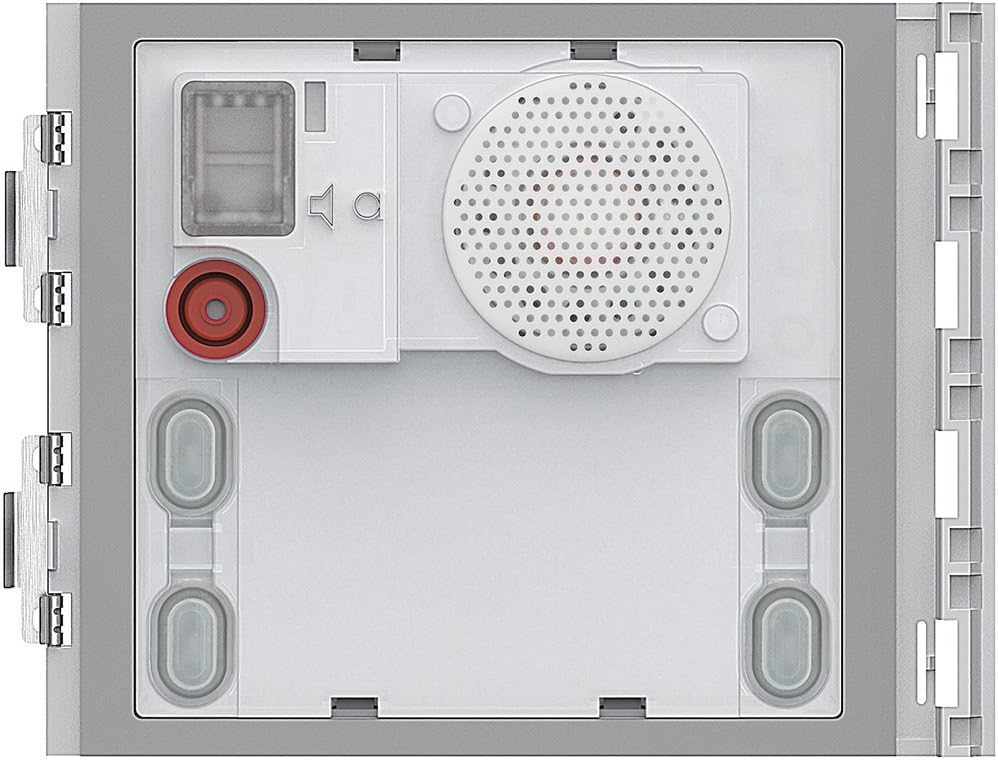
Figure 1: Front view of the Legrand 351000 Audio Door Speaker Module. This image displays the speaker grille, microphone, and connection points for control buttons, indicating the internal layout for installation.
2.3 Wiring Connections
- Power Disconnection: Before making any connections, ensure that the power to the BUS system is completely disconnected to prevent electrical shock.
- BUS Connection: Connect the 2-wire BUS system cables to the designated terminals on the speaker module. Refer to the BUS system's main unit manual for specific wiring diagrams.
- Button Connections: If using external control buttons (e.g., for door release or additional functions), connect them to the appropriate terminals on the module. The module supports up to 4 buttons.
- Secure Connections: Ensure all wire connections are secure and properly insulated.
After all connections are made, restore power to the BUS system.
3. Operating Instructions
The Legrand 351000 module functions as an audio interface within a 2-wire BUS intercom system. Its operation is primarily controlled by the main intercom unit and associated call buttons.
3.1 Basic Functionality
- Audio Communication: When a call is initiated from an indoor unit or a visitor presses a call button connected to this module, two-way audio communication is established.
- Sound Output: The integrated speaker provides clear audio output from the indoor unit.
- Microphone Input: The integrated microphone captures audio from the visitor's side.
3.2 Call Buttons
If external call buttons are connected, pressing a button will initiate a call to the corresponding indoor unit(s) as configured in the BUS system.
4. Maintenance
The Legrand 351000 module requires minimal maintenance to ensure long-term performance.
4.1 Cleaning
- Gently wipe the exterior surfaces with a soft, dry cloth.
- Do not use abrasive cleaners, solvents, or harsh chemicals, as these can damage the finish or internal components.
- Avoid spraying liquids directly onto the module.
4.2 Inspection
Periodically inspect the module for any visible damage or loose connections. If any issues are found, consult a qualified technician.
5. Troubleshooting
This section addresses common issues that may arise during the use of the Legrand 351000 module.
| Problem | Possible Cause | Solution |
|---|---|---|
| No audio from speaker | Loose wiring connection; Faulty speaker; System power issue. | Check all wiring connections. Verify system power. If problem persists, contact support. |
| Microphone not picking up sound | Obstructed microphone; Loose wiring connection; Faulty microphone. | Ensure microphone is clear. Check wiring. If problem persists, contact support. |
| Call buttons not responding | Incorrect wiring of buttons; Faulty buttons; System configuration issue. | Verify button wiring. Test buttons. Check BUS system configuration. |
| Intermittent operation | Unstable power supply; Loose BUS connection; Environmental interference. | Ensure stable power. Secure BUS connections. Consult system manual for interference mitigation. |
For issues not listed here or if troubleshooting steps do not resolve the problem, please contact Legrand customer support or a qualified service technician.
6. Technical Specifications
- Model: Legrand 351000
- Product Type: Audio Door Speaker Module
- System Compatibility: 2-wire BUS technology
- Control Buttons Supported: Up to 4
- Mounting Type: Undercover / Wall mount
- Product Dimensions: 11.5 x 9.1 x 2.2 cm (approximately 4.53 x 3.58 x 0.87 inches)
- Item Weight: 10 g (0.01 Kilograms)
- Speaker Maximum Output Power: 80 Watts
- Speaker Size: 6.5 Inches

Figure 2: Dimensional drawing of the Legrand 351000 module, showing a width of 115 mm and a height of 91 mm. This provides precise measurements for installation planning.
7. Warranty and Support
For warranty information, technical support, or service inquiries, please refer to the official Legrand website or contact your local Legrand distributor. Keep your purchase receipt as proof of purchase.