Introduction
This instruction manual provides essential information for the installation, operation, maintenance, and troubleshooting of your GROHE 64510000 Control Unit. Please read this manual thoroughly before installation and use to ensure proper function and longevity of the product. Keep this manual for future reference.
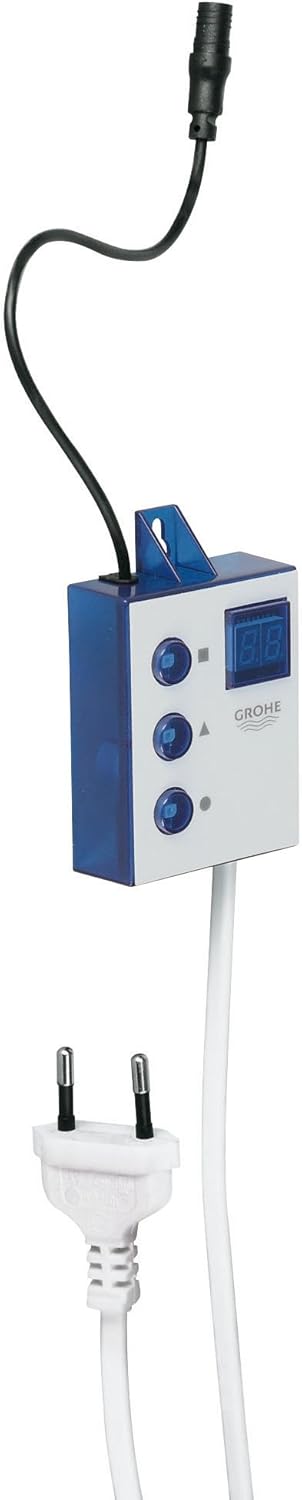
Figure 1: GROHE 64510000 Control Unit. This image shows the control unit with its attached power cable and a separate connector cable, highlighting its compact design and connectivity.
Safety Information
Always observe the following safety precautions:
- Ensure all electrical connections are made by a qualified electrician and comply with local regulations.
- Disconnect power before performing any installation, maintenance, or repair work.
- Do not expose the control unit to extreme temperatures or direct moisture unless specified for such conditions.
- Use only original GROHE replacement parts to maintain product integrity and warranty.
Package Contents
Verify that all components are present before beginning installation:
- GROHE 64510000 Control Unit
- Instruction Manual (this document)
- Associated cables for connection (as supplied)
Setup and Installation
The GROHE 64510000 Control Unit is designed for integration with compatible GROHE systems, specifically mentioned as "Caja eléctrica para 33249000".
- Preparation: Ensure the main power supply to the installation area is turned off at the circuit breaker.
- Mounting: Secure the control unit in a suitable, dry location, away from direct water spray or excessive heat. Use appropriate fasteners for the mounting surface.
- Electrical Connection: Connect the power cable of the control unit to a compatible power source. Ensure the voltage and frequency match the unit's requirements.
- System Integration: Connect the control unit to the GROHE system (e.g., 33249000) using the provided connector cable. Ensure a secure and firm connection.
- Final Check: Double-check all connections for security and correctness before restoring power.

Figure 2: Installation Diagram. This diagram illustrates the physical connections of the GROHE 64510000 Control Unit, showing the power plug and the system connector cable.
Operating Instructions
Once installed and powered, the GROHE 64510000 Control Unit operates in conjunction with the connected GROHE system. Specific operational details will depend on the primary device it controls.
- Power On: After restoring power, the unit's display (if present) should illuminate, indicating it is active.
- Functionality: The three buttons on the unit typically control specific functions of the connected GROHE system. Refer to the manual of the primary GROHE device (e.g., 33249000) for detailed button assignments and operational modes.
- Display: The digital display provides feedback on the current status or settings, as determined by the primary system.
Maintenance
The GROHE 64510000 Control Unit is designed for durability and robustness, requiring minimal maintenance.
- Cleaning: Clean the exterior of the unit with a soft, damp cloth. Do not use abrasive cleaners, solvents, or harsh chemicals, as these can damage the surface.
- Inspection: Periodically inspect the cables and connections for any signs of wear or damage. If damage is found, disconnect power and contact a qualified technician for repair or replacement.
- No User-Serviceable Parts: The internal components of the control unit are not user-serviceable. Do not attempt to open or repair the unit yourself, as this will void the warranty and may pose a safety risk.
Troubleshooting
If you encounter issues with your GROHE 64510000 Control Unit, refer to the following common problems and solutions:
| Problem | Possible Cause | Solution |
|---|---|---|
| Unit does not power on. | No power supply; loose connection; faulty power outlet. | Check power supply to the outlet. Ensure power cable is securely connected. Test the outlet with another device. Check circuit breaker. |
| Unit display is blank or flickering. | Intermittent power; internal fault. | Ensure stable power supply. If problem persists, contact GROHE customer support. |
| Connected system is not responding. | Loose connection to primary system; primary system fault. | Verify the connector cable between the control unit and the primary GROHE system is secure. Refer to the primary system's manual for troubleshooting. |
If the problem persists after attempting these solutions, please contact GROHE customer support.
Specifications
| Feature | Detail |
|---|---|
| Brand | GROHE |
| Model Number | 64510000 |
| Part Number | 64510000 |
| Item Weight | 8.6 ounces |
| Product Dimensions | 8.27 x 2.95 x 1.97 inches |
| Color | Silver |
| Item Package Quantity | 1 |
| Certification | CE |
| Included Components | GROHE 64510000 - Caja eléctrica para 33249000 |
| Batteries Included? | No |
| Batteries Required? | No |
| Date First Available | September 5, 2013 |
Warranty Information
The GROHE 64510000 Control Unit comes with a 5-year warranty. This warranty covers defects in materials and workmanship under normal use and service. Please retain your proof of purchase for warranty claims.
For full terms and conditions of the warranty, please refer to the official GROHE warranty documentation or visit the GROHE Store.
Customer Support
For technical assistance, spare parts, or warranty claims, please contact GROHE customer support. You can find contact information on the official GROHE website or through your local GROHE dealer.
When contacting support, please have your product model number (64510000) and date of purchase readily available.


