
1. Introduction
Welcome to the user manual for your new Seiko Sportura FC Barcelona Chronograph Watch, Model SPC089P1. This timepiece combines precision quartz movement with a sporty design, featuring a chronograph function and 100-meter water resistance. This manual provides essential information on how to set up, operate, maintain, and troubleshoot your watch to ensure optimal performance and longevity.
Please read this manual thoroughly before using your watch and keep it for future reference.
2. Product Overview
The Seiko Sportura FC Barcelona Chronograph Watch (SPC089P1) is a sophisticated men's timepiece designed for both style and functionality. It features a durable stainless steel case, a comfortable black leather strap, and a striking blue dial with FC Barcelona branding. The watch is equipped with a precise quartz movement and a sapphire crystal with anti-reflective coating for enhanced durability and readability.
Key features include a chronograph (stopwatch) function, a date display, and water resistance up to 100 meters (10 bar).
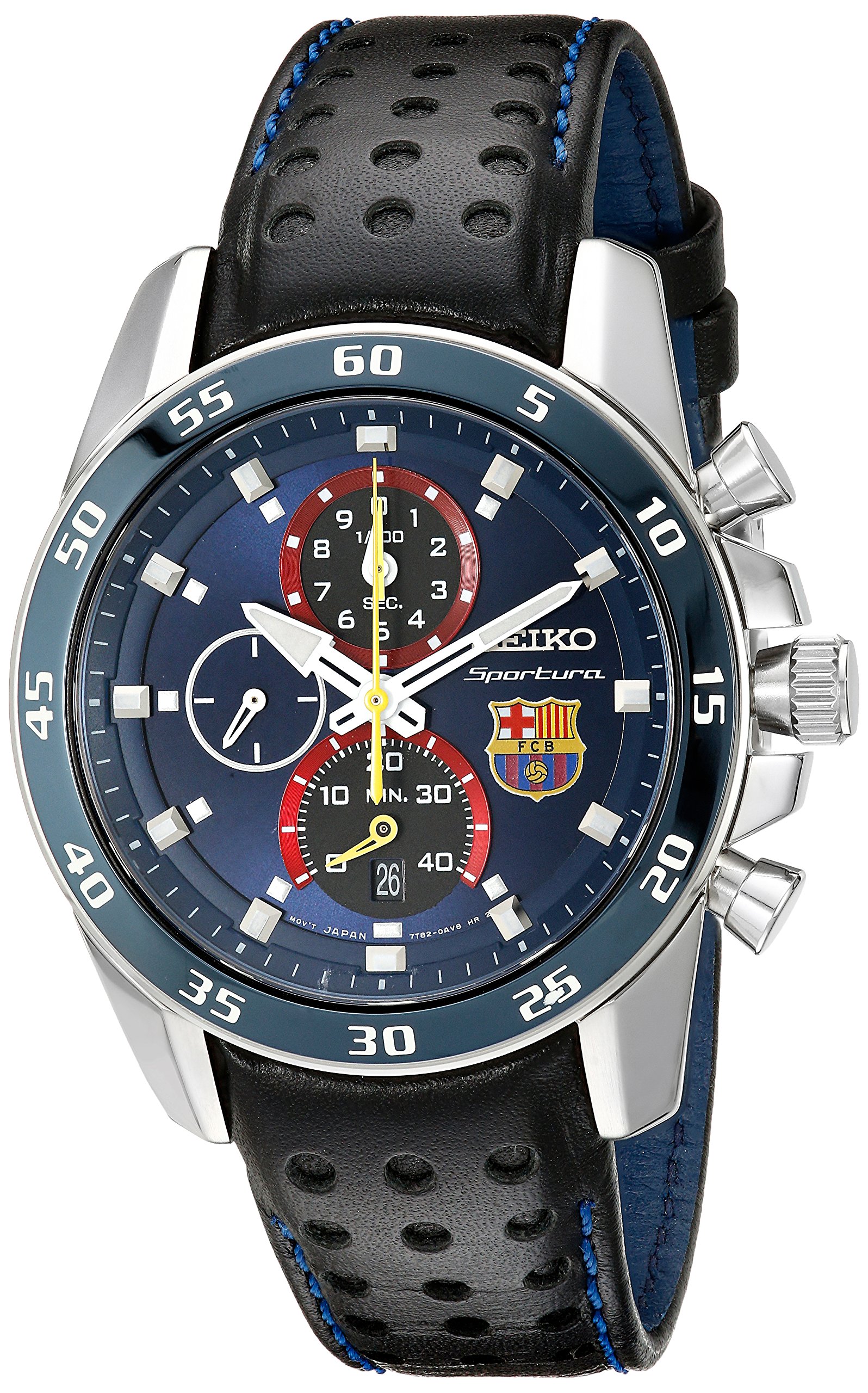
Figure 2.1: Front view of the Seiko Sportura FC Barcelona Chronograph Watch.

Figure 2.2: The Seiko Sportura FC Barcelona Chronograph Watch as worn on a wrist.
3. Setup
3.1 Setting the Time
- Pull the crown out to the second click position. The small second hand will stop.
- Turn the crown to set the hour and minute hands. Ensure the AM/PM is correctly set by observing the date change. If setting the time for AM, advance the hands past 12 o'clock once. If setting for PM, advance the hands past 12 o'clock twice.
- Push the crown back into the normal position.
3.2 Setting the Date
- Pull the crown out to the first click position.
- Turn the crown clockwise to set the date. Do not set the date between 9:00 PM and 1:00 AM, as this may cause malfunction. If the date needs to be set during this period, first set the time outside this period, then set the date, and finally reset the time.
- Push the crown back into the normal position.
4. Operating Instructions
4.1 Basic Timekeeping
Once the time and date are set, the watch will accurately display the current time and date. The small second hand indicates continuous timekeeping.
4.2 Using the Chronograph (Stopwatch)
The chronograph function allows for precise measurement of elapsed time up to a certain duration (e.g., 60 minutes or 12 hours, depending on the specific sub-dial configuration). Refer to the watch face for sub-dial markings.
- Start/Stop: Press button 'A' (typically the upper pusher) to start the chronograph. Press button 'A' again to stop it.
- Reset: While the chronograph is stopped, press button 'B' (typically the lower pusher) to reset all chronograph hands to their zero positions.
- Split Time (if available): Some chronographs offer a split-time function. Consult the detailed movement manual for specific instructions if your model supports this.
5. Maintenance
5.1 Cleaning Your Watch
- Wipe the case and crystal with a soft, dry cloth regularly to remove dust and fingerprints.
- For the leather strap, avoid prolonged exposure to water, direct sunlight, and harsh chemicals to prevent damage and discoloration. Clean with a slightly damp cloth and allow to air dry.
5.2 Water Resistance
Your watch is water resistant up to 100 meters (10 bar). This means it is suitable for swimming and snorkeling, but not for scuba diving. Ensure the crown is pushed in completely before any contact with water. Do not operate the crown or pushers while the watch is wet or submerged.
5.3 Battery Replacement
The watch is powered by a quartz movement and requires a battery. When the battery is low, the second hand may move in two-second intervals. It is recommended to have the battery replaced by an authorized Seiko service center to ensure proper sealing and maintain water resistance.
6. Troubleshooting
- Watch not running: Check if the crown is pushed in completely. If the watch still does not run, the battery may need replacement.
- Incorrect time/date: Refer to Section 3 for instructions on setting the time and date. Ensure the crown is fully pushed in after adjustment.
- Chronograph hands not resetting to zero: This may require a chronograph hand position adjustment. Consult an authorized service center for this procedure.
- Condensation inside the watch: This indicates a loss of water resistance. Immediately take the watch to an authorized service center for inspection and repair to prevent further damage.
7. Specifications
| Feature | Detail |
|---|---|
| Model Number | SPC089P1 |
| Movement | Quartz |
| Case Material | Stainless Steel |
| Case Diameter | 42 mm |
| Case Thickness | 11 mm |
| Band Material | Leather |
| Band Color | Black |
| Band Width | 21 mm |
| Dial Color | Blue |
| Crystal | Sapphire Crystal with Anti-reflective Coating |
| Water Resistance | 100 meters (10 bar) |
| Special Features | Chronograph, Date Display |
| Item Weight | 86 grams |
| Clasp Type | Buckle (Tang Buckle) |
| Display Type | Analog |

Figure 7.1: General watch size guide for reference.
8. Warranty and Support
Your Seiko watch is covered by a manufacturer's warranty against defects in materials and workmanship. The specific terms and duration of the warranty may vary by region. Please refer to the warranty card included with your purchase for detailed information.
For service, repairs, or technical support, please contact an authorized Seiko service center or the retailer from whom you purchased the watch. Using unauthorized service providers may void your warranty.
You can find more information and locate authorized service centers by visiting the official Seiko website: www.seikowatches.com