
1. Introduction
This manual provides detailed instructions for the setup, operation, and maintenance of your Craig CHT914C Stereo Home Theater/Tower Speaker System. Please read this manual thoroughly before using the product to ensure proper functionality and to maximize your listening experience. The CHT914C offers versatile audio playback options, including Bluetooth wireless connectivity and FM stereo radio, and can be configured as a single tower or two separate stereo speakers.
2. Package Contents
Verify that all items listed below are included in your package:
- Craig CHT914C Speaker System (main unit and detachable base/speaker)
- Hardware for conversion (screws, connecting cables if applicable)
- Remote Control (if included, typically for digital volume and source)
- AC Power Adapter
- User Manual (this document)
3. Important Safety Information
To reduce the risk of electric shock, fire, or damage to the unit, please observe the following safety precautions:
- Do not expose this appliance to rain or moisture.
- Do not place objects filled with liquids, such as vases, on the appliance.
- Do not block any ventilation openings. Install in accordance with the manufacturer's instructions.
- Do not install near any heat sources such as radiators, heat registers, stoves, or other apparatus (including amplifiers) that produce heat.
- Protect the power cord from being walked on or pinched, particularly at plugs, convenience receptacles, and the point where they exit from the appliance.
- Only use attachments/accessories specified by the manufacturer.
- Unplug this appliance during lightning storms or when unused for long periods of time.
- Refer all servicing to qualified service personnel. Servicing is required when the apparatus has been damaged in any way, such as power-supply cord or plug is damaged, liquid has been spilled or objects have fallen into the apparatus, the apparatus has been exposed to rain or moisture, does not operate normally, or has been dropped.
4. Setup and Assembly
The Craig CHT914C speaker system offers two primary configurations: a single tower speaker or two separate stereo speakers. Hardware for conversion is included.
4.1. Tower Speaker Assembly
To assemble the unit as a single tower speaker:
- Carefully align the top speaker unit with the bottom speaker unit.
- Connect the internal wiring or external cable (if provided) that links the two sections.
- Secure the two sections together using the provided screws or locking mechanism.
- Attach the base to the bottom of the assembled tower speaker, ensuring it is stable.
- Connect the AC power adapter to the power input on the main unit and then to a wall outlet.
4.2. Stereo Speaker Configuration
To convert the system into two separate stereo speakers:
- Separate the top and bottom speaker units by disengaging the locking mechanism or removing the screws.
- Attach the provided individual bases to each speaker unit. Ensure each base is securely fastened for stability.
- Connect the AC power adapter to the main speaker unit (typically the one with controls).
- Use the provided speaker cable to connect the main speaker unit to the secondary speaker unit.
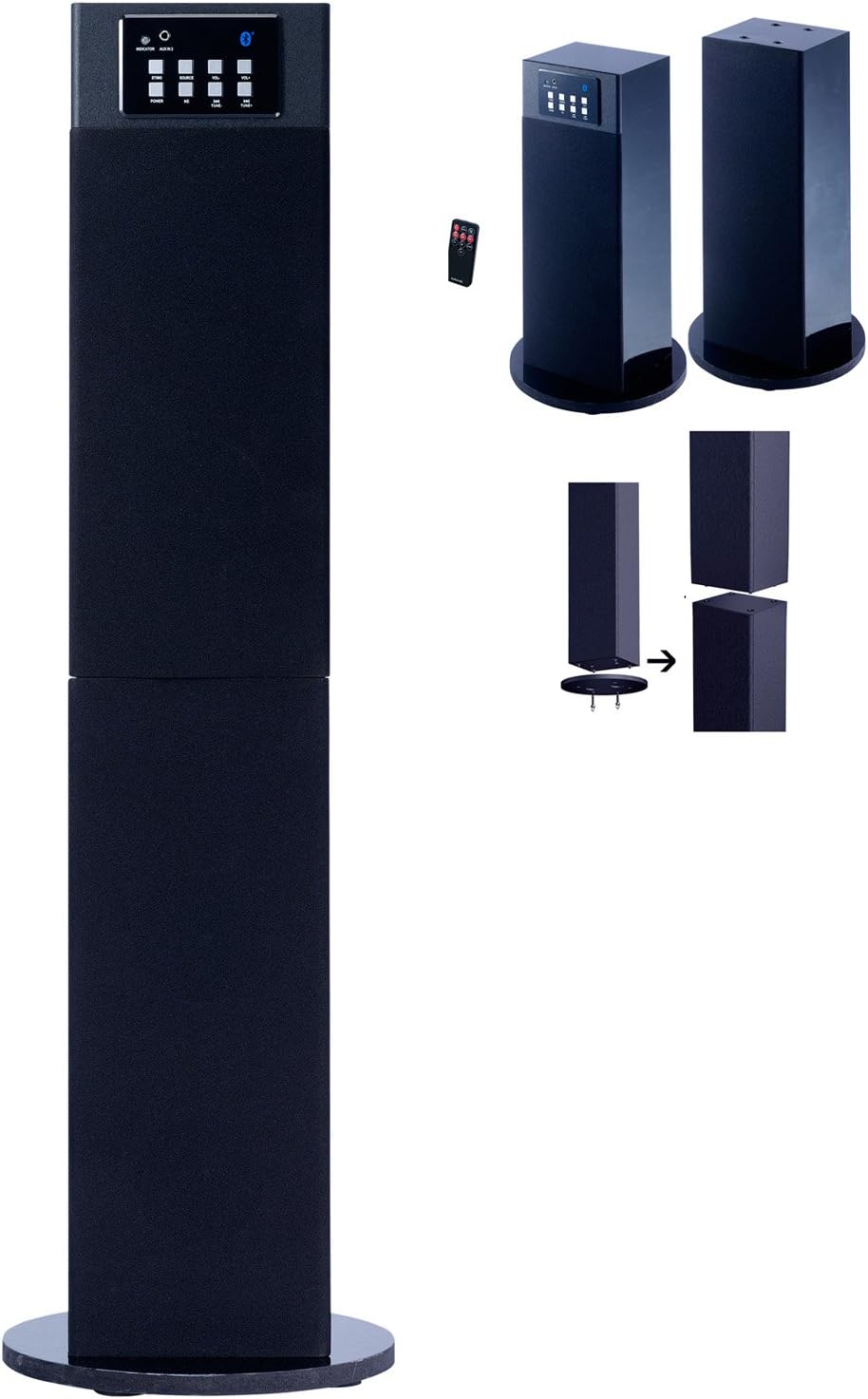
Figure 1: The Craig CHT914C speaker system. The image displays the unit in its full tower configuration on the left. On the right, it illustrates how the tower can be separated into two individual stereo speakers, each with its own base. A close-up of the control panel with buttons for power, source, volume, and Bluetooth indicator is visible, along with a small remote control.
5. Operating Instructions
5.1. Power On/Off
Press the POWER button on the control panel or remote control to turn the unit on or off. An indicator light will illuminate when the unit is powered on.
5.2. Source Selection
Press the SOURCE button repeatedly on the control panel or remote control to cycle through available input modes: Bluetooth, AUX (Audio In), and FM Radio. The current source will be indicated by an LED on the control panel.
5.3. Volume Control
Adjust the volume using the VOL+ and VOL- buttons on the control panel or the volume buttons on the remote control. The system features digital volume control for precise adjustments.
5.4. Bluetooth Pairing
To connect a Bluetooth-enabled device:
- Select the Bluetooth source mode using the SOURCE button. The Bluetooth indicator will flash, indicating it is in pairing mode.
- On your smartphone or other Bluetooth device, enable Bluetooth and search for available devices.
- Select "CHT914C" (or similar name) from the list of devices.
- Once paired, the Bluetooth indicator will stop flashing and remain solid. You can now play audio wirelessly from your device.
5.5. FM Radio Operation
To use the built-in FM stereo radio:
- Select the FM radio source mode using the SOURCE button.
- Use the TUNE+ and TUNE- buttons (or equivalent on remote) to manually tune to desired radio stations.
- For automatic scanning and saving of stations, refer to the specific instructions for your remote control, as functionality may vary.
6. Maintenance
Proper care and maintenance will ensure the longevity of your speaker system:
- Cleaning: Use a soft, dry cloth to clean the exterior surfaces of the speakers. Do not use liquid cleaners or aerosol sprays, as they may damage the finish or internal components.
- Placement: Place the speakers on a stable, flat surface to prevent accidental falls. Avoid placing them in direct sunlight or near heat sources.
- Ventilation: Ensure that the ventilation openings are not obstructed to prevent overheating.
- Power Cord: Regularly inspect the power cord for any signs of damage. If damaged, discontinue use and seek professional repair.
7. Troubleshooting
If you encounter issues with your CHT914C speaker system, refer to the following common problems and solutions:
| Problem | Possible Cause | Solution |
|---|---|---|
| No Power | Power cord not connected; Wall outlet not active; Unit is off. | Ensure power cord is securely plugged into the unit and a working wall outlet. Press the POWER button. |
| No Sound | Volume too low; Incorrect source selected; Audio cable not connected (for AUX); Bluetooth not paired. | Increase volume. Select the correct source. Ensure audio cables are connected. Re-pair Bluetooth device. |
| Bluetooth Not Connecting | Speaker not in pairing mode; Device too far; Device already connected to another speaker. | Ensure speaker is in Bluetooth pairing mode (flashing indicator). Move device closer. Disconnect device from other Bluetooth speakers. |
| Poor FM Reception | Weak signal; Antenna not extended/positioned correctly. | Adjust the position of the unit or its antenna for better reception. Try tuning to a stronger station. |
8. Specifications
- Model: CHT914C
- Brand: Craig
- Speaker Type: Tower (convertible to Stereo)
- Connectivity: Bluetooth, AUX (Audio In)
- Special Features: FM Stereo Radio, Digital Volume Control
- Speaker Output Power: 6 Watts (Maximum)
- Impedance: 4 Ohms
- Power Source: Corded Electric
- Product Dimensions: 9.06 x 9.06 x 15.75 inches (assembled tower)
- Item Weight: 11.2 pounds
- UPC: 731398549146, 799472266549
9. Warranty and Support
This product is manufactured by Craig Electronics. For specific warranty information and support, please refer to the documentation included with your purchase or visit the official Craig Electronics website. Please note that the seller's legal disclaimer states: "Please do your own research. Ask questions, etc before ordering. No return. All checked before shipment." This implies that direct returns or post-purchase support from the seller may be limited. For technical issues or warranty claims, contacting the manufacturer directly is recommended.


