
1. Introduction
Thank you for choosing the LOZ Motor Building Block Jungle Action Robotic Frog, Model 3012. This instruction manual provides detailed guidance for assembling, operating, and maintaining your robotic frog building block set. Please read this manual thoroughly before beginning assembly to ensure correct construction and safe operation.
2. Safety Information
- Choking Hazard: This product contains small parts and is not suitable for children under 3 years of age. Adult supervision is recommended during assembly and play for children aged 6 and up.
- Battery Safety: Requires 2 AA batteries (not included). Do not mix old and new batteries. Do not mix alkaline, standard (carbon-zinc), or rechargeable (nickel-cadmium) batteries. Insert batteries with correct polarity. Remove batteries if the toy will not be used for an extended period.
- Motor Care: A small amount of oil stain may be present on the motor surface for lubrication. This is normal and can be wiped off with paper.
- Keep away from water and excessive heat.
3. Package Contents
The LOZ Motor Building Block Jungle Action Robotic Frog set includes 118 pieces of various building blocks and connectors, along with a motor unit. Please verify all components are present before starting assembly.

Image 3.1: Assortment of building blocks included in the set.
4. Assembly Instructions
Follow the step-by-step diagrams provided in the included printed manual to assemble your Robotic Frog. The general process involves connecting the various building blocks and rods to form the body and legs, then integrating the motor unit.
4.1. General Assembly
- Identify all parts and sort them by type and color for easier assembly.
- Begin by constructing the main body frame, ensuring all connections are secure.
- Attach the leg mechanisms, paying close attention to the orientation of flexible links and inactive/active joints for proper movement.

Image 4.1: Top view of the assembled Robotic Frog.
4.2. Motor and Battery Installation
- Locate the motor unit and the designated compartment in the main body.
- Insert 2 AA batteries (not included) into the battery compartment of the motor unit, ensuring correct polarity (+/-).
- Securely attach the motor unit into the assembled structure as indicated in the manual. Ensure gears and connectors align properly with the leg mechanisms.
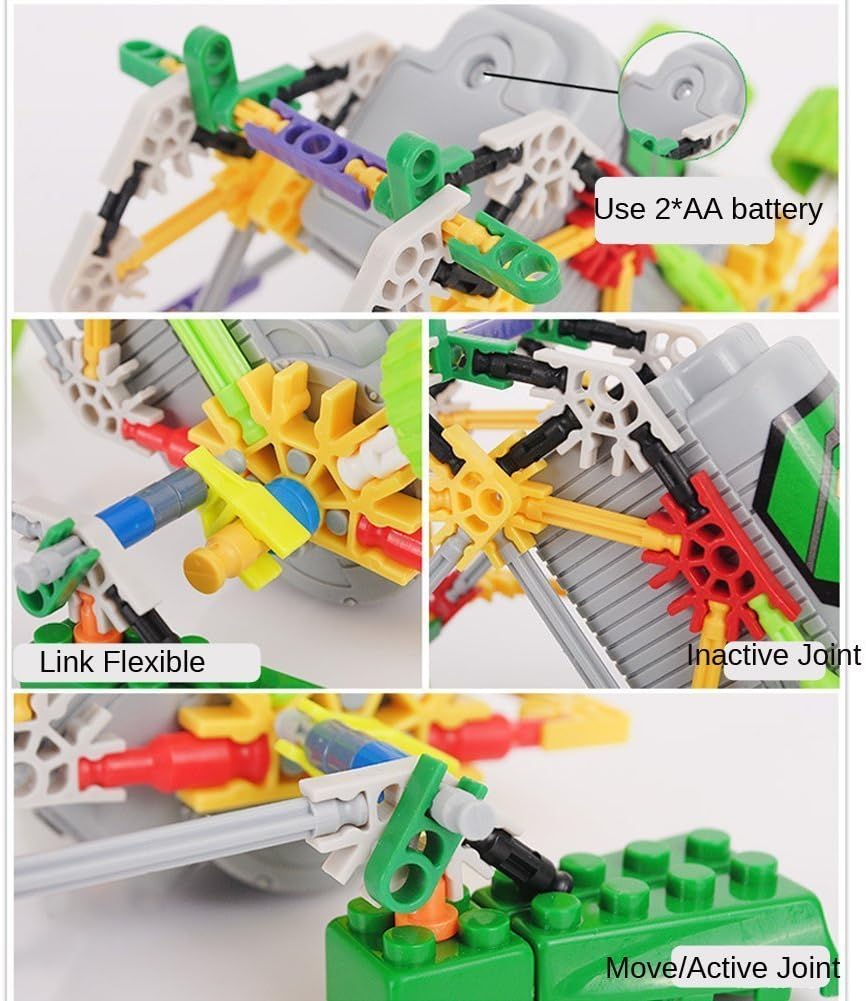
Image 4.2: Details of battery installation and joint types.
5. Operating Instructions
Once fully assembled and batteries are installed, your Robotic Frog is ready for operation.
- Locate the ON/OFF switch on the motor unit.
- Flip the switch to the "ON" position. The motor will activate, and the robotic frog will begin to move.
- Observe its unique hopping motion. The design allows it to move in a manner resembling a primate or alien.
- To stop operation, flip the switch back to the "OFF" position.
For a demonstration of the robot's movement, you may refer to the video available at http://www.iqiyi.com/w_19rrma5aut.html.
6. Maintenance
- Cleaning: Wipe the building blocks and motor unit with a dry, soft cloth. Do not use harsh chemicals or immerse in water.
- Battery Replacement: When the robotic frog's movement slows down or stops, replace the 2 AA batteries with new ones. Always ensure correct polarity.
- Storage: Store the assembled model or disassembled blocks in a cool, dry place away from direct sunlight.
7. Troubleshooting
| Problem | Possible Cause | Solution |
|---|---|---|
| Robotic frog does not move. |
|
|
| Movement is sluggish or inconsistent. |
|
|
8. Specifications
| Model Number | 3012 |
| Brand | LOZ |
| Number of Pieces | 118 |
| Material | Plastic |
| Power Source | 2 x AA Batteries (not included) |
| Recommended Age | 6 years and up |
| Product Dimensions (L x W x H) | 18.01 x 13.49 x 13.49 cm |
9. Warranty and Support
This product is designed for durability and enjoyment. For any missing parts, assembly difficulties, or operational issues not covered in the troubleshooting section, please contact LOZ customer support. Specific warranty details may be provided with your purchase documentation. Please retain your proof of purchase for any warranty claims.
For further assistance, please visit the official LOZ website or contact their customer service department.