
Introduction
This manual provides comprehensive instructions for the installation, operation, and maintenance of the Galcon 8054 AC-4S 4-Station Irrigation Timer. This smart irrigation controller is designed for managing watering schedules in gardens, nurseries, and greenhouses, offering flexible programming options for efficient water management.
Product Overview
The Galcon 8054 AC-4S is an indoor irrigation timer capable of controlling up to four independent irrigation zones. It features a large LCD screen and intuitive buttons for easy programming. Key functionalities include flexible scheduling, independent valve functions, cyclic programming, and sensor input capabilities.
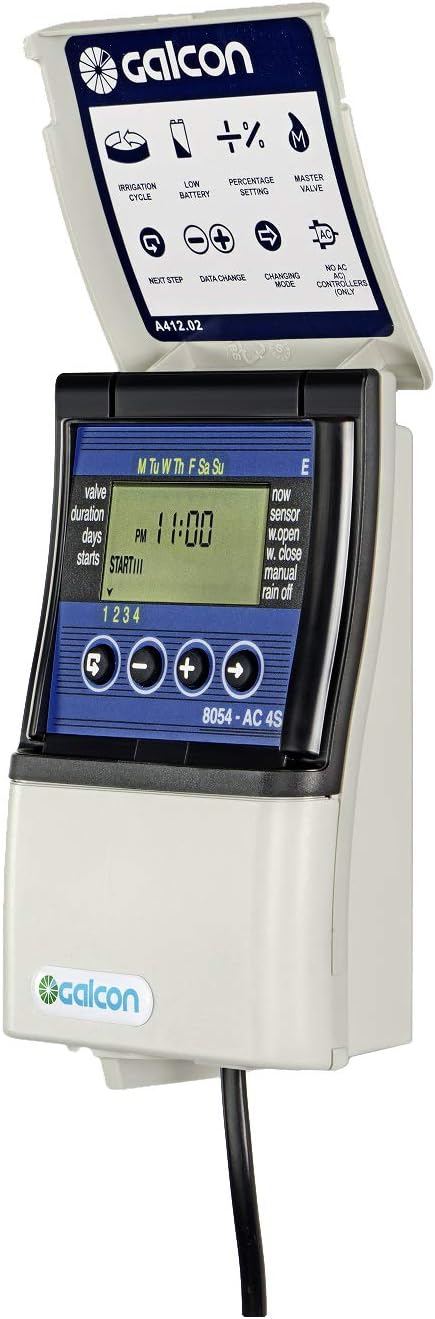
Figure 1: Front view of the Galcon 8054 AC-4S Irrigation Timer with its protective cover open, revealing the LCD display and control buttons. The display shows current time and programming indicators.
Key Features:
- Flexible Scheduling: Program irrigation by day of the week, daily, or in cycles. Duration can be set from 1 second to 12 hours.
- Independent Valve Functions: Up to 4 start times per valve for weekly programming, totaling 16 different start times across all four valves.
- Cyclic Programming: Set cycles from daily to every 30 days.
- Sensor Connection: Input for rain sensors or soil moisture sensors, assignable to individual valves to prevent unnecessary irrigation.
- Monthly Water Budgeting: Adjust irrigation from 10% to 190%.
- Rain Delay: Pause irrigation for up to 30 days.
- Circuit Identification: Detects short circuits and disconnections, with visual alerts.
- Battery Backup: Requires a 9V battery (not included) for program retention during power outages.
Setup and Installation
The Galcon 8054 AC-4S is designed for indoor installation. Ensure the installation location is protected from direct weather exposure.
Components Required (Not Included):
- 24VAC irrigation solenoid valves (up to 4).
- 9V battery for program backup.
- Appropriate wiring for connecting valves to the controller.
- Optional: Rain sensor or soil moisture sensor.
Installation Steps:
- Mounting: Select a suitable indoor location near a 110VAC 60Hz power outlet. Securely mount the controller to a wall using appropriate fasteners.
- Power Connection: Connect the controller to a standard 110VAC 60Hz power source. The transformer is suitable for USA 120Volt power.
- Battery Installation: Open the battery compartment and insert a new 9V battery. This battery provides backup for programming settings in case of a power interruption.
- Valve Wiring: Connect the 24VAC solenoid valves to the corresponding terminals on the controller. Ensure proper common wire connection. The controller can operate up to 4 valves.
- Sensor Connection (Optional): If using a rain or soil moisture sensor, connect it to the designated sensor input terminals. Refer to the sensor's specific instructions for wiring.

Figure 2: Side view of the Galcon 8054 AC-4S Irrigation Timer, highlighting its compact and durable casing designed for indoor use.
Operating Instructions
The Galcon 8054 AC-4S features a user-friendly interface with a large LCD screen and four control buttons for easy programming.
Basic Navigation:
- Use the Cycle Arrow button (arrow in a circle) to cycle through programming options.
- Use the Adjust Arrow button (-->) to select or confirm an option.
- Use the +/- buttons to adjust values or settings.
Programming Modes:
The controller supports various programming modes to suit different irrigation needs:
- Weekly Programming:
Allows setting specific irrigation days (e.g., Monday, Wednesday, Friday). Up to 4 start times can be set for each valve independently. Irrigation duration can be set from 1 second to 12 hours.
- Daily Programming:
Sets irrigation to occur every day at specified start times.
- Cyclic Programming:
Enables irrigation to run in cycles, from every day to every 30 days. This is particularly useful for propagation or specific plant needs requiring frequent, short watering intervals.
Advanced Functions:
- Monthly Water Budgeting: Adjust the overall irrigation duration for all programs from 10% to 190% to account for seasonal changes or water restrictions.
- Rain Delay: Temporarily suspend all irrigation for a set period, from 1 to 30 days, to conserve water during rainy periods.
- Sensor Input: If a sensor is connected, configure the controller to respond to sensor input (e.g., suspend irrigation when a rain sensor detects rain). The sensor input can be assigned to specific valves.

Figure 3: Front view of the Galcon 8054 AC-4S Irrigation Timer with its protective cover closed, indicating its readiness for operation and protection of the display.
Maintenance
Regular maintenance ensures the longevity and optimal performance of your Galcon 8054 AC-4S irrigation timer.
- Battery Replacement: The 9V battery provides backup for your programming settings. Replace the battery annually or when the low battery indicator appears on the display to prevent loss of settings during power outages.
- Cleaning: Wipe the exterior of the controller with a soft, damp cloth. Do not use abrasive cleaners or solvents. Ensure the protective flip cover is kept clean to maintain visibility of the display.
- Inspection: Periodically check all wiring connections for tightness and signs of wear or corrosion. Ensure the controller is free from dust and debris, especially around ventilation openings.
Troubleshooting
This section addresses common issues you might encounter with your Galcon 8054 AC-4S irrigation timer.
| Problem | Possible Cause | Solution |
|---|---|---|
| Controller display is blank. | No power supply; faulty transformer; dead 9V battery (if no AC power). | Check AC power connection. Ensure transformer is working. Replace 9V battery. |
| Valves not activating. | Incorrect wiring; faulty valve; short circuit detected; rain delay active; sensor preventing irrigation. | Verify wiring connections to valves and common. Check for short circuit indicators on display. Disable rain delay. Check sensor status and connection. Test valves manually if possible. |
| Programming not saving. | Low or dead 9V backup battery. | Replace the 9V battery. Ensure programming steps are completed and saved correctly. |
| Irrigation runs at incorrect times/durations. | Incorrect programming settings; water budgeting active. | Review and adjust programming settings for start times, durations, and days. Check monthly water budgeting percentage. |
| Short circuit or disconnection error message. | Wiring fault to a valve; faulty valve solenoid. | Inspect wiring for cuts or exposed wires. Check valve solenoid for resistance. Disconnect the problematic valve to isolate the issue. |
Specifications
| Attribute | Detail |
|---|---|
| Model Number | GAEBS0002U1 |
| Product Dimensions | 3.4 x 9.6 x 7.3 inches |
| Item Weight | 1.94 pounds |
| Input Voltage | 110VAC 60Hz (Designed for USA & Canada) |
| Operated Valve Voltage | 24VAC |
| Number of Stations | 4 |
| Battery (Backup) | 1 x 9V battery (not included) |
| Color | White |
| Manufacturer | Galcon |
Warranty and Support
Galcon is committed to providing high-quality products and excellent customer service.
Customer Support:
For any questions or issues regarding your Galcon 8054 AC-4S irrigation timer, please contact Galcon customer support. We aim to respond to inquiries within 1-3 business days.
This product is designed for use in USA and Canada only.
For more information and support resources, visit the official Galcon website or refer to the product page on Amazon: Galcon 8054 AC-4S Product Page
