1. Product Overview
The HoMedics Deep Sleep II Sound Therapy Machine (Model HDS-2000) is designed to create a calming environment for improved sleep. It features a selection of white noise, water, and nature sounds, along with specialized sleep therapy programs. The device includes dual speakers for rich sound reproduction, an LCD screen, a timer, a dimmer function, and a remote control for convenient operation.
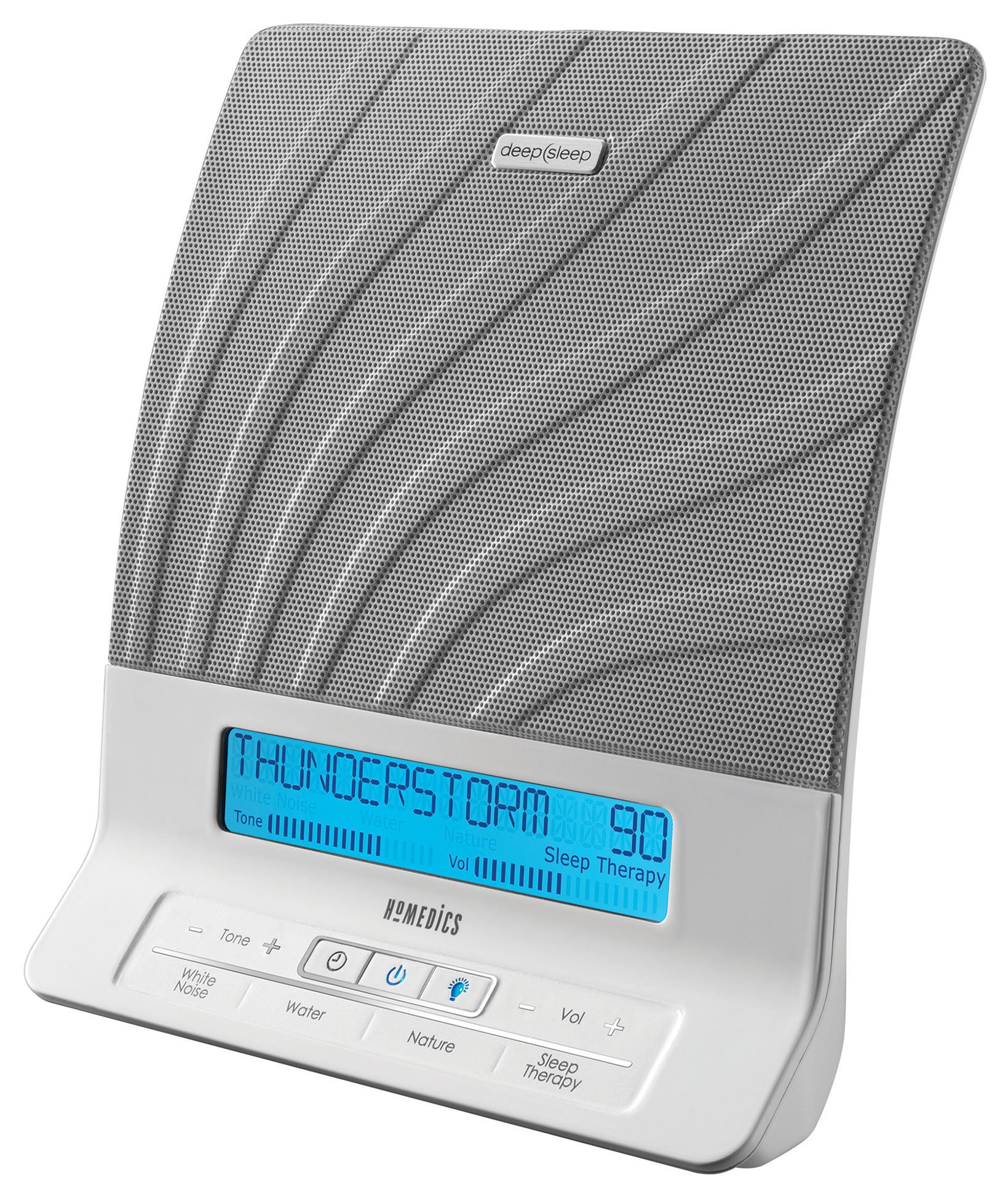
Figure 1: Front view of the HoMedics Deep Sleep II Sound Therapy Machine, displaying "CAMP FIRE" on its LCD screen and showing the control buttons.
2. Setup
2.1 Power Connection
Connect the provided wall outlet adapter to the DC input jack on the back of the unit. Plug the adapter into a standard electrical outlet.
2.2 Remote Control Battery Installation
The remote control requires 2 AA batteries (not included). Open the battery compartment on the back of the remote and insert the batteries, ensuring correct polarity (+/-). Close the compartment securely.
2.3 Placement
For optimal sound and to effectively mask distractions, place the unit on a flat, stable surface. If aiming to mask sounds within the bedroom, such as snoring, position the unit directly at your bedside, preferably on a nightstand, with the speakers facing you.
3. Operation
3.1 Power On/Off
Press the POWER button on the unit or remote control to turn the device on or off.
3.2 Sound Selection
The Deep Sleep II offers 12 digitally recorded sounds across three categories and 8 Sleep Therapy programs:
- White Noise: Soothe, Mask, Relax, Calm.
- Water Sounds: Ocean, Brook, Thunderstorm, Rain.
- Nature Sounds: Summer Night, Campfire, Wind Chimes, Everglades.
Use the dedicated White Noise, Water, or Nature buttons on the unit or remote to cycle through the sounds within each category. The selected sound will be displayed on the LCD screen.
3.3 Sleep Therapy Programs
The 8 Sleep Therapy programs combine relaxation sounds with white noise tones. Press the Sleep Therapy button to activate and cycle through these programs. These programs are designed to help you fall asleep and remain asleep by gradually transitioning sounds.
3.4 Volume Control
Adjust the sound volume using the Volume + and Volume - buttons on the unit or remote control.
3.5 Tone Adjustment
The Tone button allows you to adjust the sound's frequency, making it deeper or higher pitched to suit your preference.
3.6 Auto-Off Timer
Set the auto-off timer for 30, 60, or 90 minutes. Press the TIMER button repeatedly to select the desired duration. The unit will automatically turn off after the set time.
3.7 Display Dimmer
Adjust the brightness of the LCD display using the DIMMER button. Options include low, medium, high, or off. This allows for a comfortable viewing experience in various lighting conditions.
4. Maintenance and Safety
4.1 Cleaning
To clean the unit, wipe it with a soft, dry cloth. Do not use abrasive cleaners, solvents, or immerse the unit in water. Ensure the unit is unplugged before cleaning.
4.2 Safety Information
- Do not use this device with children.
- Always unplug the device from the power source before handling.
- Do not expose the device to excessive moisture.
- This device is not intended for use as a toy.
5. Troubleshooting
| Problem | Possible Cause | Solution |
|---|---|---|
| Unit does not power on. | Power adapter not properly connected or outlet not functioning. | Ensure the power adapter is securely plugged into both the unit and a working electrical outlet. |
| No sound or sound cuts in and out. | Volume too low, sound selection error, or internal malfunction. | Increase volume. Re-select a sound. If the issue persists, unplug the unit for 30 seconds and plug it back in. If the problem continues, contact customer support. |
| Remote control not working. | Dead batteries or obstruction. | Replace remote control batteries (2 AA). Ensure there is a clear line of sight between the remote and the unit. |
| Display is too bright or too dim. | Dimmer setting needs adjustment. | Press the DIMMER button to cycle through brightness levels (low, medium, high, off). |
6. Specifications
- Model Number: HDS-2000
- Product Dimensions (L x W x H): 7.75 x 4 x 8.25 inches
- Weight: 2.69 Pounds
- Power Source: AC Wall Adapter (included)
- Remote Control Batteries: 2 AA batteries (not included)
- Manufacturer: HoMedics
7. Warranty and Support
For warranty information or technical support, please refer to the warranty card included with your product or contact HoMedics Customer Service directly. Keep your purchase receipt as proof of purchase for warranty claims.
Note: Statements regarding dietary supplements have not been evaluated by the FDA and are not intended to diagnose, treat, cure, or prevent any disease or health condition. This product is a sound therapy machine and not a medical device.


