
Introduction
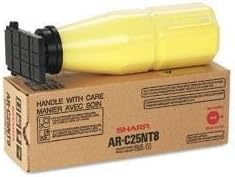
This instruction manual provides comprehensive guidance for the proper handling, installation, and maintenance of your Sharp BR AR-C150 1-300GM Yellow Toner cartridge, model ARC25NT8. This product is designed to deliver consistent, high-quality yellow prints for compatible Sharp printer models. Please read this manual thoroughly before use to ensure optimal performance and safety.
Safety Information
Always observe the following safety precautions when handling toner cartridges:
- Keep toner cartridges out of reach of children.
- Do not ingest toner. If swallowed, seek medical attention immediately.
- Avoid direct contact with toner powder. If contact occurs, wash affected areas thoroughly with soap and water.
- Do not incinerate used toner cartridges, as this can cause toner dust to explode.
- Store toner in a cool, dry place away from direct sunlight and extreme temperatures.
Setup and Installation
Follow these steps to properly install the toner cartridge into your compatible Sharp printer.
- Unpack the Toner: Carefully remove the new Sharp BR AR-C150 Yellow Toner cartridge from its packaging. Avoid shaking or dropping the cartridge.
- Prepare the Printer: Ensure your printer is powered on and open the front cover or toner access door according to your printer's specific instructions.
- Remove Old Cartridge (if applicable): If replacing an empty cartridge, gently pull out the old yellow toner cartridge. Place it in a protective bag for proper disposal.
- Insert New Cartridge: Align the new toner cartridge with the corresponding slot in the printer. Push it firmly until it clicks into place. Do not force the cartridge.
- Close Printer Cover: Close the printer's front cover or toner access door. The printer may perform a calibration cycle.
Operating Instructions
Once installed, the Sharp BR AR-C150 Yellow Toner cartridge operates automatically with your compatible Sharp printer. The printer's internal system will detect the new toner and manage its usage.
- Toner Level Monitoring: Most Sharp printers provide a way to monitor toner levels through the printer's control panel or via printer software on your computer. Refer to your printer's specific user manual for details on checking toner status.
- Print Quality: This toner is designed for optimal print quality. If you notice any degradation in yellow print output, refer to the Troubleshooting section.
Maintenance
Proper maintenance ensures the longevity and performance of your toner cartridge.
- Storage: Store unused toner cartridges in their original sealed packaging in a cool, dry environment, away from direct sunlight and extreme temperatures.
- Handling: Always handle the toner cartridge by its designated handles or edges to avoid touching the drum or toner outlet.
- Disposal: Dispose of empty toner cartridges responsibly. Many manufacturers and retailers offer recycling programs. Do not dispose of toner cartridges in regular household waste. Check local regulations for proper disposal methods.
Troubleshooting
If you encounter issues with your Sharp BR AR-C150 Yellow Toner, consider the following common problems and solutions:
- "Low Toner" or "Replace Toner" Message:
- Ensure the cartridge is fully seated in its slot. Remove and reinsert it firmly.
- If the message persists after reinstallation, the cartridge may indeed be empty or nearing its end of life. Replace with a new cartridge.
- Poor Print Quality (Faded Yellow, Streaks, Spots):
- Check the toner level. Low toner can cause faded prints.
- Perform a printer cleaning cycle. Refer to your printer's manual for instructions on cleaning the print heads or drum unit.
- Ensure the toner cartridge is a genuine Sharp product. Non-genuine cartridges may cause print quality issues.
- If the issue persists, the cartridge may be defective. Contact customer support.
- Cartridge Not Recognized:
- Remove the cartridge and check for any protective tapes or covers that may not have been removed during installation.
- Ensure the cartridge is correctly installed and fully seated.
- Restart the printer.
Specifications
| Attribute | Detail |
|---|---|
| Brand | Sharp |
| Model Number | ARC25NT8 |
| Product Name | BR AR-C150 - 1-300GM Yellow Toner |
| Color | Yellow |
| Item Weight | 2.6 pounds (approx. 1.18 kg) |
| Product Dimensions | 1 x 1 x 1 inches (approx. 2.54 x 2.54 x 2.54 cm) |
| Compatible Devices | Printer (specific Sharp models) |
| UPC | 700465276391 |
Warranty and Support
This Sharp toner cartridge is covered by the manufacturer's standard warranty. For specific warranty terms and conditions, please refer to the documentation included with your purchase or visit the official Sharp website.
For technical assistance, troubleshooting beyond this manual, or warranty claims, please contact Sharp customer support. Contact information can typically be found on the Sharp official website or on your product packaging.