
Cooler Master R9-NBC-NXLK-GP
Cooler Master NotePal XL Laptop Cooling Pad User Manual
Model: R9-NBC-NXLK-GP
Introduction
The Cooler Master NotePal XL is an ergonomically designed laptop cooling pad engineered to enhance user comfort and optimize laptop performance. It provides an improved viewing and typing angle, reducing strain during extended use. The integrated silent fan and USB hub contribute to a more efficient and convenient computing experience.
Product Features
- Silent 230mm Blue LED Fan: A large, quiet fan provides efficient cooling for your laptop, preventing overheating and maintaining optimal performance. The blue LED illumination indicates operation.
- Ergonomic Design: The elevated design positions your laptop at a comfortable angle for typing and viewing, reducing neck, back, and wrist strain.
- Integrated USB Hub: Equipped with multiple USB ports, allowing you to connect additional peripherals directly through the cooling pad.
- Fan Speed Controller: Adjust the fan speed to balance cooling performance and noise levels according to your preference.
- Non-slip Feet: Ensures stability and prevents your laptop from sliding on the cooling pad or desk surface.
- Wide Compatibility: Supports laptops up to 17 inches in size.
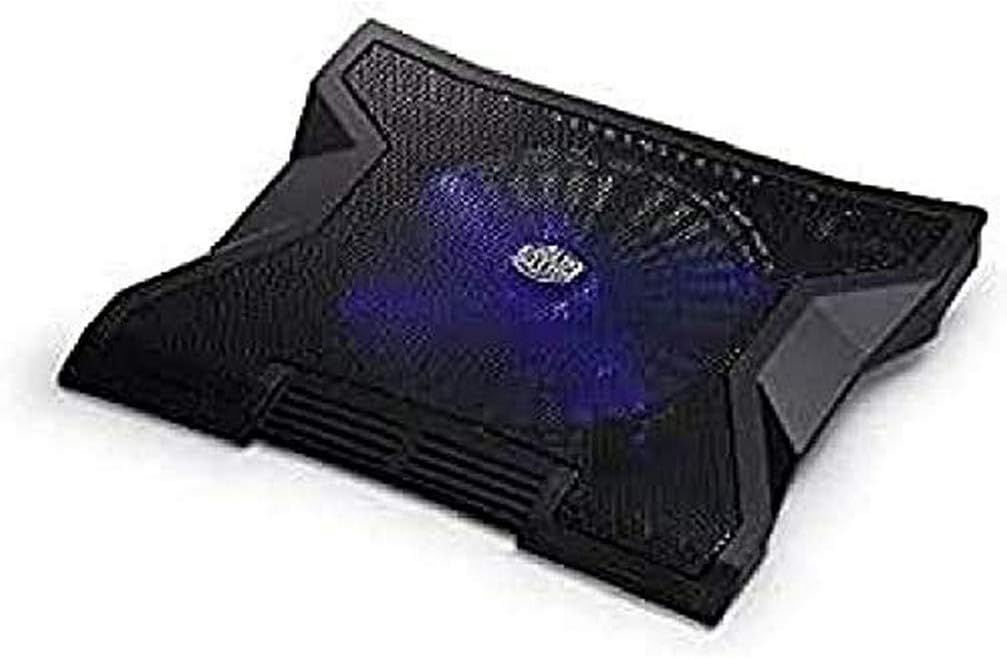
Image: Top-down view of the Cooler Master NotePal XL cooling pad, showcasing the large central fan with blue LED illumination.
Setup Instructions
- Unpack the Cooling Pad: Carefully remove the NotePal XL from its packaging.
- Position the Cooling Pad: Place the cooling pad on a stable, flat surface where you intend to use your laptop.
- Place Your Laptop: Gently place your laptop on top of the NotePal XL, ensuring it is centered and stable on the non-slip surface.
- Connect Power: Locate the USB cable attached to the NotePal XL. Plug the smaller end into the designated USB port on the cooling pad and the larger end into an available USB port on your laptop. The cooling pad draws power directly from your laptop's USB port.
- Verify Operation: Once connected, the fan should begin to spin, and the blue LED light should illuminate, indicating that the cooling pad is operational.

Image: Side view of the Cooler Master NotePal XL, highlighting the integrated USB ports and fan speed control dial.
Operating Instructions
- Power On/Off: The cooling pad powers on automatically when connected to a powered USB port. To turn off the fan, use the fan speed controller to set the speed to minimum or disconnect the USB cable.
- Adjusting Fan Speed: Use the rotary dial located on the side of the cooling pad to adjust the fan speed. Turn the dial clockwise to increase fan speed and counter-clockwise to decrease it.
- Using the USB Hub: The integrated USB hub allows you to connect up to three additional USB devices (e.g., mouse, keyboard, external drive) to your laptop through the cooling pad. Simply plug your devices into the available USB ports on the side of the NotePal XL.

Image: Overhead view of the Cooler Master NotePal XL, showing the full mesh surface and the Cooler Master logo at the center.
Maintenance
Regular maintenance helps ensure the longevity and optimal performance of your Cooler Master NotePal XL.
- Cleaning the Fan and Mesh: Periodically, use a can of compressed air to blow dust out of the fan blades and the mesh surface. For stubborn dust, gently wipe the mesh with a soft, dry cloth. Ensure the cooling pad is disconnected from power before cleaning.
- Cleaning the Surface: Wipe the exterior surfaces of the cooling pad with a slightly damp, soft cloth. Avoid using harsh chemicals or abrasive cleaners, as these can damage the finish.
- Storage: When not in use for extended periods, store the cooling pad in a cool, dry place away from direct sunlight and extreme temperatures.

Image: Underside view of the Cooler Master NotePal XL, revealing the large fan and ventilation grilles.
Troubleshooting
| Problem | Possible Cause | Solution |
|---|---|---|
| Fan is not spinning / Blue LED is off. |
|
|
| Cooling performance is insufficient. |
|
|
| USB hub devices are not recognized. |
|
|
Specifications
| Attribute | Detail |
|---|---|
| Model Number | R9-NBC-NXLK-GP |
| Brand | Cooler Master |
| Compatible Laptop Size | Up to 17 inches |
| Fan Size | 230mm |
| Fan Lighting | Blue LED |
| USB Ports | Multiple (typically 3) |
| Dimensions (L x W x H) | 37.9L x 30.5W x 4.7H Centimetres |
| Item Weight | 850 Grams |
| Material | Metal (mesh) and Plastic (frame) |
| Power Source | Corded Electric (USB Powered) |
| Cooling Method | Air |
Warranty and Support
Cooler Master products are designed and manufactured to high quality standards. For information regarding warranty coverage, technical support, or service inquiries, please refer to the official Cooler Master website or contact their customer support directly.
Please retain your proof of purchase for any warranty claims.
Official Cooler Master Website: www.coolermaster.com
Related documentsR9-NBC-NXLK-GP


Ask a question about this manual
Ask about setup, troubleshooting, compatibility, parts, safety, or missing instructions. Manuals+ will review the question and use this page’s manual context to help answer it.