
1. Introduction
This manual provides detailed instructions for the proper use and maintenance of your Retevis RT-5R Dual Band Two Way Radios. The RT-5R is designed for reliable communication across various environments, featuring dual-band capabilities, 128 channel storage, and a high-power output for extended range.
Key features include:
- Multi-channel dual band radio with 128 channel storage.
- High/Low TX power selectable for optimized communication.
- Voice companding and Time-out Timer (TOT) function.
- LCD display for clear information viewing.
- Channel name display and editing functions.
- Keypad lock function to prevent accidental changes.
- Emergency alarm and low battery alarm.
- Power saving function to extend battery life.
- Built-in high brightness LED for use as a flashlight.
- VOX function for hands-free operation.
2. What's in the Box
Please verify that all items are present and in good condition upon opening the package:
- 2 x Retevis RT-5R 2-way radio
- 2 x Antenna
- 2 x Li-ion battery pack (1400mAh)
- 2 x Charger (charging base and adapter)
- 2 x Belt clip
- 2 x Sling (hand strap)
- 2 x User’s manual

3. Product Overview
Familiarize yourself with the various parts of the Retevis RT-5R radio for effective operation.


4. Setup
4.1. Battery Installation and Charging
- Align the battery pack with the grooves on the back of the radio.
- Slide the battery pack upwards until it clicks into place.
- To charge, place the radio with the installed battery into the charging base. Ensure the metal contacts on the battery align with the contacts on the charger.
- Connect the charger adapter to a power outlet. The charging indicator light will typically show red during charging and green when fully charged.

4.2. Antenna Attachment
Screw the antenna clockwise into the connector on the top of the radio until it is finger-tight. Do not overtighten.
4.3. Belt Clip Attachment
Attach the belt clip to the designated slots on the back of the radio using the provided screws. This allows for convenient carrying.
5. Operating Instructions
5.1. Power On/Off and Volume Adjustment
Rotate the power/volume knob (located on the top of the radio) clockwise to turn the radio on and increase volume. Rotate counter-clockwise to decrease volume and turn the radio off.
5.2. Channel Selection and Frequency Setting
The RT-5R supports 128 channels. Use the up/down arrow keys on the keypad or the channel knob (if available) to navigate through channels. The radio also supports direct frequency input and dual-band operation.

5.3. Transmit/Receive (PTT Button)
To transmit, press and hold the Push-To-Talk (PTT) button on the side of the radio. Speak clearly into the microphone. Release the PTT button to receive.
5.4. VOX Function
The Voice Operated Exchange (VOX) function allows for hands-free transmission. When VOX is enabled, the radio will automatically transmit when it detects your voice. Refer to the menu settings for VOX activation and sensitivity adjustment.
5.5. Keypad Lock
To prevent accidental key presses, activate the keypad lock function through the radio's menu or a dedicated shortcut key (refer to the specific key mapping in the full manual).
5.6. Emergency Alarm
The emergency alarm function can be activated in critical situations. This feature typically emits a loud siren sound and/or transmits an alert signal. Consult the full manual for activation methods.
5.7. Flashlight Function
The built-in LED light on the top of the radio can be used as a flashlight. Activate it via a dedicated button or menu option.
5.8. High/Low TX Power Selection
You can select between high and low transmit power settings. High power provides greater range but consumes more battery. Low power conserves battery life and is suitable for shorter distances.
6. Maintenance
6.1. Battery Care
- Charge the battery fully before first use.
- Avoid overcharging or completely draining the battery to prolong its lifespan.
- Store batteries in a cool, dry place when not in use.

6.2. Cleaning
Clean the radio's exterior with a soft, damp cloth. Do not use harsh chemicals or abrasive cleaners. Ensure the radio is powered off and dry before use.
6.3. Storage
When storing the radio for extended periods, remove the battery pack. Store the radio and battery in a dry, temperature-controlled environment.
7. Troubleshooting
If you encounter issues with your Retevis RT-5R radio, refer to the following common problems and solutions:
| Problem | Possible Cause | Solution |
|---|---|---|
| Radio does not power on | Low or dead battery; improperly installed battery | Charge the battery; ensure battery is correctly installed. |
| Cannot transmit or receive | Incorrect channel/frequency; out of range; antenna not attached | Verify channel/frequency settings; move closer to other radios; ensure antenna is securely attached. |
| Poor audio quality | Low signal strength; interference; volume too low/high | Adjust squelch level; move to a clearer area; adjust volume. |
| Keypad is unresponsive | Keypad lock is active | Deactivate keypad lock. |
8. Specifications
Detailed technical specifications for the Retevis RT-5R Dual Band Two Way Radio:
| Feature | Specification |
|---|---|
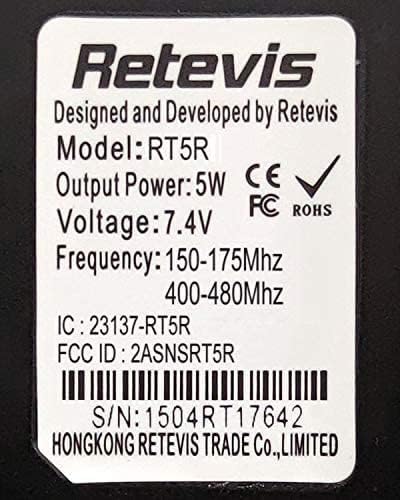
| Model Number | RT-5R (5687DFD69CFDD252) |
| Rated Voltage | 7.4V DC ±10% |
| Battery Type | Li-ion battery |
| Battery Capacity | 1400mAh |
| Item Weight | 7.4 ounces (approx. 209 grams) |
| Product Dimensions | 4.61 x 2.32 x 1.16 inches (approx. 11.7 x 5.9 x 2.9 cm) |
| Display Type | LCD |
| Number of Channels | 128 |
| Frequency Range | 150-175MHz, 400-480MHz (Analog) |
| Water Resistance Level | Not Water Resistant |
9. Warranty and Support
9.1. Warranty Information
Retevis provides a 2-year warranty for the radio body and a 1-year warranty for accessories. A 30-day no-reason return policy is also offered. For service beyond the warranty period, maintenance services are available, with buyers responsible for associated costs.
9.2. Customer Support
For any inquiries, technical assistance, or warranty claims, please contact Retevis customer support. You can typically reach support through the platform of purchase (e.g., Amazon) where responses are usually provided within 12 hours.


