
Introduction
This manual provides essential information for the safe and efficient installation, operation, and maintenance of your BKI T0002 Thermostat. Please read these instructions thoroughly before attempting to install or operate the device. Retain this manual for future reference.
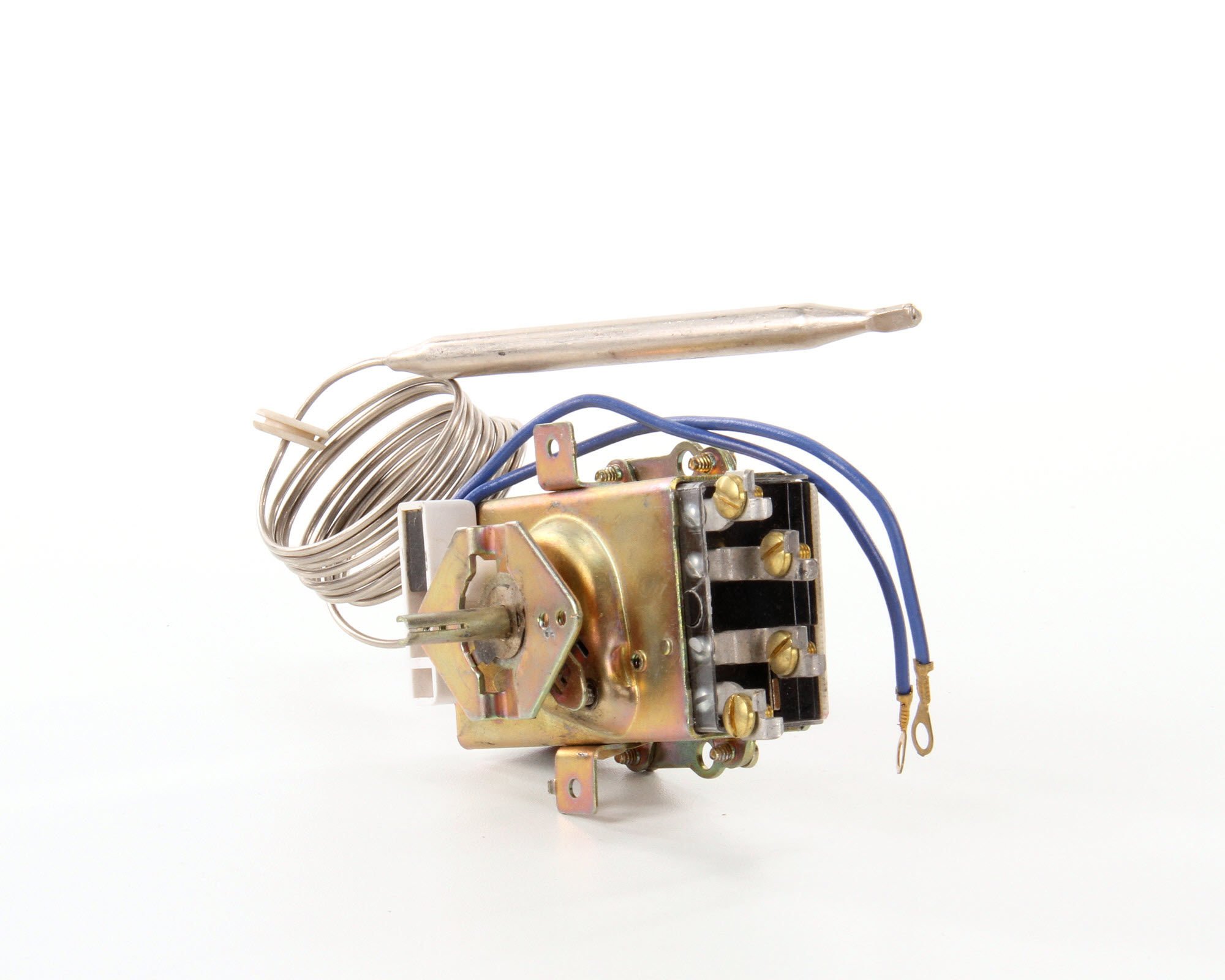
Figure 1: Front view of the BKI T0002 Thermostat. This image shows the compact design and button control interface of the device.
Safety Information
WARNING: Risk of electric shock. Disconnect power before installation or servicing.
- Always ensure power is disconnected at the circuit breaker or fuse box before performing any wiring or maintenance.
- Installation must be performed by a qualified electrician in accordance with all local and national electrical codes.
- Do not operate the thermostat with damaged wiring or if it has been exposed to moisture.
- This thermostat is designed for 208V applications. Verify your power supply matches this requirement.
Setup
1. Unpacking
- Carefully remove the thermostat from its packaging.
- Inspect the device for any signs of damage. If damaged, do not install and contact your supplier.
- Retain packaging materials for future transport or storage.
2. Mounting
The BKI T0002 Thermostat is typically integrated into a control panel or enclosure. Ensure the mounting location is free from excessive vibration, moisture, and extreme temperatures outside its operating range.
- Secure the thermostat using appropriate fasteners through the designated mounting holes.
- Ensure adequate clearance for wiring and ventilation.
3. Wiring
IMPORTANT: All wiring must comply with local and national electrical codes. This device operates on 208V.
- Disconnect Power: Turn off the main power supply to the equipment at the circuit breaker.
- Identify Terminals: Refer to the wiring diagram provided with your specific equipment or on the thermostat itself. Common terminals include Line (L1, L2), Load (H1, H2), and Sensor inputs.
- Connect Power Wires: Connect the 208V power supply wires to the designated Line terminals.
- Connect Load Wires: Connect the heating element or other controlled load wires to the designated Load terminals.
- Connect Sensor: Connect the temperature sensor wires to the appropriate sensor input terminals. Ensure the sensor is placed in the area where temperature control is desired.
- Secure Connections: Ensure all wire connections are tight and secure to prevent loose contacts and potential hazards.
- Verify Wiring: Double-check all connections against the wiring diagram before restoring power.
Operating Instructions
The BKI T0002 Thermostat features a button control interface for setting and adjusting temperature.
1. Power On
- After successful wiring, restore power to the equipment at the circuit breaker.
- The thermostat display (if applicable) or indicator lights should illuminate.
2. Setting Temperature
- Use the UP and DOWN buttons (or similar controls) to adjust the desired temperature setpoint.
- The thermostat is rated for up to 300 degrees (D). Ensure your setpoint is within the safe operating range of your equipment.
- Once the desired temperature is set, the thermostat will automatically control the heating element to maintain this temperature.
3. Monitoring
- Observe the equipment's temperature and the thermostat's status indicators to ensure proper operation.
- This model does not feature a backlight, so ensure adequate ambient lighting for viewing.
Maintenance
Regular maintenance ensures optimal performance and longevity of your BKI T0002 Thermostat.
1. Cleaning
- Disconnect Power: Always disconnect power before cleaning.
- Wipe the exterior of the thermostat with a soft, damp cloth. Do not use abrasive cleaners or solvents.
- Ensure no moisture enters the internal components.
2. Inspection
- Periodically inspect wiring connections for tightness and signs of wear or damage.
- Check the temperature sensor for proper placement and any physical damage.
- Ensure the thermostat is securely mounted.
Troubleshooting
If you encounter issues with your BKI T0002 Thermostat, refer to the following common troubleshooting steps.
| Problem | Possible Cause | Solution |
|---|---|---|
| Thermostat not powering on. | No power supply; loose wiring; faulty thermostat. | Check circuit breaker. Verify 208V power supply. Inspect wiring connections. If issues persist, contact support. |
| Equipment not heating to set temperature. | Incorrect setpoint; faulty sensor; faulty heating element; thermostat malfunction. | Verify setpoint. Check sensor connection and placement. Test heating element. Contact support if necessary. |
| Temperature fluctuates widely. | Sensor not properly placed; environmental factors; thermostat calibration issue. | Ensure sensor is in a stable temperature zone. Minimize drafts around sensor. Contact support for calibration advice. |
For problems not listed or if solutions do not resolve the issue, contact BKI technical support.
Specifications
- Brand: BKI
- Model: T0002
- Voltage: 208 Volts
- Control Type: Button Control
- Maximum Temperature Rating: 300 Degrees (D)
- Backlight: No
- Item Weight: 16 ounces (1 pound)
- UPC: 046851656843
- ASIN: B00EC8PI9Y
- Date First Available: January 7, 2020
Warranty and Support
For warranty information, please refer to the documentation included with your purchase or visit the official BKI website. For technical assistance, replacement parts, or further inquiries, please contact BKI customer support through their official channels.
BKI Contact Information: (Refer to your product packaging or BKI's official website for the most current contact details.)