
1. Introduction
This manual provides essential information for the proper installation, operation, and maintenance of the MASTER-BILT 02-71129 PCB Harness (CCR-49DF). This component is designed for use in specific MASTER-BILT refrigeration units. Please read this manual thoroughly before attempting any installation or service to ensure safe and efficient use.
2. Safety Information
WARNING: Electrical components can be hazardous. Always disconnect power to the unit before installing, servicing, or removing this PCB harness. Failure to do so may result in serious injury or death.
- Only qualified and authorized personnel should perform installation and service procedures.
- Wear appropriate personal protective equipment (PPE), including safety glasses and insulated gloves.
- Ensure all connections are secure and correctly oriented to prevent electrical shorts or malfunctions.
- Do not modify the harness or its components. Use only genuine MASTER-BILT replacement parts.
- Keep the harness away from moisture, extreme temperatures, and corrosive substances.
3. Product Overview
The MASTER-BILT 02-71129 PCB Harness (CCR-49DF) is a critical electrical component designed to connect and transmit signals and power within specific MASTER-BILT refrigeration systems. It ensures the proper functioning of the Printed Circuit Board (PCB) by providing reliable electrical pathways.
This harness is constructed from high-quality materials, including Polycarbonate (PC), to ensure durability and performance in demanding commercial environments.
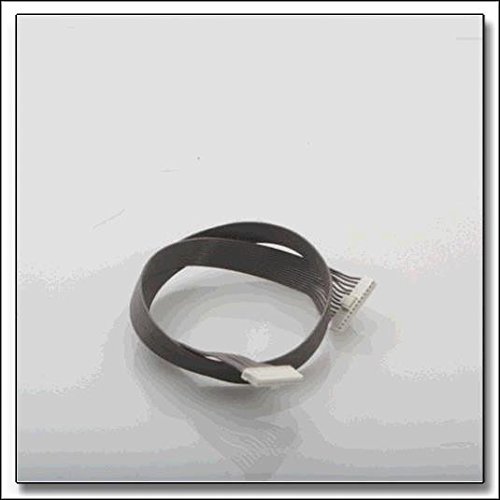
Figure 1: MASTER-BILT 02-71129 PCB Harness. This image shows the electrical harness with multiple connectors and wires, designed for internal connections within a refrigeration unit.
4. Setup and Installation
Installation of the 02-71129 PCB Harness requires technical expertise and should only be performed by a certified technician. Incorrect installation can lead to equipment damage, electrical hazards, or void the product warranty.
- Disconnect Power: Before beginning, ensure the refrigeration unit is completely disconnected from its power source. Verify with a voltage tester.
- Access PCB Area: Carefully open the access panel to the PCB compartment of the refrigeration unit.
- Identify Existing Harness: Locate the existing harness connected to the PCB. Note the routing and connection points for accurate replacement.
- Remove Old Harness: Disconnect the old harness from the PCB and other connected components. Dispose of it responsibly.
- Install New Harness: Connect the new MASTER-BILT 02-71129 PCB Harness, ensuring each connector is firmly seated in its corresponding port on the PCB and other components. Follow the original routing path.
- Secure Connections: Double-check all connections for tightness and correct orientation.
- Close Access Panel: Securely close the PCB access panel.
- Restore Power: Reconnect power to the refrigeration unit and observe for proper operation.
5. Operating Principles
The 02-71129 PCB Harness functions as an internal conduit for electrical signals and power within the MASTER-BILT refrigeration unit. It does not have direct user-operable controls. Its proper functioning is integral to the overall operation of the unit's control system, ensuring that the PCB can accurately monitor sensors, control compressors, fans, and other components as programmed.
Once correctly installed, the harness facilitates communication between the PCB and various parts of the appliance, contributing to efficient temperature regulation and system performance.
6. Maintenance
The MASTER-BILT 02-71129 PCB Harness is designed for long-term reliability and typically requires minimal maintenance. However, periodic inspection can help ensure continued performance.
- Visual Inspection: During routine appliance maintenance, visually inspect the harness for any signs of wear, fraying, discoloration, or damage to the insulation.
- Connection Integrity: Ensure all connectors remain firmly seated. Loose connections can lead to intermittent operation or electrical issues.
- Cleanliness: Keep the area around the harness and PCB clean and free from dust, debris, or moisture accumulation, which can interfere with electrical conductivity.
- Avoid Stress: Do not bend, crimp, or apply excessive tension to the harness during or after installation.
If any damage is observed, the harness should be replaced by a qualified technician.
7. Troubleshooting
Issues related to the PCB harness often manifest as malfunctions in the refrigeration unit's control system. Since this is an internal electrical component, troubleshooting should be performed by a qualified technician.
- No Power to PCB: If the PCB is not receiving power, check the harness connections and continuity.
- Intermittent Operation: Loose or corroded connections within the harness can cause intermittent functionality of the refrigeration unit.
- Error Codes: Specific error codes displayed by the refrigeration unit's control panel may indicate an issue with the PCB or its connections, which could involve the harness.
- Visible Damage: If the harness shows signs of burning, melting, or physical damage, it must be replaced immediately.
Always consult the main refrigeration unit's service manual for specific diagnostic procedures. Do not attempt repairs if you are not qualified.
8. Specifications
| Brand | MASTER-BILT |
| Model Number | MSB02-71129 |
| Part Number | 02-71129 |
| Associated Model | CCR-49DF |
| Material | Polycarbonate (PC) |
| Height | 0.5 Inches |
| Width | 1.5 Inches |
| Length | 23.5 Inches |
| Weight | 0.08 Pounds (approx. 1.28 ounces) |
| UPC | 220215084637 |
9. Warranty and Support
For information regarding the warranty of your MASTER-BILT 02-71129 PCB Harness, please refer to the documentation provided with your original refrigeration unit or contact MASTER-BILT customer support directly. Warranty terms may vary based on purchase date and region.
For technical assistance, replacement parts, or service inquiries, please contact MASTER-BILT customer service or an authorized service provider. Ensure you have your product model number (MSB02-71129) and the refrigeration unit's serial number available when seeking support.
You can typically find contact information on the official MASTER-BILT website or within the main appliance's user manual.