
1. Overview
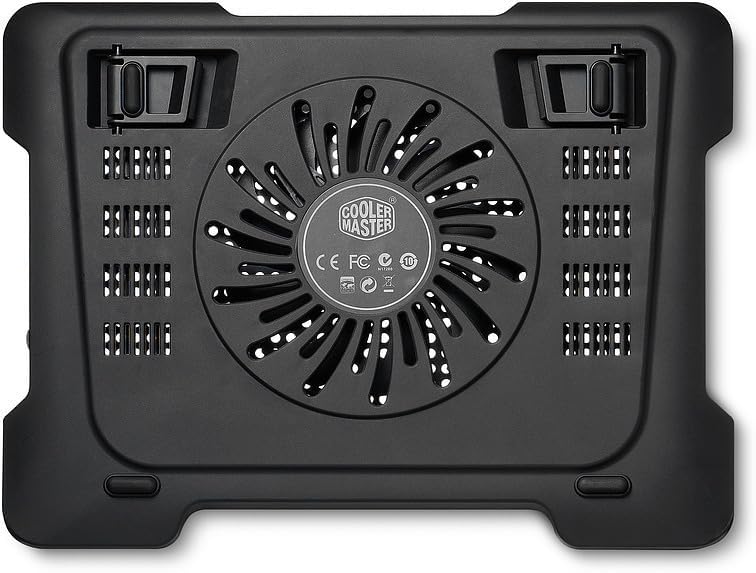
The Cooler Master Notepal X-Lite II is a laptop cooling pad designed to enhance the thermal performance of laptops up to 15.6 inches. It features a silent 140mm fan and an integrated USB hub for convenient connectivity. The ergonomic design provides a comfortable typing angle, making it suitable for extended use.

This cooling pad is engineered to provide efficient heat dissipation, preventing your laptop from overheating during intensive tasks or prolonged usage. Its slim and lightweight design ensures portability, while the adjustable height settings offer improved ergonomics.
2. Setup
- Unpack the Cooling Pad: Carefully remove the Notepal X-Lite II from its packaging.
- Position the Cooling Pad: Place the cooling pad on a flat, stable surface where you intend to use your laptop.
- Adjust Height (Optional): The cooling pad features adjustable feet at the rear. Lift the pad and extend the feet to your desired ergonomic height. There are multiple height settings available to suit your preference.
- Place Your Laptop: Carefully place your laptop on top of the cooling pad. Ensure it is centered and stable. The front of the pad has a slightly curved design for wrist comfort.
- Connect USB Power: Locate the mini USB port on the cooling pad and the USB 2.0 cable. Connect the mini USB end to the cooling pad and the standard USB-A end to an available USB port on your laptop. The cooling pad will draw power from your laptop's USB port.
- Utilize USB Hub: The cooling pad includes two additional USB 2.0 ports. These can be used to connect other USB devices, such as a mouse, keyboard, or flash drive, without occupying additional ports on your laptop.

3. Operating Instructions
- Power On/Off: The cooling pad is powered by your laptop's USB port. Once connected, the fan should begin operating automatically. There is no separate power switch on this model.
- Fan Operation: The integrated 140mm fan operates silently to draw heat away from your laptop's underside.
- Quiet Operation: The fan is designed for quiet operation, ensuring minimal distraction during use.

4. Maintenance
Regular maintenance ensures optimal performance and longevity of your cooling pad.
- Cleaning the Fan and Grille: Over time, dust can accumulate on the fan blades and the metal mesh grille, reducing cooling efficiency.
- Disconnect the cooling pad from your laptop.
- Use a can of compressed air to blow away dust from the fan and the grille.
- Alternatively, use a soft, dry cloth or a small brush to gently clean the surfaces. Avoid using liquid cleaners directly on the fan or electronic components.
- Cable Management: Ensure the USB cable is not kinked or strained to prevent damage.
- Storage: When not in use, store the cooling pad in a clean, dry place. The USB cable can be neatly tucked away in the designated storage area underneath the pad for portability.
5. Troubleshooting
- Fan Not Spinning:
- Ensure the USB cable is securely connected to both the cooling pad and a functioning USB port on your laptop.
- Try connecting the cooling pad to a different USB port on your laptop or another device to rule out a faulty port.
- Check for any obstructions (e.g., dust, debris) preventing the fan from spinning. Clean as per maintenance instructions.
- Insufficient Cooling:
- Verify that the fan is spinning.
- Ensure your laptop's ventilation grilles are aligned with the cooling pad's fan area for optimal airflow.
- Clean any dust from the cooling pad's fan and your laptop's internal fans/vents.
- Ensure the cooling pad is on a flat, hard surface to allow proper air intake from below. Avoid placing it on soft surfaces like beds or couches.
- Unusual Noise from Fan:
- Check for any foreign objects or debris caught in the fan blades.
- If the noise persists after cleaning, the fan may be worn. Contact Cooler Master support for assistance.
6. Specifications
| Feature | Detail |
|---|---|
| Brand | Cooler Master |
| Model Number | R9-NBC-XL2K-GP |
| Color | Black |
| Material | Aluminum |
| Fan Size | 140mm (Silent) |
| Noise Level | 15-21 dBA |
| Power Source | USB 5V DC |
| USB Ports | 1 x Mini USB (input), 2 x USB 2.0 (output) |
| Compatibility | Supports laptops up to 15.6 inches |
| Item Weight | 1.75 pounds (795 g) |
| Product Dimensions (LxWxH) | 1.11 x 12.99 x 9.89 inches (330 x 28 x 251 mm) |
7. Warranty & Support
For warranty information and technical support, please refer to the official Cooler Master website or contact their customer service directly. Keep your purchase receipt as proof of purchase for any warranty claims.
Cooler Master Official Website: www.coolermaster.com

