
Russell Hobbs 20060-65
Russell Hobbs Buckingham Grind and Brew Coffee Maker
Model: 20060-65
Introduction
This manual provides essential information for the safe and efficient operation, maintenance, and troubleshooting of your Russell Hobbs Buckingham Grind and Brew Coffee Maker. Please read these instructions thoroughly before first use and retain them for future reference.

The Russell Hobbs Buckingham Grind and Brew Coffee Maker, showcasing its sleek design and integrated components.
Safety Precautions
- Always ensure the appliance is unplugged before cleaning or maintenance.
- Do not immerse the appliance, cord, or plug in water or any other liquid.
- Keep the appliance out of reach of children.
- Do not operate the appliance if the cord or plug is damaged, or if the appliance malfunctions or has been damaged in any way.
- Use the appliance only for its intended household purpose.
Setup
- Unpacking: Carefully remove the coffee maker from its packaging. Retain packaging for future storage or transport.
- Initial Cleaning: Before first use, wash the glass carafe, lid, and removable filter holder in warm, soapy water. Rinse thoroughly and dry. Wipe the exterior of the appliance with a damp cloth.
- Positioning: Place the coffee maker on a stable, level, heat-resistant surface, away from edges and heat sources.
- Water Reservoir: Open the lid and fill the water reservoir with fresh, cold water up to the desired cup marking. The capacity is 1.5 liters, suitable for up to 10 cups.
- Bean Hopper: Open the bean hopper lid and fill with whole coffee beans. The bean reservoir has a capacity of 250 grams. Ensure the lid is securely closed after filling.
- Filter Placement: Insert a permanent filter or a paper filter (size 4) into the removable filter holder.
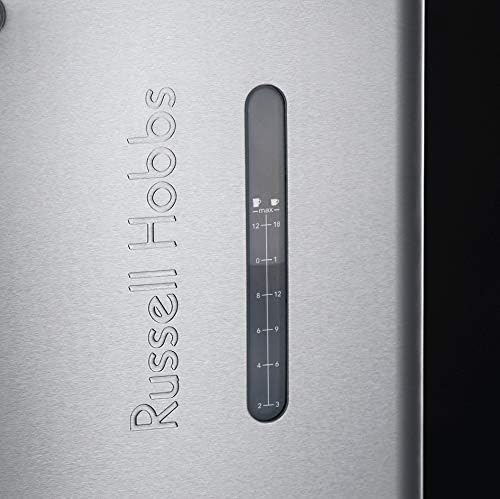
Close-up view of the water level indicator on the side of the coffee maker, showing cup markings.

The transparent bean hopper, clearly showing whole coffee beans ready for grinding.
Operating Instructions
- Power On: Plug the coffee maker into a suitable power outlet. The LCD display will illuminate.
- Set Grind Level: Use the grind setting dial to select your preferred grind fineness. There are nine settings from coarse to fine.
- Set Coffee Strength: Use the digital controls to adjust the coffee strength.
- Select Number of Cups: Choose the desired number of cups (2-10) using the digital controls.
- Programmable Timer (Optional): To set a delayed brew time, use the programmable timer function on the LCD display. Follow the on-screen prompts to set the desired start time.
- Brewing with Whole Beans: Ensure the bean hopper is filled. The machine will automatically grind the selected amount of beans before brewing.
- Brewing with Pre-Ground Coffee: If using pre-ground coffee, ensure the bean hopper is empty. Add the desired amount of pre-ground coffee directly into the filter holder. Select the 'pre-ground' option on the display if available, or ensure the grinder is disengaged.
- Start Brewing: Press the start button to begin the brewing process.
- Pause and Serve: The drip-stop feature allows you to temporarily remove the carafe during brewing to pour a cup. Replace the carafe within 20 seconds to prevent overflow.
- Keep Warm Function: After brewing, the warming plate will keep the coffee warm for a period. The appliance will automatically shut off after a set time.

The digital LCD display showing the time and various brewing settings.

The grind setting dial, allowing adjustment of coffee bean fineness.
Maintenance
Regular cleaning ensures optimal performance and extends the life of your coffee maker.
- Daily Cleaning:
- After each use, discard used coffee grounds and rinse the filter holder and glass carafe with warm water. These parts are removable and washable.
- Wipe the exterior of the appliance with a damp cloth. Do not use abrasive cleaners.
- Bean Hopper Cleaning: Periodically empty and clean the bean hopper to remove any residual coffee oils or dust.
- Descaling: Over time, mineral deposits (limescale) can build up in the coffee maker, affecting performance. Descale your appliance regularly, depending on water hardness and frequency of use. Follow the instructions of a commercial descaling solution, or use a mixture of white vinegar and water (1:2 ratio). Run the solution through the brewing cycle, then run several cycles with fresh water to rinse thoroughly.
Troubleshooting
| Problem | Possible Cause | Solution |
|---|---|---|
| Coffee does not brew. | No water in reservoir; appliance not plugged in; power outage. | Fill water reservoir; check power connection; check circuit breaker. |
| Weak coffee. | Not enough coffee grounds; grind setting too coarse; descaling needed. | Add more coffee; adjust grind to finer setting; descale the appliance. |
| Grinder not working. | Bean hopper empty; beans jammed; grinder setting incorrect. | Fill bean hopper; clear any jammed beans; ensure correct setting for whole beans. |
| Water leakage. | Water reservoir not properly seated; overfilled reservoir; carafe not correctly placed. | Ensure reservoir is secure; do not overfill; ensure carafe is fully inserted under drip-stop. |
Specifications

Diagram showing the approximate dimensions of the coffee maker: 45cm height, 32cm depth, 28cm width.
| Feature | Detail |
|---|---|
| Brand | Russell Hobbs |
| Model Number | 20060-65 |
| Color | Silver |
| Product Dimensions | 34.5 x 29.5 x 47.7 cm (approx. 28 x 32 x 45 cm as per image) |
| Capacity | 10 Cups |
| Volume | 1.5 Liters |
| Power/Wattage | 1000 Watts |
| Voltage | 230 VAC |
| Material | Stainless Steel, Plastic |
| Automatic Shut-off | No (as per specification, but typically coffee makers have this) |
| Special Features | Integrated conical grinder, LCD display, programmable timer, 9-step grind adjustment, 250g bean hopper, compatible with pre-ground coffee. |
| Filter Type | Reusable |
| Item Weight | 5.32 Kilograms |
Warranty and Support
For warranty information and customer support, please refer to the documentation included with your product or visit the official Russell Hobbs website. The manufacturer is Spectrum Brands Benelux B.V.
Related documents20060-65


Ask a question about this manual
Ask about setup, troubleshooting, compatibility, parts, safety, or missing instructions. Manuals+ will review the question and use this page’s manual context to help answer it.