
TAKSTAR SGC-598
TAKSTAR SGC-598 Interview Microphone User Manual
Model: SGC-598 | Brand: TAKSTAR
1. Introduction
The TAKSTAR SGC-598 is a high-sensitivity condenser microphone designed for enhancing audio recording quality with DSLR cameras and DV camcorders. Its cardioid polar pattern effectively reduces ambient noise, making it suitable for interviews, photography, and various other recording occasions. This manual provides detailed instructions for setup, operation, maintenance, and troubleshooting to ensure optimal performance of your microphone.
Package Contents
- 1 x TAKSTAR SGC-598 Microphone
- 1 x Windscreen
- 1 x English User's Manual
- Note: 1.5V AA battery is required but not included.

Figure 1.1: The TAKSTAR SGC-598 microphone attached to a DSLR camera, ready for use.
2. Safety Information
- Do not expose the microphone to extreme temperatures, humidity, or corrosive environments.
- Avoid dropping or subjecting the microphone to strong impacts.
- Keep the microphone away from water and other liquids.
- Do not attempt to disassemble or modify the microphone. This will void the warranty.
- Dispose of used batteries responsibly according to local regulations.
- Ensure proper battery polarity when installing.
3. Setup
3.1 Battery Installation
- Locate the battery compartment on the side of the microphone unit.
- Slide open the battery compartment cover.
- Insert one 1.5V AA alkaline battery, ensuring correct polarity (+/-).
- Close the battery compartment cover securely.
3.2 Mounting the Microphone
The SGC-598 features a standard universal connector for easy attachment to your camera's hot shoe or a compatible mounting bracket.
- Slide the microphone's mounting foot into your camera's hot shoe or mounting bracket.
- Tighten the locking wheel on the microphone's base to secure it in place.
3.3 Connecting to Camera/Camcorder
Connect the microphone's 3.5mm audio output cable to the microphone input jack on your camera or camcorder.

Figure 3.1: Detailed view showing the mounting interface, battery compartment, and shockproof design.

Figure 3.2: The SGC-598 microphone securely mounted on a camera, illustrating its compact integration.
4. Operating Instructions
4.1 Powering On/Off
Locate the ON/OFF switch on the microphone unit. Slide the switch to 'ON' to power on the microphone. Slide to 'OFF' when not in use to conserve battery life.
4.2 Sensitivity Enhancement (+10dB)
The microphone features a +10dB sensitivity enhancement switch. This can be used to boost the audio signal, which is useful in quieter environments or when recording from a distance. Switch to '+10dB' for enhanced sensitivity or '0' for standard sensitivity.
4.3 Low-Frequency Attenuation (200Hz)
The SGC-598 includes a low-frequency attenuation feature at 200Hz. This helps to reduce unwanted low-frequency noise such as wind noise, rumble, or air conditioning hum. Engage this feature when recording in noisy environments to improve clarity.
4.4 Low Power Indicator
The microphone is equipped with a low power indicator. When the battery level is low, this indicator will illuminate, signaling that the battery needs to be replaced soon to ensure continuous operation.

Figure 4.1: Control panel of the SGC-598, highlighting the sensitivity and power switches.
5. Maintenance
5.1 Cleaning
- Use a soft, dry cloth to clean the microphone body.
- Do not use liquid cleaners, solvents, or abrasive materials.
- Gently clean the windscreen with a soft brush if it accumulates dust or debris.
5.2 Storage
- When not in use for extended periods, remove the battery to prevent leakage.
- Store the microphone in a cool, dry place, away from direct sunlight and extreme temperatures.
- Use the provided carrying pouch (if applicable) to protect the microphone from dust and scratches.
6. Troubleshooting
6.1 No Sound Output
- Check Battery: Ensure a fresh 1.5V AA battery is correctly installed and the low power indicator is not active.
- Power Switch: Verify the microphone's ON/OFF switch is in the 'ON' position.
- Cable Connection: Confirm the 3.5mm audio cable is securely connected to both the microphone and the camera's microphone input.
- Camera Settings: Check your camera's audio input settings to ensure the external microphone is selected and input levels are appropriately set.
6.2 Poor Sound Quality (Hissing, Low Volume)
- Battery Level: A low battery can affect sound quality. Replace with a fresh battery.
- Sensitivity Setting: If audio is too low, try switching the +10dB enhancement to 'ON'. If there is excessive hiss, switch it to '0'.
- Low-Frequency Attenuation: Engage the 200Hz low-frequency attenuation if experiencing excessive rumble or wind noise.
- Proximity: Ensure the microphone is positioned close enough to the sound source.
- Camera Input Level: Adjust your camera's audio input gain. Avoid setting it too high, which can introduce hiss, or too low, which results in weak audio.
- Environmental Noise: The SGC-598 is designed to reduce ambient noise, but extreme noise levels may still affect recording quality. Try to record in quieter environments.
6.3 Microphone Not Mounting Securely
- Locking Wheel: Ensure the locking wheel on the microphone's base is fully tightened after sliding it into the hot shoe.
- Compatibility: Verify your camera's hot shoe is a standard size compatible with the microphone's mounting foot.
7. Specifications
| Monomer | Back electret |
| Polar Pattern | Cardioid (Unidirectional) |
| Frequency Response | 50Hz-16kHz |
| Sensitivity | -32dB ± 3dB (0dB = 1V/Pa at 1kHz) |
| Enhanced Sensitivity | +10dB |
| Low-Frequency Attenuation | 60Hz 10dB/octave |
| Output Impedance | 2000Ω ± 30% |
| Power Source | 1.5V AA Battery (not included) |
| Battery Life | Up to 100 hours (with AA alkaline battery) |
| Material | Plastic |
| Dimensions (L x W x H) | Approximately 11.3 x 7.7 x 2.7 inches (28.7 x 19.6 x 6.9 cm) |
| Item Weight | Approximately 5.9 ounces (0.17 kg) |
| Connector Type | 3.5 mm Jack |
| Compatible Devices | Camcorder, Camera (Nikon, Canon, etc.) |
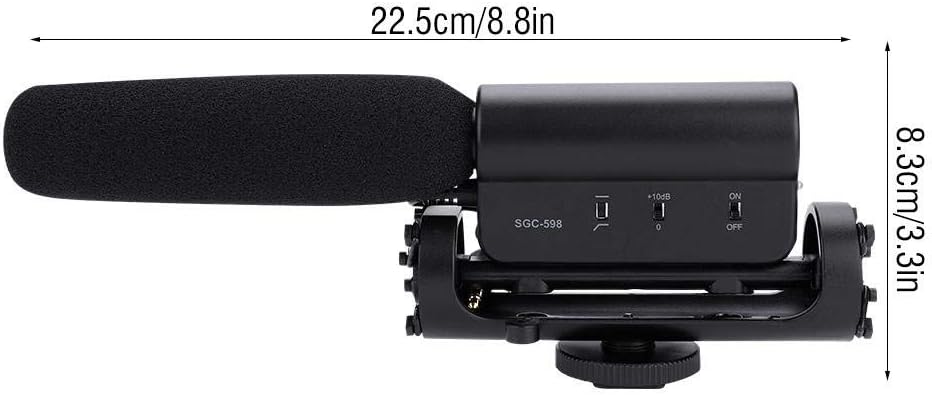
Figure 7.1: Dimensional overview of the SGC-598 microphone.
8. Warranty and Support
8.1 Warranty Information
TAKSTAR products are manufactured to high quality standards. For specific warranty terms and conditions, please refer to the warranty card included with your product or visit the official TAKSTAR website. The warranty typically covers defects in materials and workmanship under normal use.
8.2 Customer Support
If you encounter any issues or have questions regarding your TAKSTAR SGC-598 microphone, please contact TAKSTAR customer support. Contact information can usually be found on the official TAKSTAR website or in the product packaging.
Related documentsSGC-598


Ask a question about this manual
Ask about setup, troubleshooting, compatibility, parts, safety, or missing instructions. Manuals+ will review the question and use this page’s manual context to help answer it.