
1. Introduction
Thank you for purchasing the Stanley LIONHALS Li-Ion Halogen Spotlight. This manual provides important information regarding the safe operation, maintenance, and troubleshooting of your new spotlight. Please read this manual thoroughly before using the product and retain it for future reference.
This spotlight is designed for powerful, portable illumination, ideal for job sites, outdoor activities, and emergency situations. Its Li-Ion battery ensures long-lasting performance and quick recharging.
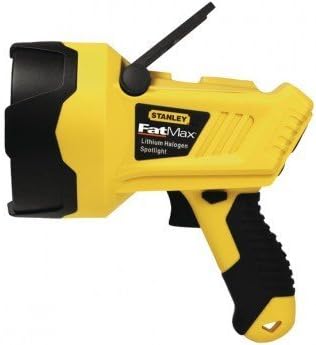
Figure 1: Stanley LIONHALS Li-Ion Halogen Spotlight. This image shows the yellow and black spotlight from a side angle, highlighting its handle, trigger, and the halogen bulb housing.
2. Important Safety Information
Always observe basic safety precautions when using electrical products to reduce the risk of fire, electric shock, and personal injury.
- Read all instructions: Before operating the spotlight, read and understand all safety warnings and operating instructions.
- Do not expose to water: This spotlight is not waterproof. Do not use it in wet conditions or immerse it in water.
- Avoid direct eye exposure: Do not look directly into the light beam. The intense light can cause temporary vision impairment or permanent eye damage.
- Use appropriate charger: Only use the charger supplied with the spotlight. Using an incompatible charger may damage the battery or cause fire.
- Keep away from children: This product is not a toy. Keep it out of reach of children.
- Proper ventilation: Ensure adequate ventilation when charging to prevent overheating.
- Battery care: Do not disassemble, puncture, or incinerate the battery. Dispose of batteries according to local regulations.
- Hot surface: The halogen bulb and surrounding area can become very hot during operation. Allow the spotlight to cool before handling or storing.
3. Package Contents
Please check the package contents to ensure all items are present and undamaged:
- Stanley LIONHALS Li-Ion Halogen Spotlight
- AC Charging Adapter
- DC Charging Adapter (Vehicle)
- User Manual (this document)
If any items are missing or damaged, please contact customer support immediately.
4. Setup and Initial Charging
Before first use, the spotlight's battery must be fully charged.
- Initial Charge: Connect the AC charging adapter to the charging port on the spotlight. Plug the adapter into a standard wall outlet. The charging indicator light will illuminate (color may vary, refer to product for specific indication).
- Charging Time: Allow approximately 3-5 hours for a full charge. The indicator light will change or turn off when charging is complete.
- DC Charging (Optional): For vehicle charging, use the supplied DC charging adapter. Plug it into your vehicle's 12V accessory outlet and connect the other end to the spotlight's charging port.
- Disconnect: Once fully charged, disconnect the charger from the spotlight and the power source.
Note: It is recommended to fully charge the battery every 3 months if the spotlight is not in regular use to maintain battery health.
5. Operating Instructions
5.1 Turning On/Off
- To turn the spotlight ON, press the power button located on the handle.
- To turn the spotlight OFF, press the power button again.
5.2 Using the Stand/Handle
The spotlight features an adjustable stand/handle for versatile positioning.
- Handheld Use: Grip the ergonomic handle firmly for portable illumination.
- Freestanding Use: Adjust the handle to act as a stable base, allowing the spotlight to stand on a flat surface and direct light as needed.
5.3 Battery Level Indicator
The spotlight is equipped with a battery level indicator (if present, refer to product for exact location and type) to show the remaining charge. Consult the product's specific indicator for details (e.g., LED colors, number of bars).
6. Maintenance and Care
Regular maintenance ensures the longevity and optimal performance of your spotlight.
- Cleaning: Wipe the spotlight with a soft, damp cloth. Do not use abrasive cleaners or solvents. Ensure the spotlight is turned off and unplugged before cleaning.
- Bulb Replacement: If the halogen bulb needs replacement, ensure the spotlight is cool and unplugged. Consult a qualified technician or refer to specific bulb replacement instructions if provided with the product. Use only genuine replacement bulbs.
- Storage: Store the spotlight in a cool, dry place away from direct sunlight and extreme temperatures. For long-term storage, ensure the battery is partially charged (around 50%) and recharge every 3 months.
- Battery Disposal: Do not dispose of the battery in household waste. Follow local regulations for proper recycling or disposal of Li-Ion batteries.
7. Troubleshooting
If you encounter issues with your spotlight, refer to the following common problems and solutions:
| Problem | Possible Cause | Solution |
|---|---|---|
| Spotlight does not turn on. | Battery is depleted. Bulb is faulty. | Charge the battery fully. Replace the halogen bulb (if applicable and user-serviceable). |
| Light is dim. | Low battery charge. Bulb nearing end of life. | Recharge the battery. Consider replacing the bulb. |
| Spotlight not charging. | Charger not properly connected. Faulty charger or outlet. | Ensure charger is securely plugged into spotlight and power source. Try a different outlet or charger. |
| Spotlight gets excessively hot. | Normal operation for halogen bulbs. Poor ventilation. | This is normal. Allow to cool before handling. Ensure clear airflow around the unit. |
If the problem persists after trying these solutions, please contact Stanley customer support.
8. Specifications
| Feature | Detail |
|---|---|
| Model Number | Stanley-LIONHALS |
| Bulb Type | Halogen |
| Battery Type | Li-Ion (Lithium-Ion) |
| Manufacturer | STANLEY |
| ASIN | B00E4TMI3A |
| First Available Date | April 2, 2014 |
9. Warranty and Customer Support
9.1 Warranty Information
This Stanley LIONHALS Li-Ion Halogen Spotlight comes with a limited warranty. Please refer to the warranty card included with your purchase or visit the official Stanley website for detailed warranty terms and conditions. Keep your purchase receipt as proof of purchase for warranty claims.
9.2 Customer Support
For technical assistance, troubleshooting not covered in this manual, or warranty inquiries, please contact Stanley Customer Support:
- Website: www.stanleytools.com
- Phone: Refer to the Stanley website for regional contact numbers.
When contacting support, please have your product model number (Stanley-LIONHALS) and purchase date available.


