
Utilitech 0607226
Utilitech Steel Fixed/Tilt TV Wall Mount User Manual
Model: 0607226
Introduction
This manual provides detailed instructions for the safe and proper installation, operation, and maintenance of your Utilitech Steel Fixed/Tilt TV Wall Mount. Designed for televisions ranging from 37 inches to 90 inches, this mount offers a secure and adjustable solution for your viewing needs. Please read all instructions carefully before beginning installation.

Image: The Utilitech Steel Fixed/Tilt TV Wall Mount, showcasing its robust steel construction and integrated bubble level.
Safety Information
WARNING: Failure to read and follow these instructions can result in serious personal injury, property damage, or voiding of your warranty. If you do not understand these instructions or have doubts about the safety of the installation, please contact a qualified installer.
- Maximum Weight Capacity: This mount is designed to support televisions with a maximum weight of 175 lbs (79.4 kg). Do not exceed this weight limit.
- Ensure the mounting surface can safely support the combined weight of the mount and the television.
- Always use appropriate safety gear during installation, including eye protection.
- Do not overtighten screws, as this may cause damage to the mount or the television.
- Keep children and pets away from the work area during installation.
Product Features
- Tilt Functionality: Offers a 12-degree tilt capability for optimal viewing angles and glare reduction.
- Slim Profile: Mounts your TV with a minimal 1.77-inch profile from the wall, providing a sleek, low-profile appearance.
- Locking Feature: Securely holds the TV in place once mounted.
- Integrated Bubble Level: Ensures accurate and level installation.
- Durable Construction: Made from heavy-duty cold-rolled steel for maximum strength and stability.
- Complete Kit: Includes all necessary mounting hardware and detailed instructions for a straightforward installation.
Specifications
| Specification | Value |
|---|---|
| Product Dimensions | 28.5 x 14.5 x 2 inches |
| Item Weight | 6.84 pounds |
| Item Model Number | 0607226 |
| Mounting Type | Wall Mount |
| Movement Type | Fixed, Tilt |
| Brand | Utilitech |
| Material | Alloy Steel |
| Maximum Compatible Size | 90 Inches |
| Minimum Compatible Size | 37 Inches |
| Color | Black |
| Maximum Tilt Angle | 12 Degrees |
| UPC | 856066003697 |
Setup and Installation
Tools Required (Not Included)
- Pencil
- Stud Finder
- Drill with appropriate drill bits (wood/concrete)
- Socket Wrench or Adjustable Wrench
- Phillips Head Screwdriver
- Measuring Tape
- Safety Glasses
Installation Steps
- Wall Preparation:
- Determine the desired height for your TV.
- Use a stud finder to locate and mark the center of two adjacent wooden studs in your wall. For concrete or brick walls, mark the desired drilling locations.
- Ensure there are no hidden electrical wires or plumbing in the drilling path.
- Mounting the Wall Plate:
- Hold the wall plate against the wall at the marked locations. Use the integrated bubble level to ensure it is perfectly horizontal.
- Mark the drilling points through the holes on the wall plate.
- Drill pilot holes at the marked locations. The size of the drill bit will depend on your wall type and the provided lag bolts.
- Secure the wall plate to the wall using the provided lag bolts and washers. Tighten firmly but do not overtighten.

Image: The wall mount's main plate securely installed on a wall, ready for the TV brackets.
- Attaching Brackets to TV:
- Carefully place your TV face down on a soft, clean surface to prevent scratches.
- Identify the VESA mounting holes on the back of your TV.
- Select the appropriate screws, washers, and spacers from the provided hardware kit that fit your TV's mounting holes.
- Attach the two vertical TV brackets to the back of your TV, ensuring they are centered and aligned. The hooks on the brackets should face upwards.

Image: A side profile view of one of the TV mounting brackets, showing its slim design and attachment points.
- Mounting TV to Wall Plate:
- With assistance, carefully lift the TV and align the hooks on the TV brackets with the top edge of the wall plate.
- Gently lower the TV, allowing the brackets to engage with the wall plate. Ensure both brackets are securely seated.
- Locate the locking screws or pull-straps at the bottom of the TV brackets. Secure the TV to the wall plate using these mechanisms to prevent accidental dislodgement.
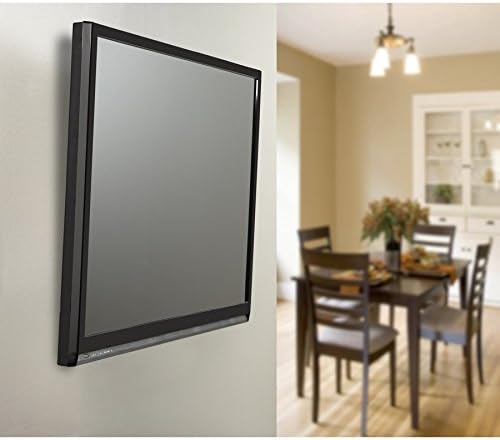
Image: A television securely mounted on the Utilitech wall mount, demonstrating its low-profile appearance in a room.
Operating the Tilt Feature
Your Utilitech TV wall mount features a convenient tilt mechanism to optimize your viewing experience and reduce glare from lights or windows.
- To adjust the tilt, gently push the bottom of the TV forward or pull it backward. The mount allows for a maximum tilt of 12 degrees.
- The friction-based design allows the TV to stay at the desired angle without needing to tighten or loosen knobs.
- Always adjust the TV by holding the frame, not the screen, to prevent damage.

Image: The Utilitech TV mount shown at an angle on a wall, illustrating its tilt functionality.
Maintenance
Regular maintenance will ensure the longevity and safe operation of your TV wall mount.
- Cleaning: Wipe the mount with a soft, dry cloth to remove dust. Do not use abrasive cleaners or solvents.
- Periodic Inspection: Every 6-12 months, check all screws and bolts to ensure they are still tight and secure. Retighten if necessary.
- Damage Check: Inspect the mount for any signs of wear, corrosion, or damage. If any damage is found, discontinue use and contact customer support.
Troubleshooting
- TV is not level:
- Ensure the wall plate was installed level using the integrated bubble level.
- Check if the TV brackets are evenly attached to the TV.
- Mount feels loose on the wall:
- Verify that all lag bolts securing the wall plate to the wall are fully tightened.
- Ensure the mount is installed into solid wood studs or appropriate concrete/brick anchors.
- TV is difficult to tilt:
- Ensure no cables are obstructing the tilt mechanism.
- The tilt mechanism is designed to hold the TV firmly; apply gentle, even pressure.
- Missing parts:
- Carefully check all packaging materials. If parts are still missing, contact Utilitech customer support.
Warranty and Support
Utilitech products are manufactured to high-quality standards and are warranted to be free from defects in materials and workmanship. For specific warranty details, please refer to the warranty card included with your product or visit the official Utilitech website.
For technical support, replacement parts, or any questions regarding your Utilitech TV wall mount, please contact Utilitech Customer Service. Contact information can typically be found on the product packaging or the brand's official website.
Ask a question about this manual
Ask about setup, troubleshooting, compatibility, parts, safety, or missing instructions. Manuals+ will review the question and use this page’s manual context to help answer it.