
1. Introduction
This manual provides essential information for the safe and effective installation, operation, and maintenance of the Patlite BM-202H Signal Phone. Please read this manual thoroughly before using the product and retain it for future reference.
2. Safety Information
Always observe the following safety precautions to prevent injury to personnel and damage to the product or other equipment.
- Ensure that installation and wiring are performed by qualified personnel only.
- Disconnect all power sources before performing any installation, wiring, or maintenance work.
- Verify that the power supply voltage matches the product's specifications (24V AC/DC).
- Do not expose the product to excessive moisture, dust, or extreme temperatures.
- Do not attempt to modify or disassemble the product. Refer all servicing to authorized personnel.
3. Product Overview
The Patlite BM-202H is a compact signal phone designed for industrial applications, providing audio signaling capabilities. It operates on a 24V AC/DC power supply and consumes 0.4W.
3.1. Components

Figure 1: Front View of Patlite BM-202H Signal Phone. This image displays the compact, black cubic housing of the signal phone with a prominent circular speaker grille on the front face, surrounded by a silver, ribbed bezel.
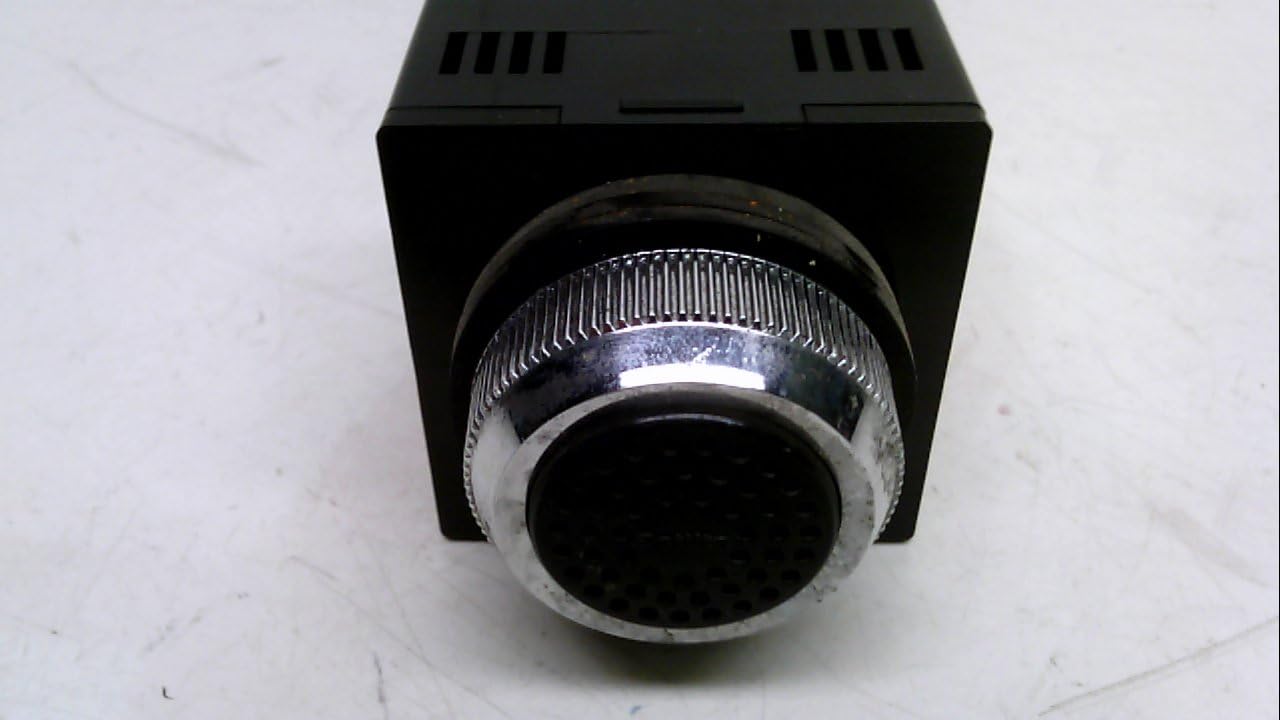
Figure 2: Close-up of Speaker Grille. A detailed view of the signal phone's speaker grille, showing its textured surface and the metallic, finely ribbed bezel that secures it to the device housing.
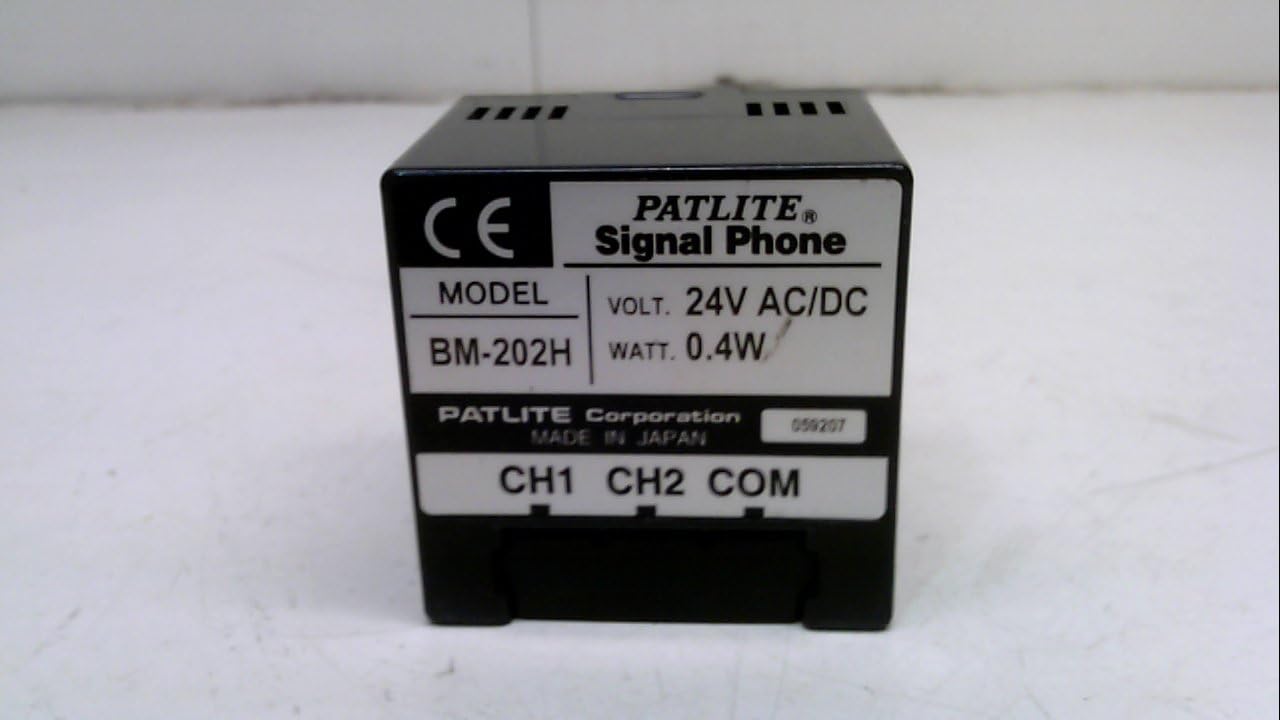
Figure 3: Side View with Product Label. This image shows the side of the Patlite BM-202H, featuring a label that clearly indicates the model number (BM-202H), voltage (24V AC/DC), wattage (0.4W), and connection terminals (CH1, CH2, COM). The label also states 'PATLITE Corporation MADE IN JAPAN'.
4. Setup and Installation
4.1. Before Installation
- Unpack the BM-202H and inspect it for any visible damage.
- Ensure all necessary tools and wiring materials are available.
- Confirm the installation environment is suitable (e.g., away from excessive heat, moisture, or vibration).
4.2. Wiring
The BM-202H requires a 24V AC/DC power supply and features connection terminals labeled CH1, CH2, and COM. These terminals are typically used for signal input and common ground connections.
- Ensure the power supply is disconnected before beginning any wiring.
- Connect the 24V AC or DC power supply to the appropriate power input terminals (refer to the product label for exact polarity if DC).
- Connect the common (COM) terminal to the system's common ground.
- Connect signal input lines to CH1 and CH2 as required by your application. These channels typically trigger different audio signals or functions.
- Secure all wiring connections to prevent accidental disconnection.
- Once wiring is complete, carefully restore power and test the unit's functionality.
5. Operating Instructions
The Patlite BM-202H Signal Phone is designed for straightforward operation, primarily functioning as an audio output device triggered by external signals.
- Power On: Once correctly wired and power is supplied, the unit is ready for operation.
- Signal Input: The unit will emit an audible signal when a trigger is received on its CH1 or CH2 input terminals. The specific audio pattern or message may vary based on the signal input configuration.
- Audio Output: Sound is emitted from the front speaker grille. Ensure the grille is not obstructed for optimal sound clarity.
- Volume Adjustment: If applicable, adjust the volume using any integrated controls. (Note: Specific volume controls are not detailed in product specifications; assume fixed volume unless otherwise indicated by the manufacturer).
6. Maintenance
Regular maintenance helps ensure the longevity and reliable performance of your Patlite BM-202H Signal Phone.
- Cleaning: Gently wipe the exterior of the unit with a soft, dry cloth. Do not use abrasive cleaners, solvents, or excessive moisture.
- Inspection: Periodically inspect the wiring connections for any signs of wear, corrosion, or looseness. Ensure the unit is securely mounted.
- Environmental Check: Verify that the operating environment remains within specified conditions (temperature, humidity, dust levels).
- Speaker Grille: Ensure the speaker grille is free from dust and debris to maintain clear audio output.
7. Troubleshooting
If you encounter issues with your BM-202H, refer to the following table for common problems and solutions.
| Problem | Possible Cause | Solution |
|---|---|---|
| No audio output | No power supply; Incorrect wiring; No signal input; Damaged unit. | Check power connections and voltage; Verify wiring to CH1/CH2/COM; Confirm signal source is active; Contact support if unit is damaged. |
| Distorted or low audio | Obstructed speaker grille; Incorrect signal level; Unit malfunction. | Clear any obstructions from the grille; Verify signal input levels; Contact support. |
| Unit does not respond to signal | Incorrect signal wiring; Signal source issue; Unit malfunction. | Check CH1/CH2 wiring; Test signal source; Contact support. |
8. Specifications
- Model: BM-202H
- Brand: Patlite
- Voltage: 24V AC/DC
- Wattage: 0.4W
- Product Dimensions (L x W x H): 0.31 x 0.31 x 0.24 inches (0.79 x 0.79 x 0.61 cm)
- Item Weight: 1.67 pounds (0.76 kg)
- Material: Copper (internal components)
- Manufacturer: PATLITE
9. Warranty and Support
For warranty information, technical support, or service inquiries, please contact your authorized Patlite distributor or visit the official Patlite website. Keep your purchase receipt as proof of purchase.


