1. Introduction
This instruction manual provides essential information for the safe and proper installation, operation, and maintenance of the Hubbell HBL2430 Receptacle. Please read this manual thoroughly before proceeding with any installation or use. Retain this manual for future reference.
2. Safety Information
WARNING: RISK OF ELECTRIC SHOCK OR FIRE.
- Always turn off power at the circuit breaker or fuse box before installing, servicing, or removing the receptacle.
- Installation must be performed by a qualified electrician in accordance with all national and local electrical codes.
- Do not use this device if it appears damaged.
- Ensure all wire connections are secure and properly insulated.
- This receptacle is designed for specific voltage and amperage ratings. Do not exceed these ratings.
- Keep children away from electrical outlets.
3. Product Overview
The Hubbell HBL2430 is a robust electrical receptacle designed for industrial and commercial applications. It features durable construction suitable for demanding environments, ensuring reliable power connections.
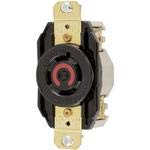
Image 1: Front view of the Hubbell HBL2430 Receptacle. This image shows the black body of the receptacle with brass-colored mounting straps and the distinct red ring around the central opening, indicating its specific configuration.
4. Specifications
| Feature | Detail |
|---|---|
| Model Number | HBL2430 |
| Brand | Hubbell |
| Voltage | 480 Volts |
| Amperage | 20 Amps |
| Material | Polyester |
| Compatible Devices | All (compatible with NEMA L8-20R configuration) |
| Item Weight | 0.16 ounces |
| Manufacturer | Hubbell |
5. Setup and Installation
Professional installation by a qualified electrician is strongly recommended.
- Turn Off Power: Locate the circuit breaker or fuse controlling the circuit where the receptacle will be installed. Turn off the power completely. Verify with a voltage tester.
- Prepare Wiring: Strip approximately 1/2 inch of insulation from the ends of the electrical wires (hot, neutral, ground).
- Connect Wires:
- Connect the hot (live) wire (typically black or red) to the brass-colored terminal screw.
- Connect the neutral wire (typically white) to the silver-colored terminal screw.
- Connect the ground wire (typically green or bare copper) to the green terminal screw.
- Mount Receptacle: Carefully fold the wires into the electrical box and secure the receptacle to the box using the provided mounting screws.
- Install Faceplate: Attach the appropriate faceplate (not included) over the receptacle.
- Restore Power: Turn the power back on at the circuit breaker or fuse box.
- Test: Test the receptacle with a suitable electrical device or tester to ensure proper functionality.
6. Operating Instructions
The Hubbell HBL2430 Receptacle is designed for straightforward operation. Once properly installed, simply insert a compatible plug into the receptacle. Ensure the plug is fully seated to establish a secure electrical connection.
- Only use plugs that match the NEMA L8-20P configuration for this L8-20R receptacle.
- Do not force plugs into the receptacle.
- Avoid overloading the circuit.
- If the receptacle feels hot to the touch, disconnect devices and consult a qualified electrician.
7. Maintenance
The Hubbell HBL2430 Receptacle requires minimal maintenance. Regular inspection can help ensure continued safe operation.
- Cleaning: Periodically wipe the receptacle and faceplate with a dry, soft cloth. Do not use liquid cleaners or abrasive materials. Ensure power is off before cleaning.
- Inspection: Annually inspect the receptacle for any signs of damage, such as cracks, discoloration, or loose connections. If any damage is observed, turn off power and have the receptacle inspected and replaced by a qualified electrician.
- Tightness: If accessible and safe to do so (with power off), periodically check the tightness of the terminal screws.
8. Troubleshooting
If you experience issues with your Hubbell HBL2430 Receptacle, consider the following common troubleshooting steps:
- No Power:
- Check the circuit breaker or fuse box. A tripped breaker or blown fuse will cut power to the circuit. Reset the breaker or replace the fuse.
- Ensure the receptacle is properly wired and all connections are secure. (Consult a qualified electrician).
- Loose Plug: If a plug feels loose in the receptacle, it may indicate wear. The receptacle should be replaced by a qualified electrician.
- Overheating: If the receptacle feels hot, immediately unplug all devices and turn off power. This could indicate an overload or a faulty connection. Do not use until inspected by a qualified electrician.
For issues not resolved by these steps, contact a qualified electrician or Hubbell customer support.
9. Warranty and Support
For specific warranty information regarding your Hubbell HBL2430 Receptacle, please refer to the documentation provided at the time of purchase or visit the official Hubbell website. Hubbell products are designed for quality and durability.
For technical support, product inquiries, or warranty claims, please contact Hubbell customer service directly. Contact information can typically be found on the manufacturer's website or product packaging.
Hubbell Official Website: www.hubbell.com


