
1. Introduction
This manual provides essential instructions for the safe and effective installation and use of the Marathon J600 2-Way 9.65mm Terminal Block Jumper. Please read this manual thoroughly before installation and retain it for future reference. This product is designed for professional use in industrial electrical applications.
2. Product Overview
The Marathon J600 is a 2-position terminal block jumper designed to create a common electrical connection between adjacent terminal block positions. It features a 9.65mm pitch, ensuring compatibility with specific terminal block series. This jumper facilitates efficient wiring by consolidating connections.
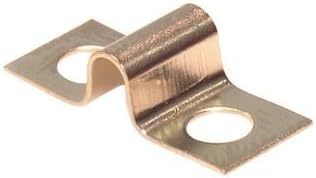
Figure 1: Marathon J600 2-Way 9.65mm Terminal Block Jumper. This image displays the metallic jumper with two connection points, designed to bridge electrical connections between two terminal block positions.
3. Setup and Installation
Safety First: Always ensure that power to the circuit is disconnected and locked out before performing any installation or maintenance on electrical components. Failure to do so can result in serious injury or death.
- Verify Compatibility: Confirm that the J600 jumper is compatible with your specific terminal block series and spacing (9.65mm pitch).
- Prepare Terminal Block: Ensure the terminal block screws are loosened sufficiently to allow insertion of the jumper.
- Insert Jumper: Carefully insert the jumper into the designated connection points of the two adjacent terminal block positions. The jumper should sit flush within the terminal block's connection area.
- Secure Connection: Tighten the terminal block screws firmly to secure the jumper in place. Do not overtighten, as this can damage the terminal block or jumper. Ensure a secure electrical and mechanical connection.
- Inspect: Visually inspect the installed jumper to ensure it is properly seated and all connections are secure.
After installation, power can be restored to the circuit. Always perform a functional test to confirm proper operation.
4. Operating Principles
The Marathon J600 jumper functions passively by creating a permanent electrical bridge between two adjacent terminal block positions. Once installed, it ensures that any electrical signal or power applied to one connected terminal block position is also present at the other, effectively creating a common potential. No active operation is required from the user after proper installation.
5. Maintenance
The Marathon J600 jumper requires minimal maintenance. Regular inspection is recommended as part of routine electrical system checks.
- Visual Inspection: Periodically check the jumper and its connections for any signs of corrosion, discoloration, loose connections, or physical damage.
- Cleaning: If necessary, gently clean the jumper and surrounding terminal block area with a dry, non-abrasive cloth. Ensure power is disconnected before cleaning.
- Tightness Check: Re-verify the tightness of the terminal block screws securing the jumper during scheduled maintenance intervals.
6. Troubleshooting
If an electrical continuity issue arises in a circuit utilizing the J600 jumper, consider the following:
- No Continuity:
- Ensure the jumper is fully seated and the terminal block screws are adequately tightened.
- Check for any foreign objects or debris preventing proper contact.
- Verify the jumper is not damaged or corroded.
- Overheating/Discoloration:
- This may indicate a loose connection or an overloaded circuit. Disconnect power immediately and investigate the cause. Consult a qualified electrician.
Always consult a qualified electrician for complex electrical issues.
7. Specifications
| Brand | Marathon |
| Model Number | J600 |
| Connector Type | Screw |
| Number of Positions | 2 |
| Pitch | 9.65mm |
| Manufacturer | Marathon/Kulka |
| ASIN | B00DWI8L9Y |
8. Warranty and Support
For information regarding product warranty, please refer to the documentation provided at the time of purchase or contact Marathon customer support directly. Support contact details can typically be found on the manufacturer's official website or through your authorized distributor.
Marathon Official Website: www.marathonsp.com