
1. Introduction
This manual provides detailed instructions for the setup, operation, and maintenance of your Marea B35138/3 digital watch. Please read this manual thoroughly to ensure proper use and to maximize the lifespan of your device. Keep this manual for future reference.
2. Product Overview
The Marea B35138/3 is a digital wrist watch featuring a unique dual-display design and a comfortable silicone strap. It provides accurate timekeeping and basic date functions.
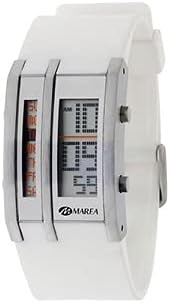
Image 1: Front view of the Marea B35138/3 digital watch. It features a white silicone strap, a rectangular case with metallic accents, and two distinct digital display sections. The right display shows hours and minutes, while the left display appears to be a scrolling or secondary indicator.
Component Identification:
- Display (Right): Shows hours and minutes.
- Display (Left): Secondary digital display, potentially for seconds or other indicators.
- Button A (Top Right): Typically used for mode selection or incrementing values.
- Button B (Bottom Right): Typically used for setting/adjusting values or confirming selections.
- Strap: White silicone material for comfortable wear.
3. Setup
Setting Time and Date:
To set the time and date on your Marea B35138/3 watch, follow these general steps. Button functions may vary slightly, but the typical process involves entering a setting mode and adjusting values.
- Enter Setting Mode: Press and hold Button A (Mode) for approximately 3-5 seconds until a digit on the display begins to flash. This indicates you are in setting mode.
- Adjust Hours: While the hour digit is flashing, press Button B (Set/Adjust) repeatedly to advance the hour. Observe the AM/PM indicator if present.
- Adjust Minutes: Press Button A (Mode) once to move the flashing indicator to the minute digits. Then, press Button B (Set/Adjust) repeatedly to adjust the minutes.
- Set Date (if applicable): Continue pressing Button A (Mode) to cycle through other settings such as year, month, and day. Use Button B (Set/Adjust) to change the values for each.
- Exit Setting Mode: Once all desired settings are adjusted, press Button A (Mode) again until no digits are flashing, or wait for approximately 10-15 seconds for the watch to automatically exit setting mode.
Note: If your watch features a 24-hour format, the AM/PM indicator will not be present.
4. Operating
Viewing Time and Date:
- Current Time: The watch typically displays the current time (hours and minutes) by default on the main right display.
- Date Display: Press Button A (Mode) briefly to cycle through different display modes. One press should show the date (month/day). Subsequent presses may reveal other functions if available (e.g., seconds, alarm time).
- Return to Time Display: After viewing other modes, the watch will usually revert to the time display automatically after a few seconds, or you can press Button A (Mode) until the time is shown again.
5. Maintenance
Cleaning:
To maintain the appearance of your watch, wipe the case and strap regularly with a soft, dry cloth. For stubborn dirt, a slightly damp cloth can be used, followed by immediate drying. Avoid using harsh chemicals or abrasive cleaners.
Battery Replacement:
The Marea B35138/3 watch is powered by a standard watch battery (e.g., a lithium coin cell like CR2016). When the display becomes dim or stops functioning, the battery may need replacement. It is recommended to have the battery replaced by a qualified watch technician to ensure proper sealing and prevent damage to the internal components.
Water Resistance:
This watch is generally designed to be splash resistant, suitable for daily use such as hand washing or light rain. It is not recommended for swimming, showering, or diving. Avoid prolonged exposure to water.
6. Troubleshooting
- Display is blank or dim: This usually indicates a low battery. Replace the battery as described in the Maintenance section.
- Incorrect time displayed: Re-enter the setting mode and adjust the time and date according to the Setup instructions. Ensure you have selected the correct AM/PM setting if applicable.
- Buttons are unresponsive: Check if the watch is in a specific mode that locks buttons. If not, a low battery or internal malfunction may be the cause. Try replacing the battery first. If the issue persists, contact customer support.
- Condensation inside the display: This indicates a breach in the watch's water resistance. Avoid further water exposure and seek professional service immediately to prevent damage to internal components.
7. Specifications
| Brand | Marea |
| Model Number | B35138/3 |
| Display Type | Digital |
| Strap Material | Silicone |
| Case Material | Metal / Plastic |
| Power Source | Battery (e.g., CR2016) |
| Water Resistance | Splash Resistant (Not suitable for swimming or showering) |
8. Warranty and Support
Marea products are manufactured to high-quality standards. For specific warranty information regarding your B35138/3 watch, please refer to the warranty card included with your purchase or visit the official Marea website. For technical support, service, or inquiries, please contact Marea customer service through their official channels.
