
Introduction
Welcome to your Smoby Cotoons Musical Flower Mobile. This mobile is designed to provide a soothing and stimulating environment for your baby, featuring gentle melodies, nature sounds, rotating plush butterflies, and a captivating light projection. Please read this manual carefully before assembly and use to ensure safe and proper operation.
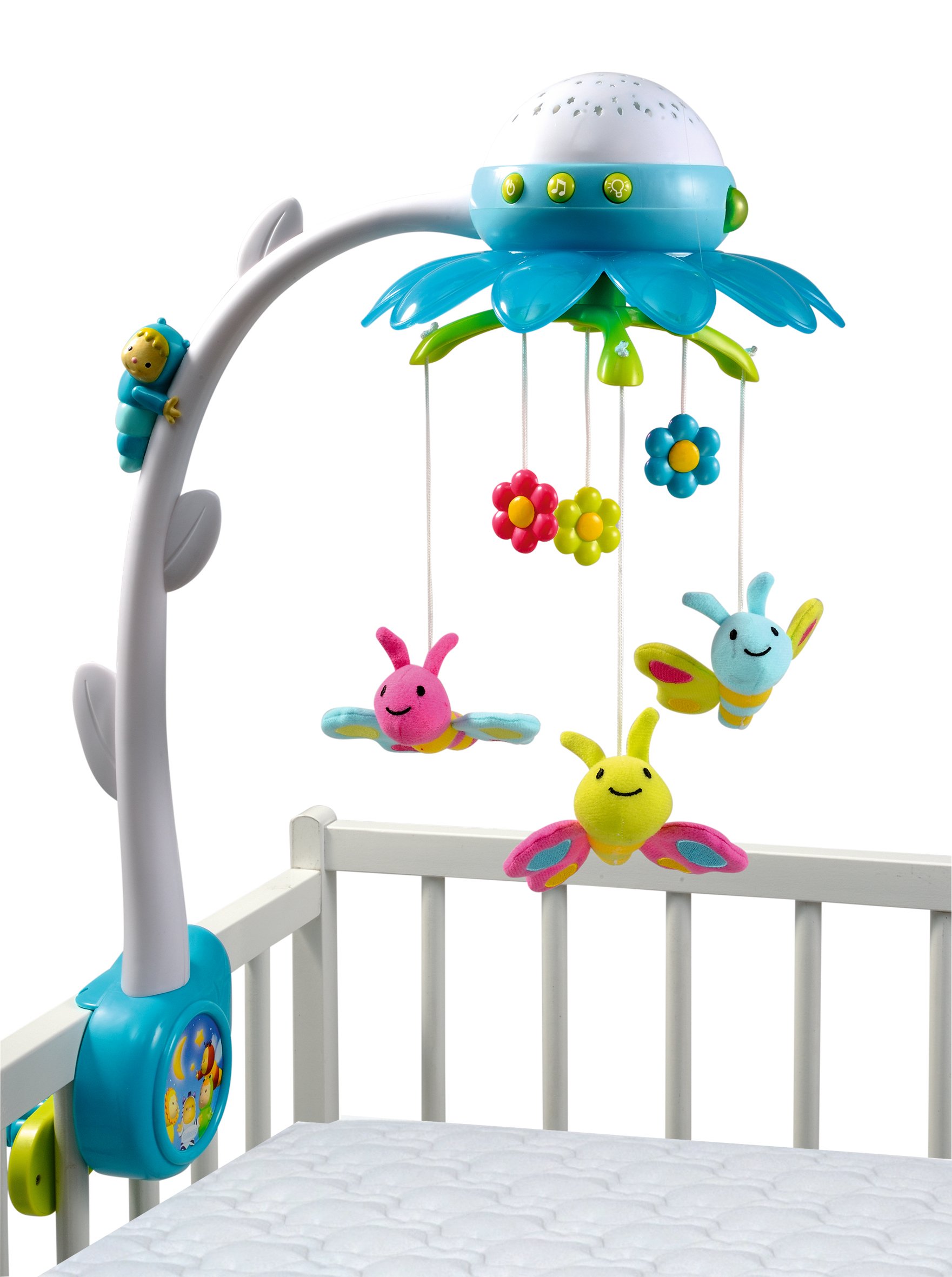
Smoby Cotoons Musical Flower Mobile with a baby in a crib, showing the rotating butterflies and light projection.
Important Safety Information
Please read all instructions before assembly and use. Keep this manual for future reference.
- WARNING: Possible entanglement injury. Keep out of baby's reach. Remove mobile from crib when baby begins to push up on hands and knees or reaches 5 months of age, whichever comes first.
- WARNING: Adult assembly required. Keep small parts away from children during assembly.
- Battery Safety: Use new 1.5V batteries. Do not mix old and new batteries. Do not mix alkaline, standard (carbon-zinc), or rechargeable (nickel-cadmium) batteries. Remove batteries if the product is not used for a long period.
Package Contents
Before assembly, ensure all parts are present:
- Main mobile unit with flower canopy and projector
- Crib attachment arm
- Crib clamp and screw mechanism
- 3 plush butterflies
- Remote control
- Instruction Manual (this document)

Close-up of the three colorful plush butterflies hanging from the mobile.
Setup and Assembly
Follow these steps to assemble and attach your mobile to the crib.
1. Attach the Crib Clamp
Position the crib clamp (blue and yellow parts) on the side rail of your baby's crib. Ensure it is securely tightened using the screw mechanism. The clamp is designed to fit both barred and solid-sided cribs.

Close-up of the crib clamp mechanism attached to a crib rail.

Side view of the mobile's crib attachment arm and clamp.
2. Install the Mobile Arm
Slide the mobile arm (white curved piece) into the slot on the crib clamp until it clicks securely into place.
3. Attach the Main Mobile Unit
Carefully attach the main flower mobile unit to the top of the mobile arm. Ensure it is firmly seated.
4. Insert Batteries
Locate the battery compartment on the main mobile unit and the remote control. Insert the required 1.5V batteries, ensuring correct polarity (+/-). Close the battery compartments securely. Note: New batteries are recommended for optimal performance.
Operating Instructions
Your Smoby Cotoons Musical Flower Mobile offers various functions for your baby's comfort.
Using the Remote Control
The remote control allows you to manage the mobile's functions from a distance without disturbing your baby.

The teardrop-shaped remote control for the Smoby Cotoons mobile.
- Power Button: Press to turn the mobile ON or OFF.
- Music Selection: Cycle through the 4 available sounds: 3 lullabies and 1 nature ambiance.
- Projection Control: Activate or deactivate the ceiling projection of flowers and butterflies.
- Rotation Control: Start or stop the rotation of the plush butterflies.
Mobile Functions
- Musical Melodies: Choose from a selection of soothing tunes or nature sounds to help your baby relax.
- Light Projection: A gentle, color-changing light projects patterns onto the ceiling, creating a calming visual display.
- Rotating Butterflies: The three plush butterflies gently rotate, captivating your baby's attention.
- Automatic Shut-off: The mobile is designed to automatically turn off after approximately 10 minutes to conserve battery life and ensure baby's uninterrupted sleep.
Care and Maintenance
To ensure the longevity and hygiene of your Smoby Cotoons Mobile:
- Cleaning: Wipe the plastic surfaces with a damp cloth and mild soap. Do not immerse the electronic components in water.
- Plush Toys: The plush butterflies can be surface-cleaned with a damp cloth. Do not machine wash.
- Storage: When not in use for extended periods, remove batteries and store the mobile in a clean, dry place.
Troubleshooting
If you encounter any issues with your mobile, please refer to the following common solutions:
Mobile does not turn on or operate:
- Check if batteries are inserted correctly with the correct polarity.
- Ensure batteries are new and have sufficient charge (1.5V or higher).
- Verify that the battery compartment covers are securely closed.
Remote control is not working:
- Check the remote control's battery.
- Ensure there are no obstructions between the remote and the mobile unit.
Motor noise is audible:
- A slight motor sound is normal during operation. If it is excessively loud, ensure all parts are assembled correctly and securely.
Projection is dim or unclear:
- Ensure the room is sufficiently dark for the projection to be visible.
- Check battery levels, as low batteries can affect light intensity.
Product Specifications
| Brand | Smoby |
| Model Number | SM 2114071 |
| Mounting Type | Crib Mount |
| Material | Plush |
| Theme | Flowers, Musical, Butterflies |
| Color | Multicolored |
| Special Feature | Musical, Light Projection, Remote Control |
| Item Dimensions (L x W x H) | 46 x 57 x 22 cm |
| Item Weight | 1.2 Kilograms |
| Recommended Age | 0 to 36 months |
Warranty and Support
For warranty information or technical support, please refer to the contact details provided on the product packaging or visit the official Smoby website. Please retain your proof of purchase.