
Introduction
This manual provides detailed instructions for the operation and maintenance of your Calypso K5609/3 Digital Quartz Watch. Please read this manual thoroughly before using your watch to ensure proper function and longevity. Keep this manual for future reference.
Safety Information
- Avoid exposing the watch to extreme temperatures (hot or cold) for extended periods.
- Do not attempt to open the watch case or replace the battery yourself, as this may void the warranty and compromise water resistance. Contact a qualified technician.
- Clean the watch with a soft, dry cloth. Avoid using chemical cleaners.
- While the watch is water-resistant up to 100 meters, avoid operating buttons underwater to prevent water ingress.
Package Contents
- Calypso K5609/3 Digital Quartz Watch
- User Manual (this document)
Watch Overview
Your Calypso K5609/3 watch features a digital display with various functions. Familiarize yourself with the buttons and display layout.
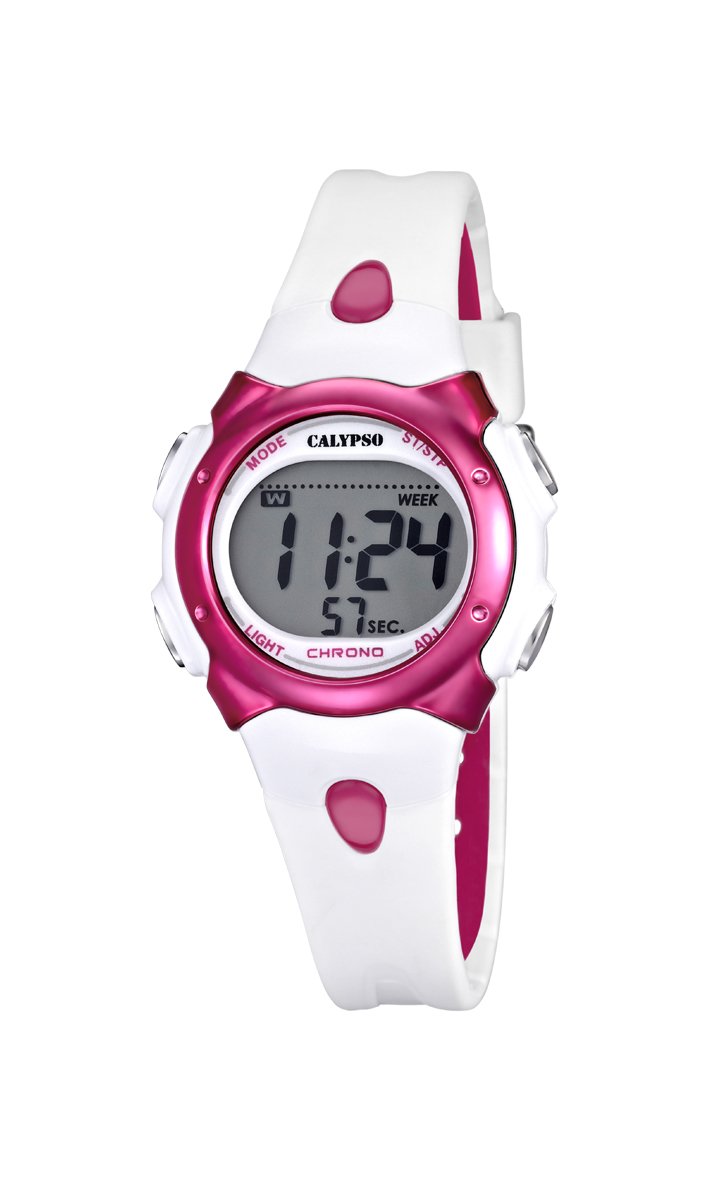
Figure 1: Front view of the Calypso K5609/3 Digital Quartz Watch. This image shows the watch face with its digital display and the overall design of the watch, including the white plastic strap.

Figure 2: Angled view of the Calypso K5609/3 Digital Quartz Watch. This image provides a different perspective of the watch, highlighting its round case shape and the texture of the plastic strap.
Button Functions (Typical Digital Watch Layout)
While specific button labels may vary, most digital watches follow a similar pattern:
- MODE Button: Cycles through different modes (Time, Alarm, Chronograph).
- SET/ADJUST Button: Used to enter setting mode and confirm selections.
- START/STOP Button: Used to start/stop chronograph, adjust values upwards.
- LIGHT Button: Activates the backlight for illumination.
Refer to the markings on your specific watch for exact button identification.
Setup
Setting Time and Date
- Press the MODE button repeatedly until the time display starts flashing or you enter the time setting mode.
- Press the SET/ADJUST button to select the digit you wish to change (e.g., hours, minutes, year, month, day).
- Use the START/STOP button to increase the selected value. Hold it down for faster adjustment.
- Continue pressing SET/ADJUST and START/STOP until all time and date settings are correct.
- Press the MODE button to exit the setting mode and return to normal time display.
Setting the Alarm
- Press the MODE button until you reach the Alarm mode (often indicated by "AL" or a bell icon).
- Press the SET/ADJUST button to select the alarm hour.
- Use the START/STOP button to set the desired alarm hour.
- Press SET/ADJUST again to select the alarm minute.
- Use the START/STOP button to set the desired alarm minute.
- Press MODE to exit the alarm setting mode.
- To activate/deactivate the alarm, typically press the START/STOP button while in Alarm mode. An alarm icon will appear/disappear on the display.
Operating
Using the Chronograph (Stopwatch)
- Press the MODE button until you reach the Chronograph mode (often indicated by "ST" or "CH"). The display should show "00:00:00".
- Press the START/STOP button to start the chronograph.
- Press the START/STOP button again to stop the chronograph.
- To reset the chronograph, press the SET/ADJUST button while the chronograph is stopped.
- Press MODE to exit the chronograph mode.
Backlight Function
To illuminate the display in low-light conditions, press the LIGHT button. The backlight will typically stay on for a few seconds.
Water Resistance
Your Calypso K5609/3 watch is water-resistant up to 100 meters (10 ATM). This means it is suitable for swimming and snorkeling. However, it is not recommended for scuba diving. Do not operate any buttons while the watch is submerged in water, as this can compromise the water seal.
Maintenance
Cleaning Your Watch
Regularly clean your watch to maintain its appearance and function. Use a soft, slightly damp cloth to wipe the case and strap. For the plastic strap, mild soap and water can be used, but ensure no soap residue remains. Avoid harsh chemicals or abrasive materials.
Battery Replacement
The watch is powered by a quartz battery. When the display becomes dim or the watch stops functioning, the battery may need replacement. Battery life varies depending on usage, especially backlight and alarm functions. It is recommended to have the battery replaced by a qualified watch technician to ensure the water resistance seal is properly maintained.
Troubleshooting
| Problem | Possible Cause | Solution |
|---|---|---|
| Watch display is blank or dim. | Low or dead battery. | Replace the battery (recommended by a professional). |
| Time is incorrect. | Time not set correctly or accidental adjustment. | Refer to "Setting Time and Date" section to reset the time. |
| Alarm does not sound. | Alarm not activated or set incorrectly. | Ensure alarm is activated and set to the correct time. |
| Water inside the watch. | Buttons operated underwater or seal compromised. | Immediately take the watch to a professional for inspection and repair to prevent further damage. |
Specifications
- Model: K5609/3
- Brand: Calypso
- Display Type: Digital
- Movement: Quartz
- Case Material: Plastic
- Case Diameter: 33 mm
- Case Thickness: 8 mm
- Band Material: Plastic
- Band Width: 14 mm
- Clasp Type: Pin Buckle (Boucle Ardillon)
- Dial Window Material: Acrylic
- Water Resistance: 100 Meters (10 ATM)
- Special Features: Alarm, Chronograph, Day-Date-Month Calendar
- Power Source: Battery Powered
- Product Dimensions: 20 x 20 x 20 cm; 50 grams (packaging dimensions, watch itself is smaller)
Warranty and Support
For warranty information and customer support, please refer to the official Calypso website or contact your authorized dealer. Keep your purchase receipt as proof of purchase for warranty claims.
For further assistance, please visit: www.calypsowatches.com


