
iDance Blue50BL
iDance Blue 50 Headphone User Manual
Model: Blue50BL
Introduction
This manual provides essential information for the safe and efficient use of your iDance Blue 50 Headphone. Please read it thoroughly before operating the device and retain it for future reference.
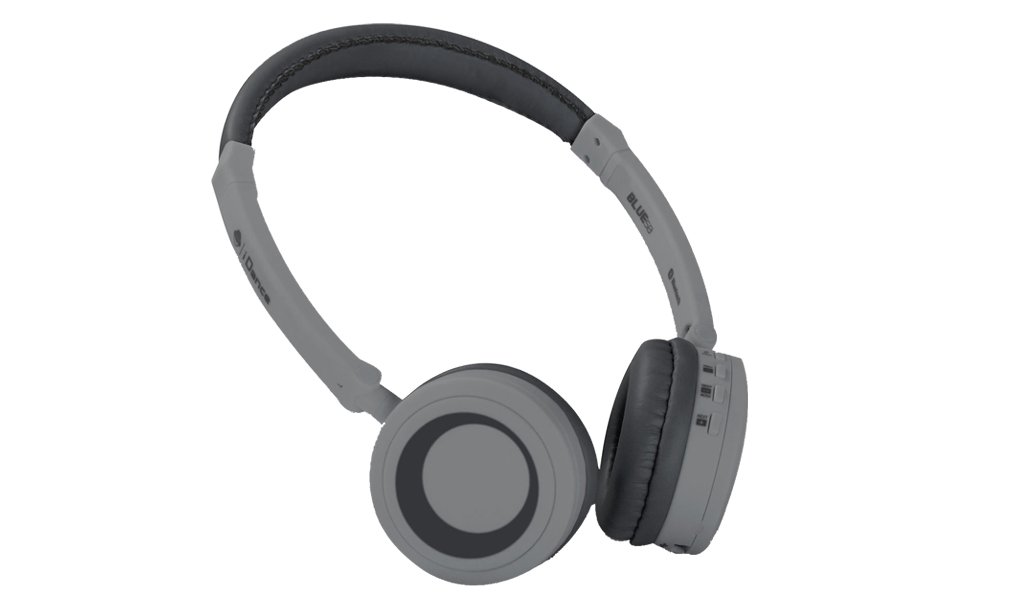
Image: The iDance Blue 50 Headphone, featuring a sleek black design with comfortable over-ear cushions and an adjustable headband. The controls are visible on the right earcup.
Package Contents
Ensure all items are present in the package:
- iDance Blue 50 Headphone
- Ear Cushions (pre-installed or separate)
- Headband (integrated)
- Detachable Cable (if wired connectivity is supported)
- Charging Cable (for wireless models)
- User Manual (this document)
Setup
Charging the Headphone
The iDance Blue 50 Headphone features built-in rechargeable batteries. Before first use, fully charge the headphones.
- Locate the charging port on the headphone (typically on one of the earcups).
- Connect the provided charging cable to the headphone.
- Connect the other end of the charging cable to a compatible USB power source (e.g., computer USB port, USB wall adapter).
- The charging indicator light will illuminate. It typically takes approximately 1 hour and 45 minutes for a full charge.
- Once fully charged, the indicator light may change color or turn off. Disconnect the charging cable.
Bluetooth Pairing
To use the headphone wirelessly, pair it with your Bluetooth-enabled device.
- Ensure the headphone is charged and turned off.
- Press and hold the Power/Pairing button (refer to the diagram in the Operating section for exact location) for approximately 5-7 seconds until the indicator light flashes rapidly, indicating pairing mode.
- On your device (smartphone, tablet, computer), enable Bluetooth and search for available devices.
- Select "iDance Blue 50" or a similar name from the list of found devices.
- Once connected, the indicator light on the headphone will typically stop flashing and remain solid blue.
- If prompted for a passcode, enter "0000" (four zeros).
Wired Connection (Optional)
For wired use, connect the detachable 3.5mm audio cable (if included) to the headphone's audio jack and your audio source.
Operating Instructions
Power On/Off
- Power On: Press and hold the Power button for 2-3 seconds.
- Power Off: Press and hold the Power button for 3-4 seconds.
Music Playback
- Play/Pause: Press the Multi-function button once.
- Next Track: Press and hold the Volume Up button.
- Previous Track: Press and hold the Volume Down button.
Volume Control
- Increase Volume: Press the Volume Up button.
- Decrease Volume: Press the Volume Down button.
Call Management
- Answer/End Call: Press the Multi-function button once.
- Reject Call: Press and hold the Multi-function button for 2 seconds.
- Redial Last Number: Double-press the Multi-function button.
The headphone offers approximately 6 hours of usage on a full charge.
Maintenance
- Cleaning: Use a soft, dry cloth to clean the headphones. Do not use abrasive cleaners or solvents.
- Storage: Store the headphones in a cool, dry place away from direct sunlight and extreme temperatures.
- Battery Care: To prolong battery life, avoid fully discharging the headphones frequently. Charge them regularly, even if not in use for extended periods.
- Avoid Moisture: Do not expose the headphones to water or excessive moisture.
- Handle with Care: Avoid dropping or subjecting the headphones to strong impacts.
Troubleshooting
| Problem | Possible Cause | Solution |
|---|---|---|
| Headphone does not power on. | Low battery. | Charge the headphone fully. |
| Cannot pair with device. | Headphone not in pairing mode; Bluetooth off on device; device too far. | Ensure headphone is in pairing mode (flashing light). Turn on Bluetooth on your device. Move device closer to headphone. |
| No sound. | Volume too low; incorrect audio source; headphone not connected. | Increase volume on both headphone and device. Ensure headphone is correctly paired/connected. Check audio output settings on your device. |
| Poor sound quality. | Interference; low battery; distance from device. | Move away from sources of interference. Charge the headphone. Reduce distance between headphone and device. |
Specifications
| Model Number | Blue50BL |
| Connectivity Technology | Wireless (Bluetooth), Wired (3.5 mm Jack) |
| Form Factor | Over Ear |
| Frequency Range | 20Hz - 20kHz |
| Control Method | Touch (on-ear controls) |
| Material | Plastic |
| Item Weight | Approx. 99.8 g |
| Included Components | Ear Cushions, Headband |
| Battery Life (Approx.) | 6 hours playback |
| Charging Time (Approx.) | 1 hour 45 minutes |
| UPC | 886898003015 |
| Manufacturer | IDANCE |
Warranty and Support
For warranty information and technical support, please refer to the warranty card included with your product or visit the official iDance website. Keep your proof of purchase for warranty claims.
For further assistance, you may contact iDance customer service through their official channels.
Ask a question about this manual
Ask about setup, troubleshooting, compatibility, parts, safety, or missing instructions. Manuals+ will review the question and use this page’s manual context to help answer it.