
Crouzet 88974053
Crouzet Programmable Logic Controller (PLC) User Manual
Model: 88974053
1. Introduction
This manual provides essential information for the safe and efficient operation of your Crouzet Programmable Logic Controller (PLC), Model 88974053. This device is designed for industrial control applications, offering 12 inputs and 8 relay outputs with a 240VAC supply voltage. Please read this manual thoroughly before installation, operation, or maintenance to ensure proper functionality and safety.
2. Safety Information
Always adhere to the following safety guidelines to prevent injury or damage to the device:
- Electrical Hazard: Ensure power is disconnected before installation, wiring, or maintenance. Only qualified personnel should perform electrical work.
- Proper Grounding: Always ensure the PLC is properly grounded to prevent electrical shock.
- Environmental Conditions: Do not expose the PLC to excessive moisture, dust, or extreme temperatures outside its specified operating range.
- Ventilation: Ensure adequate ventilation around the unit to prevent overheating.
- Intended Use: Use the PLC only for its intended purpose as a programmable logic controller in industrial environments.
3. Product Overview
The Crouzet 88974053 PLC is a compact and robust controller designed for various automation tasks. It features a clear display and intuitive controls for programming and monitoring.
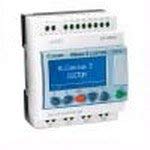
Figure 3.1: Front view of the Crouzet Programmable Logic Controller 88974053. This image shows the compact design of the PLC with its integrated display screen and control buttons. The input and output terminals are visible at the top and bottom edges of the device.
Key Components:
- Display Screen: For status monitoring and programming interface.
- Navigation Buttons: Used to navigate menus and input data.
- Input Terminals: 12 digital inputs for connecting sensors and control signals.
- Output Terminals: 8 relay outputs for controlling actuators and other devices.
- Power Supply Terminals: For 240VAC power connection.
4. Setup
Follow these steps for initial setup and wiring:
- Mounting: Mount the PLC on a DIN rail in a suitable enclosure, ensuring adequate space for wiring and ventilation.
- Power Wiring: Connect the 240VAC power supply to the designated power terminals (L and N). Ensure proper polarity and grounding.
- Input Wiring: Connect your input devices (e.g., switches, sensors) to the 12 input terminals. Refer to the wiring diagram provided in the product's technical datasheet for specific connections.
- Output Wiring: Connect your output devices (e.g., relays, contactors) to the 8 relay output terminals. Ensure the load current does not exceed the specified maximum for each relay.
- Initial Power-Up: Once all wiring is complete and verified, apply power to the PLC. The display should illuminate, indicating successful power-up.
5. Operating
The PLC can be programmed and operated via its integrated display and buttons or through compatible software (sold separately).
Basic Operation:
- Navigation: Use the arrow buttons to navigate through menus on the display.
- Selection/Confirmation: Press the 'OK' or 'Enter' button to select an option or confirm an entry.
- Programming: The PLC supports ladder logic programming. Refer to the detailed programming guide for creating and uploading programs.
- Monitoring: The display shows the current status of inputs, outputs, and program execution.
For advanced programming and network integration, consult the comprehensive programming manual and software documentation.
6. Maintenance
The Crouzet PLC is designed for minimal maintenance. However, regular checks can ensure long-term reliability.
- Cleaning: Keep the unit clean and free from dust. Use a soft, dry cloth for cleaning. Do not use liquid cleaners.
- Connection Checks: Periodically inspect all wiring connections to ensure they are secure and free from corrosion.
- Ventilation: Ensure that ventilation openings are not obstructed.
- Firmware Updates: Check the manufacturer's website for any available firmware updates that may improve performance or add features.
7. Troubleshooting
If you encounter issues with your PLC, refer to the following common problems and solutions:
| Problem | Possible Cause | Solution |
|---|---|---|
| PLC does not power on. | No power supply; incorrect wiring; blown fuse. | Check power connections; verify wiring; replace fuse if necessary. |
| Inputs not responding. | Incorrect input wiring; faulty sensor; program error. | Verify input wiring; test sensor functionality; check PLC program logic. |
| Outputs not activating. | Incorrect output wiring; faulty relay; program error; overloaded output. | Check output wiring; test relay; review program logic; ensure load is within specifications. |
| Display shows error code. | Internal fault; programming error. | Refer to the detailed error code list in the technical manual; re-upload program. |
If the problem persists after attempting these solutions, contact technical support.
8. Specifications
Detailed technical specifications for the Crouzet Programmable Logic Controller 88974053:
- Model Number: 88974053
- Brand: Crouzet
- No. of Inputs: 12
- No. of Outputs: 8 (Relay)
- Supply Voltage: 240VAC
- Item Weight: 18.14 g (0.64 ounces)
- Package Dimensions: 1 x 1 x 1 inches
- RoHS Compliant: Yes
- First Available Date: November 1, 2014
9. Warranty and Support
Crouzet products are manufactured to high-quality standards. For specific warranty terms and conditions, please refer to the documentation included with your purchase or visit the official Crouzet website. For technical support, troubleshooting assistance, or spare parts, please contact your local Crouzet distributor or authorized service center. When contacting support, please have your product model number (88974053) and serial number ready.
Related documents88974053


Ask a question about this manual
Ask about setup, troubleshooting, compatibility, parts, safety, or missing instructions. Manuals+ will review the question and use this page’s manual context to help answer it.