
1. Product Overview
The Beetel M90N is a corded landline phone designed for reliable communication. It features a 16-digit LCD display, FSK/DTMF compatible caller ID, and various memory functions for convenience.

Image 1.1: Beetel M90N Corded Landline Phone. This image shows the black corded phone from an elevated angle, highlighting the handset, keypad, and LCD display.
Key Features:
- FSK/DTMF compatible caller ID for identifying incoming calls.
- 16-digit LCD display for clear information viewing.
- 8 direct one-touch memory and 12 two-touch memory for frequently dialed numbers.
- Phonebook storage for up to 25 numbers with names.
- 140 incoming call memory and 16 outgoing call memory.
- 3-level ringer volume switch.
- Digital volume control for speakerphone mode.
- Do Not Disturb (DND) function and incoming call reject function.
- Music on hold and pre-dialing function.
- Alarm clock and local area code setting.
- Visual indication for ringer and speaker.
2. Package Contents
Upon opening the package, ensure all the following items are present:
- Beetel M90N Corded Landline Phone Unit
- Handset
- Coiled Handset Cord
- Line Cord
- User Manual (this document)
3. Setup Instructions
3.1 Connecting the Phone
- Connect the Handset: Plug one end of the coiled handset cord into the handset and the other end into the jack labeled "HANDSET" on the side of the phone base.
- Connect the Line Cord: Plug one end of the line cord into the jack labeled "LINE" on the back of the phone base. Plug the other end into your telephone wall jack.
- Install Batteries (if applicable): While the phone can function without batteries for basic calls, some features like LCD display backlight, caller ID, and memory retention may require batteries. Open the battery compartment (usually at the bottom) and insert the required batteries (e.g., AAA or AA, refer to the compartment for type and polarity).
3.2 Initial Settings
- Date and Time: Follow the on-screen prompts or refer to the "Operating Instructions" section to set the current date and time. This is crucial for accurate caller ID records.
- Local Area Code: Set your local area code (up to 6 digits) for proper caller ID display and dialing.
- LCD Contrast: Adjust the 5-step LCD contrast for optimal viewing.
4. Operating Instructions
4.1 Making and Receiving Calls
- To Make a Call: Lift the handset or press the SPEAKER button. Dial the desired number.
- To Receive a Call: Lift the handset or press the SPEAKER button when the phone rings.
- Redial: Press the REDIAL button to call the last dialed number.
- Flash Function: Use the FLASH button for call waiting or transferring calls (if supported by your service provider).
- Pause Function: Use the PAUSE button when dialing numbers that require a pause (e.g., for PABX systems).
4.2 Caller ID Functionality
The phone supports FSK/DTMF compatible caller ID, displaying the incoming caller's number and name (if available and subscribed to the service).

Image 4.1: Beetel M90N Caller ID Display. This image highlights the phone's LCD screen showing a caller ID number and "CUSTOMER CARE", indicating its FSK/DTMF compatibility.
- Incoming Call Memory: The phone stores up to 140 incoming call records. Use the UP/DOWN buttons to scroll through the call history.
- Outgoing Call Memory: Stores up to 16 outgoing call records.
- Call Back: From the call history, you can directly call back a number.
- Erase Records: Individual or all call records can be erased from memory.

Image 4.2: Beetel M90N Incoming Calls Memory. This image emphasizes the phone's capability to store up to 140 incoming call records, visible on the LCD screen.
4.3 Memory Functions
The M90N offers various memory storage options:

Image 4.3: Beetel M90N One-Touch and Two-Touch Memory. This image highlights the phone's dedicated buttons for 8 one-touch and 12 two-touch memory functions.
- Direct One-Touch Memory (8 numbers): Store frequently called numbers for quick dialing. Refer to the phone's on-screen menu or specific buttons for programming.
- Two-Touch Memory (12 numbers): Store additional numbers that can be dialed with two button presses.
- Phonebook (25 numbers with name): Store contacts with both number and name for easy retrieval.
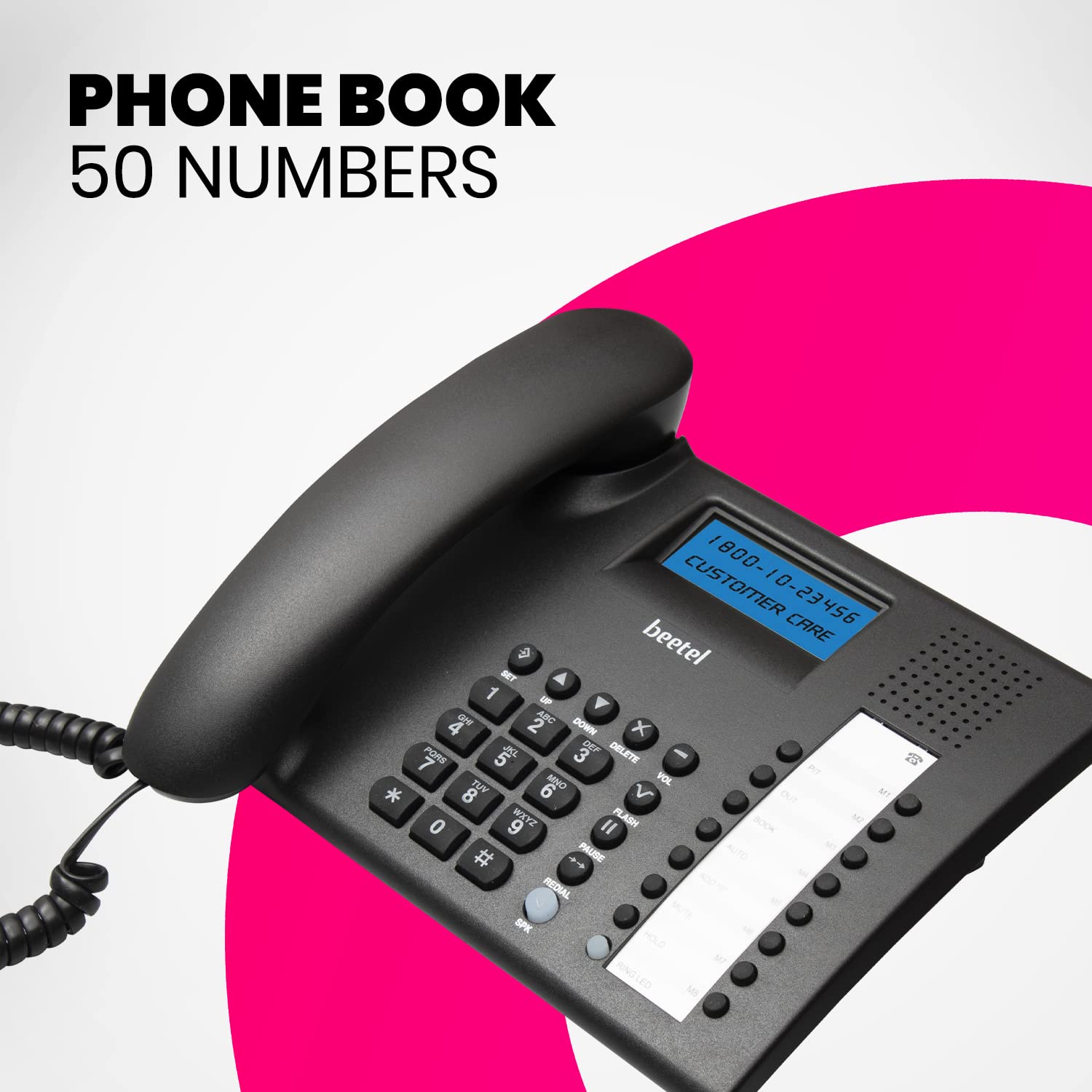
Image 4.4: Beetel M90N Phonebook Feature. This image shows the phone's keypad and LCD, indicating its capacity to store up to 25 numbers in the phonebook.
4.4 Speakerphone and Volume Control
- Speakerphone: Press the SPEAKER button to activate hands-free calling.
- Digital Volume Control: Adjust the speakerphone volume using the dedicated volume buttons during a call.
- Ringer Volume: Use the 3-level ringer volume switch (usually located on the side or back of the phone) to adjust the incoming call volume.
4.5 Additional Features
- Do Not Disturb (DND): Activate DND to temporarily silence incoming calls. Refer to the menu for activation/deactivation.
- Incoming Call Reject: Configure the phone to reject specific incoming calls.
- Music on Hold: When a call is placed on hold, music may play for the caller (if enabled).
- Alarm Clock: Set an alarm using the phone's menu.
- Baby Call: A feature that automatically dials a pre-programmed number when any key is pressed (useful for young children).
5. Maintenance
- Cleaning: Wipe the phone with a soft, damp cloth. Do not use harsh chemicals or abrasive cleaners.
- Avoid Liquids: Keep the phone away from water and other liquids to prevent damage.
- Temperature: Do not expose the phone to extreme temperatures or direct sunlight.
- Battery Replacement: If the display fades or memory functions become unreliable, replace the batteries. Ensure correct battery type and polarity.
6. Troubleshooting
| Problem | Possible Cause | Solution |
|---|---|---|
| No dial tone | Line cord not connected properly or service issue. | Ensure the line cord is securely plugged into both the phone and the wall jack. Test with another phone if possible. Contact your service provider if the issue persists. |
| LCD display is dim or blank | Low or depleted batteries. LCD contrast setting is too low. | Replace the batteries with new ones, ensuring correct polarity. Adjust the LCD contrast setting (refer to section 3.2). |
| Caller ID not displaying | Caller ID service not subscribed. Batteries are low. | Contact your telephone service provider to ensure Caller ID service is active. Replace batteries if they are low. |
| Cannot hear caller on speakerphone / Echo during speakerphone call | Speakerphone volume too low. Environmental factors causing echo. | Increase speakerphone volume using the digital volume control. Try moving the phone to a different location or reducing background noise. |
| Phone cuts off during calls | Loose connections. Battery issue affecting phone stability. | Check all cable connections. If batteries are installed, ensure they are fresh and correctly inserted. Replace if necessary, as old batteries can cause unexpected behavior. |
7. Specifications
| Feature | Detail |
|---|---|
| Model | M90N |
| Brand | Beetel |
| Telephone Type | Corded |
| Display | 16 Digit LCD Display |
| Caller ID Compatibility | FSK/DTMF |
| Incoming Call Memory | 140 numbers |
| Outgoing Call Memory | 16 numbers |
| One-Touch Memory | 8 numbers |
| Two-Touch Memory | 12 numbers |
| Phonebook Capacity | 25 numbers with name |
| Ringer Volume | 3 levels |
| LCD Contrast | 5 steps adjustable |
| Dimensions (LxWxH) | 22.3 x 20.9 x 6.5 cm |
| Weight | 720 g |
| Color | Black |
| Material | Plastic |
| Manufacturer | Beetel Teletech Limited |
| Country of Origin | China |
8. Warranty and Support
The Beetel M90N Corded Landline Phone comes with a 12-month warranty provided by Beetel.
- Warranty Period: 12 months from the date of purchase.
- Manufacturer: Beetel Teletech Limited
- For support or warranty claims, please contact Beetel customer service. Refer to the official Beetel website or product packaging for contact details.

