
Introduction
The SABRENT USB 3.0 to SATA/IDE Hard Drive Converter (Model USB-DSC9) provides a versatile solution for connecting 2.5-inch, 3.5-inch, and 5.25-inch SATA or IDE hard drives and optical drives to your computer via a USB 3.0 port. This device allows for easy data transfer, backup, and recovery without requiring internal installation of the drives. It supports data transfer speeds up to 5 Gbps and is hot-swappable for convenience.
Safety Information
- Ensure all connections are secure before powering on the device.
- Use only the provided power adapter to prevent damage to the converter or connected drives.
- Avoid exposing the device to moisture, extreme temperatures, or direct sunlight.
- Handle hard drives carefully to prevent physical damage.
- Always safely eject the drive from your operating system before disconnecting the converter or power supply.
Package Contents
Verify that all items are present in your package:
- SABRENT USB 3.0 to SATA/IDE Converter
- USB 3.0 Cable
- AC Power Adapter with Power Switch
- SATA Data Cable
- SATA Power Cable

Image: The complete package contents of the SABRENT USB-DSC9, showing the main converter unit, USB 3.0 cable, AC power adapter, SATA data cable, and SATA power cable.
Product Overview
The SABRENT USB-DSC9 converter features multiple ports and LED indicators for different drive types and activity status.

Image: A detailed view of the SABRENT USB-DSC9 converter highlighting the LED indicators for USB port activity, IDE port activity, and SATA port activity, providing visual feedback on the device's status.
- USB Port LED: Indicates connection to the computer.
- IDE Port LED: Indicates activity on the IDE interface.
- SATA Port LED: Indicates activity on the SATA interface.
Setup Instructions
Follow these steps to connect your hard drive or optical drive to the converter.
Connecting a SATA Drive (2.5-inch or 3.5-inch)
- Ensure the AC power adapter is unplugged from the wall outlet and its power switch is OFF.
- Connect the SATA data cable to the SATA port on the converter and to the SATA data port on your hard drive.
- Connect the SATA power cable to the SATA power port on your hard drive and to the power adapter.
- Plug the AC power adapter into a wall outlet and turn its power switch ON.
- Connect the USB 3.0 cable from the converter to an available USB port on your computer.
- The drive should now be detected by your operating system.

Image: The SABRENT USB-DSC9 converter connected to a 2.5-inch SATA Solid State Drive (SSD), illustrating the proper connection of the SATA data and power cables.
Connecting a 2.5-inch IDE Hard Drive
- Ensure the AC power adapter is unplugged from the wall outlet and its power switch is OFF.
- Set the jumper on your 2.5-inch IDE hard drive to Master or Cable Select (CS). Refer to your hard drive's documentation for correct jumper settings.
- Connect the 2.5-inch IDE connector on the converter directly to the IDE pins on your hard drive.
- Plug the AC power adapter into a wall outlet and turn its power switch ON.
- Connect the USB 3.0 cable from the converter to an available USB port on your computer.
- The drive should now be detected by your operating system.

Image: The SABRENT USB-DSC9 converter connected to a 2.5-inch IDE hard drive, showing the direct connection to the IDE interface.
Connecting a 3.5-inch or 5.25-inch IDE Drive
- Ensure the AC power adapter is unplugged from the wall outlet and its power switch is OFF.
- Set the jumper on your 3.5-inch or 5.25-inch IDE drive to Master or Cable Select (CS). Refer to your drive's documentation for correct jumper settings.
- Connect the 3.5-inch/5.25-inch IDE connector on the converter to the IDE pins on your drive.
- Connect the 4-pin Molex power connector from the power adapter to the corresponding power input on your IDE drive.
- Plug the AC power adapter into a wall outlet and turn its power switch ON.
- Connect the USB 3.0 cable from the converter to an available USB port on your computer.
- The drive should now be detected by your operating system.
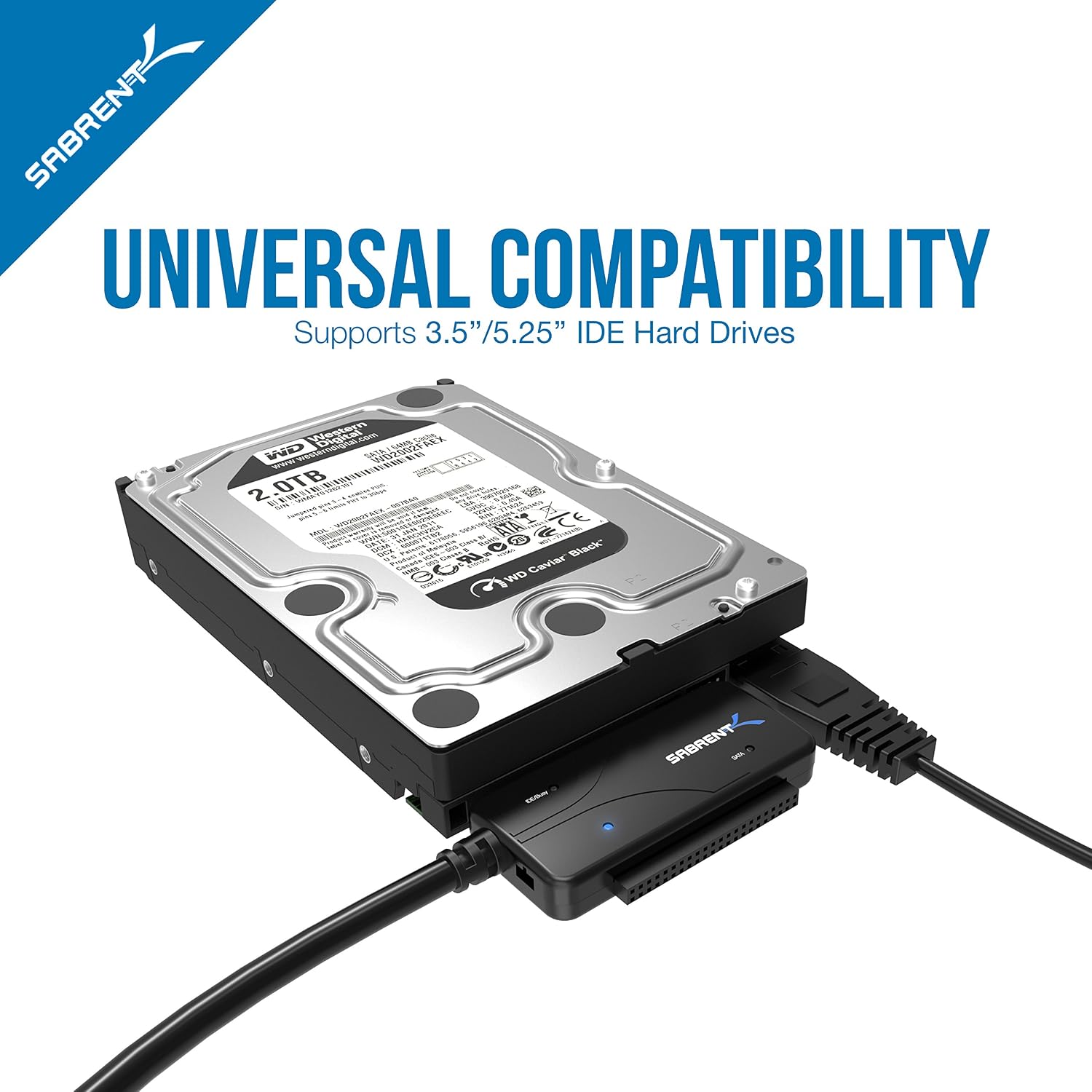
Image: The SABRENT USB-DSC9 converter connected to a 3.5-inch IDE hard drive, demonstrating the connection of both the IDE data cable and the 4-pin Molex power connector.
Operating Instructions
Once connected, the SABRENT USB-DSC9 operates as a plug-and-play device. Your operating system (Windows, macOS, Linux) should automatically recognize the connected drive as an external storage device.
- Accessing Data: The drive will appear as a removable disk in 'This PC' (Windows) or on the desktop/Finder (macOS). You can browse, copy, and transfer files as with any other external drive.
- Hot-Swappable: The converter supports hot-swapping, meaning you can connect and disconnect drives without rebooting your computer. However, always ensure to safely eject the drive through your operating system before physically disconnecting it to prevent data corruption.
- LED Indicators: Observe the LED lights on the converter. A steady light indicates power, and a flickering light indicates data activity (read/write operations).
Maintenance
To ensure the longevity and optimal performance of your SABRENT USB-DSC9 converter:
- Keep the device clean and free from dust. Use a soft, dry cloth for cleaning.
- Store the converter and cables in a cool, dry place when not in use.
- Avoid bending or crimping the cables excessively.
- Do not attempt to disassemble or repair the device yourself. Refer to professional service if needed.
Troubleshooting
| Problem | Possible Cause | Solution |
|---|---|---|
| Drive not detected by computer. | Incorrect connection sequence, insufficient power, incorrect jumper settings (IDE), faulty cables. |
|
| Drive disconnects randomly. | Loose power connection, power supply issue, unstable USB port. |
|
| Slow data transfer speeds. | Connected to a USB 2.0 port, drive performance limitations. |
|
| IDE drive not recognized after swapping. | Operating system caching previous drive information. |
|
Specifications
| Feature | Detail |
|---|---|
| Model Name | USB-DSC9 |
| Brand | SABRENT |
| Connectivity Technology | USB 3.0 |
| Compatible Devices | 2.5"/3.5" SATA HDDs/SSDs, 2.5"/3.5"/5.25" IDE HDDs/Optical Drives |
| Data Transfer Rate | Up to 5000 Megabytes Per Second (5 Gbps) |
| Special Feature | Data Transfer, Hot-Swappable, Plug and Play |
| Operating System Compatibility | Windows PC or Mac with available USB 3.0/2.0/1.1 Port |
| Power Supply | Included AC Power Adapter with On/Off Switch |
| Color | Black |
| Material | Plastic |
Warranty Information
SABRENT products typically come with a limited manufacturer's warranty. For specific warranty terms and conditions, including duration and coverage, please refer to the warranty card included with your product or visit the official SABRENT website. Keep your proof of purchase for warranty claims.
Support
If you encounter any issues or have questions regarding your SABRENT USB 3.0 to SATA/IDE Hard Drive Converter (USB-DSC9), please contact SABRENT customer support. Support resources, including FAQs and driver downloads, may also be available on the official SABRENT website.
- Website: Visit the official SABRENT website for the latest support information.
- Contact: Refer to the product packaging or SABRENT website for customer service contact details.