
Introduction
The Iomega Jaz V2000S is an external, portable SCSI drive designed for high-capacity data storage and transfer. It offers 2GB of storage space per removable disk and is backward compatible with Jaz 1GB disks. This manual provides essential information for the proper setup, operation, and maintenance of your Jaz V2000S drive.
Note: A power adapter and SCSI cable are required for operation and are not included with the drive.
Setup
Follow these steps to set up your Iomega Jaz V2000S drive:
- Unpack the Drive: Carefully remove the Jaz V2000S drive from its packaging.
- Connect the SCSI Cable: Connect one end of a compatible SCSI cable (not included) to the SCSI port on the rear of the Jaz V2000S drive. Connect the other end to the SCSI controller card in your computer or another SCSI device. Ensure the cable is securely fastened.
- Connect the Power Adapter: Plug the power adapter (not included) into the power input port on the rear of the drive. Plug the other end of the power adapter into a standard electrical outlet.
- Set SCSI ID and Termination: If your SCSI chain requires it, adjust the SCSI ID and termination settings on the drive. Refer to your computer's SCSI controller documentation for proper configuration.
- Power On: Turn on your computer, then power on the Jaz V2000S drive. The drive should initialize.
- Install Drivers (if necessary): For some operating systems, specific drivers may be required for the Jaz drive to be recognized. Consult the Iomega support website or your operating system documentation for driver installation instructions.

Image: Rear view of the Iomega Jaz V2000S drive, highlighting the SCSI port and power input for connection.
Operating the Drive
Once the drive is set up and recognized by your system, you can begin using it for data storage.
- Inserting a Jaz Disk: Gently slide a Jaz 2GB or 1GB disk into the drive's slot until it clicks into place. Do not force the disk.
- Accessing Data: The drive should appear as a removable storage device in your operating system. You can drag and drop files, save documents, and perform other data management tasks as you would with any other storage device.
- Ejecting a Jaz Disk: To safely remove a disk, first ensure no files are actively being accessed on the drive. Use your operating system's 'Eject' or 'Safely Remove Hardware' function for the Jaz drive. Once prompted, press the eject button on the front of the drive to release the disk.
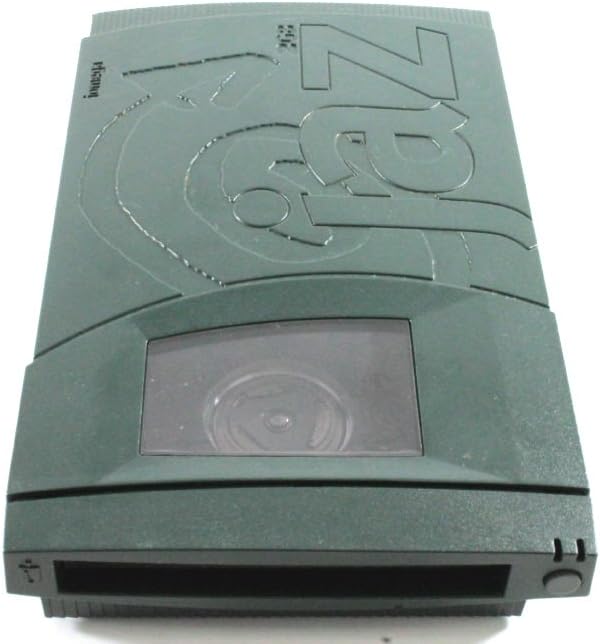
Image: Front view of the Iomega Jaz V2000S drive, showing the disk insertion slot and eject button.
Maintenance
Proper maintenance ensures the longevity and reliable performance of your Jaz V2000S drive and disks.
- Cleaning the Drive: Use a soft, dry, lint-free cloth to wipe the exterior of the drive. Do not use liquid cleaners or solvents. Avoid introducing foreign objects into the disk slot.
- Disk Handling: Always handle Jaz disks by their edges. Avoid touching the magnetic media surface. Store disks in their protective cases when not in use to prevent dust and damage.
- Environmental Conditions: Operate and store the drive in a clean, dry environment, away from extreme temperatures, humidity, and direct sunlight.
Troubleshooting
If you encounter issues with your Jaz V2000S drive, try the following troubleshooting steps:
- Drive Not Recognized:
- Ensure the power adapter is securely connected and the drive is powered on.
- Verify that the SCSI cable is properly connected at both ends.
- Check the SCSI ID and termination settings. Incorrect settings can prevent recognition.
- Confirm that the necessary drivers are installed for your operating system.
- Disk Not Reading/Writing:
- Ensure the disk is fully inserted into the drive.
- Try a different Jaz disk to rule out a faulty disk.
- Restart your computer and the Jaz drive.
- Slow Performance:
- Ensure your SCSI controller is functioning correctly and is not overloaded with other devices.
- Check for background processes on your computer that might be consuming system resources.
If problems persist, consult the Iomega support website or contact their customer service for further assistance.
Specifications
| Feature | Specification |
|---|---|
| Model Number | V2000S |
| Enclosure Type | External |
| Storage Type | Disk Drive |
| Capacity | 2 GB (per disk) |
| Interface | SCSI |
| Data Transfer Rate | Up to 20 MBps |
| Item Weight | 2.79 pounds |
| Package Dimensions | 13.6 x 11.2 x 3.9 inches |
| Hard Disk Form Factor | 2.5 Inches |
| Hard Disk Description | Mechanical Hard Disk |
| Compatible Devices | Desktop |
| Installation Type | Plug In |
| Special Feature | Portable |

Image: Bottom label of the Iomega Jaz V2000S drive, displaying model number (V2000S), FCC ID, and power requirements.
Warranty and Support
For warranty information, please refer to the documentation provided at the time of purchase or contact your reseller. Iomega's official website may also provide details on product warranties and support resources.
For technical support, driver downloads, and frequently asked questions, visit the official Iomega support website or contact their customer service department. Keep your product model number (V2000S) and any serial numbers handy when seeking support.


