
Introduction
Welcome to the user manual for your new Marea 35206-2 Men's Watch. This guide provides detailed instructions on how to set up, operate, maintain, and troubleshoot your watch. Please read this manual carefully to ensure proper use and to maximize the lifespan of your timepiece.
Product Overview
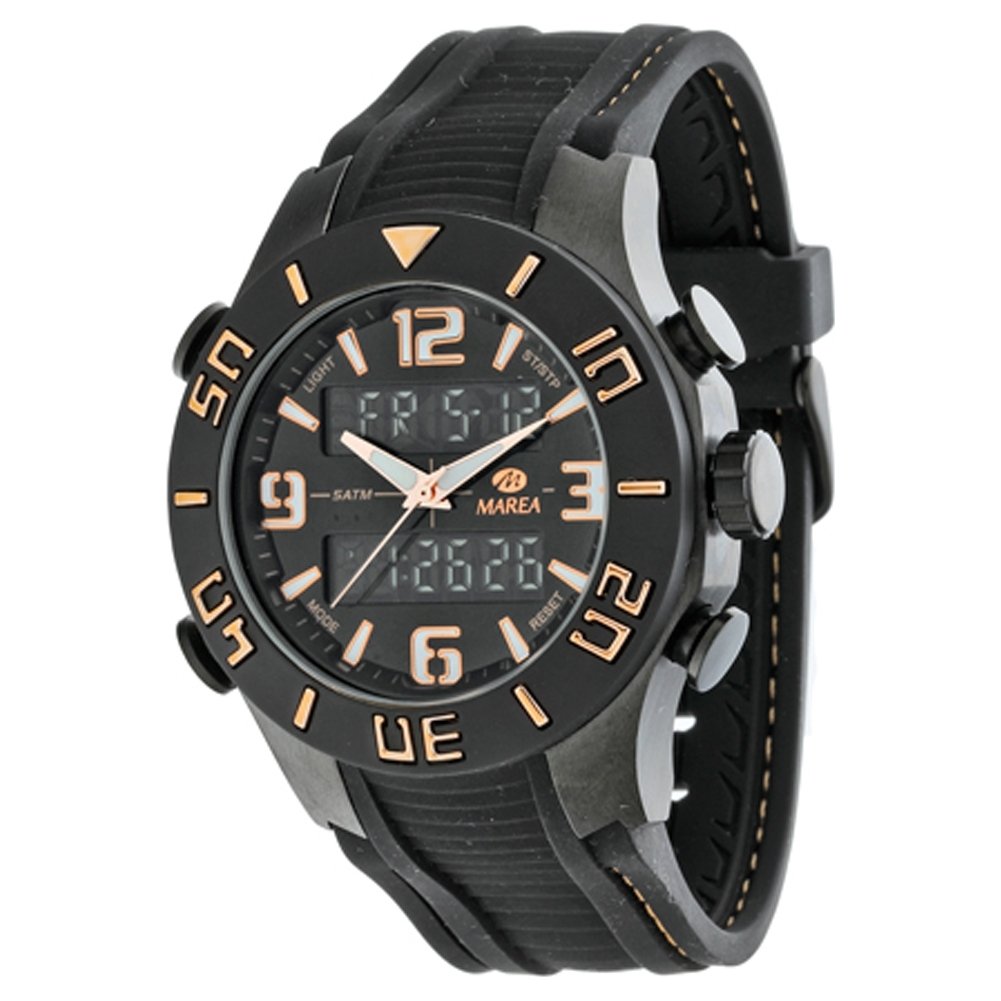
This image displays the Marea 35206-2 men's watch, featuring a black case and dial with gold-tone accents on the hour markers and hands. The watch has both analog hands and two digital displays. Four push-buttons are visible on the sides of the watch case, used for various functions. The strap is black rubber with a textured pattern.
The Marea 35206-2 is a robust analog-digital watch designed for men. It features a durable black steel case, a comfortable black rubber strap, and a black dial with clear, easy-to-read indicators. The watch combines traditional analog timekeeping with modern digital functions, powered by a reliable quartz mechanism. It is water-resistant up to 5 ATM, making it suitable for everyday use and light water activities.
Setup
Initial Setup: Setting Time and Date
- Setting Analog Time:
- Pull the crown (the knob on the right side of the watch case) out to the first position.
- Turn the crown clockwise or counter-clockwise to adjust the analog hands to the correct time.
- Once set, push the crown back into its normal position to start the analog movement.
- Setting Digital Time and Date:
- Press the 'MODE' button (usually bottom-left) repeatedly until you reach the Time Setting mode (often indicated by flashing digits).
- Use the 'RESET' button (usually bottom-right) to select the digit or setting you wish to change (e.g., seconds, hour, minute, month, day, year).
- Use the 'ST/STP' button (usually top-right) to increase the selected value.
- Once all settings are correct, press the 'MODE' button again to exit the setting mode.
Operating Instructions
Button Functions Overview:
- LIGHT: Activates the backlight for the digital display (usually top-left button).
- MODE: Cycles through different digital modes (Timekeeping, Stopwatch, Alarm, etc.) (usually bottom-left button).
- ST/STP (Start/Stop): Used to start/stop functions like the stopwatch or adjust values in setting modes (usually top-right button).
- RESET: Used to reset functions (e.g., stopwatch) or select items in setting modes (usually bottom-right button).
Using the Stopwatch:
- Press the 'MODE' button until the stopwatch display appears.
- Press 'ST/STP' to start the stopwatch.
- Press 'ST/STP' again to stop it.
- Press 'RESET' to clear the stopwatch to zero.
Setting and Using the Alarm:
- Press the 'MODE' button until the alarm setting mode appears.
- Use 'RESET' to select the hour or minute digits.
- Use 'ST/STP' to adjust the alarm time.
- Press 'MODE' to confirm and exit.
- To turn the alarm ON/OFF, typically press 'ST/STP' while in the alarm display mode. An alarm icon will indicate if it's active.
Maintenance
- Cleaning: Wipe the watch regularly with a soft, dry cloth. For the rubber strap, a damp cloth with mild soap can be used, then rinse and dry thoroughly. Avoid harsh chemicals.
- Water Resistance: Your watch is water-resistant up to 5 ATM (50 meters). This means it is suitable for showering, swimming in shallow water, and general daily use. Do not press any buttons while the watch is submerged in water, as this can compromise the water seal. Avoid hot water, as temperature changes can affect the seals.
- Battery Replacement: When the digital display becomes dim or the watch stops, it's time to replace the battery. It is recommended to have the battery replaced by a qualified watch technician to ensure the water resistance is maintained.
- Storage: When not in use, store your watch in a cool, dry place away from direct sunlight and extreme temperatures.
Troubleshooting
| Problem | Possible Cause | Solution |
|---|---|---|
| Analog hands not moving | Battery low or depleted; crown pulled out. | Push the crown back in. If still not working, replace the battery. |
| Digital display is blank or dim | Battery low or depleted. | Replace the battery. |
| Digital time/date is incorrect | Incorrectly set. | Refer to the 'Setting Digital Time and Date' section in Setup. |
| Watch fogs up internally | Exposure to extreme temperature changes; water resistance compromised. | Take the watch to a qualified technician for inspection and repair. Avoid further water exposure. |
Specifications
- Brand: Marea
- Model: 35206-02
- Gender: Men
- Mechanism: Quartz
- Display: Analog-Digital
- Case Material: Black Steel
- Case Diameter: 48 mm
- Dial Color: Black
- Strap Material: Rubber
- Strap Color: Black
- Water Resistance: 5 ATM (50 meters)
- Product Dimensions: 8.99 x 8.99 x 7.01 cm
- Product Weight: 213.19 g
Warranty and Support
This Marea 35206-2 watch comes with a 2-year warranty from the date of purchase, covering manufacturing defects. This warranty does not cover damage resulting from improper handling, accidents, unauthorized repairs, or normal wear and tear.
For warranty claims, technical support, or any questions regarding your watch, please refer to the contact information provided with your purchase documentation or visit the official Marea website for customer service details.